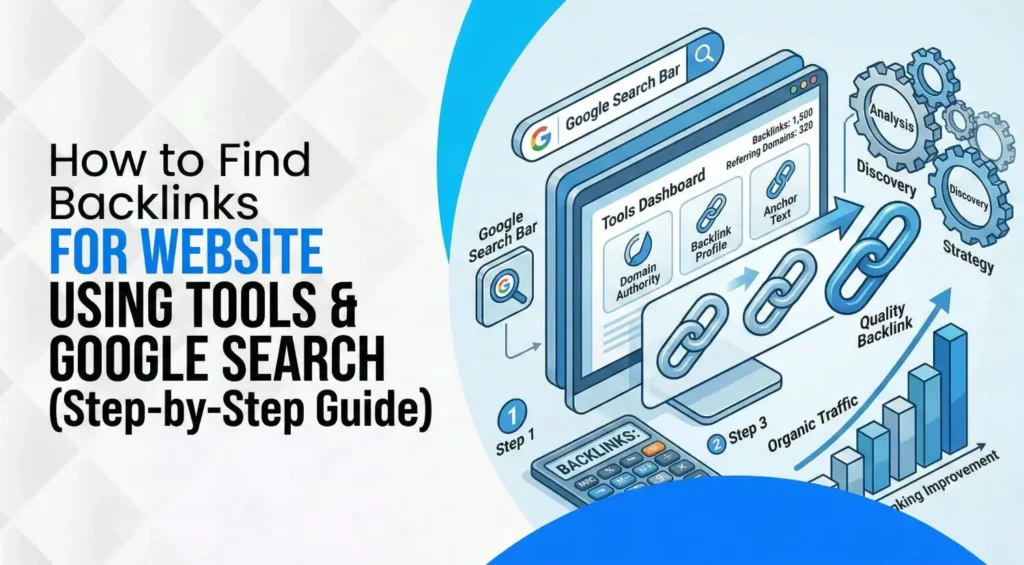
How to Find Backlinks for Website Using Tools and Google Search (Step-by-Step Guide)
March 13, 2026
| Turab Talha | Reviewed by {acf_subject_expert}
If you have ever checked your backlink counts in two tools and seen two different numbers, you are not alone. That mismatch is normal. Each platform crawls the web differently, stores data differently, and refreshes it on a different schedule. The real goal is not to “pick the correct number.” The goal is to build a complete enough picture so you can make smart decisions.
Backlinks still matter because search still happens on Google most of the time. In January 2026, Google held about 89.82% of the worldwide search engine market share. That is a big reason your link profile still affects visibility and trust.
This guide is built for action. We will collect every useful signal, organize it, and turn it into a ranked list. If you want a clear system for a backlink for websites, this is it.
- What is a backlink? A link from another site that points to your site.
- Best free places to find them: Google Search Console and Bing Webmaster Tools.
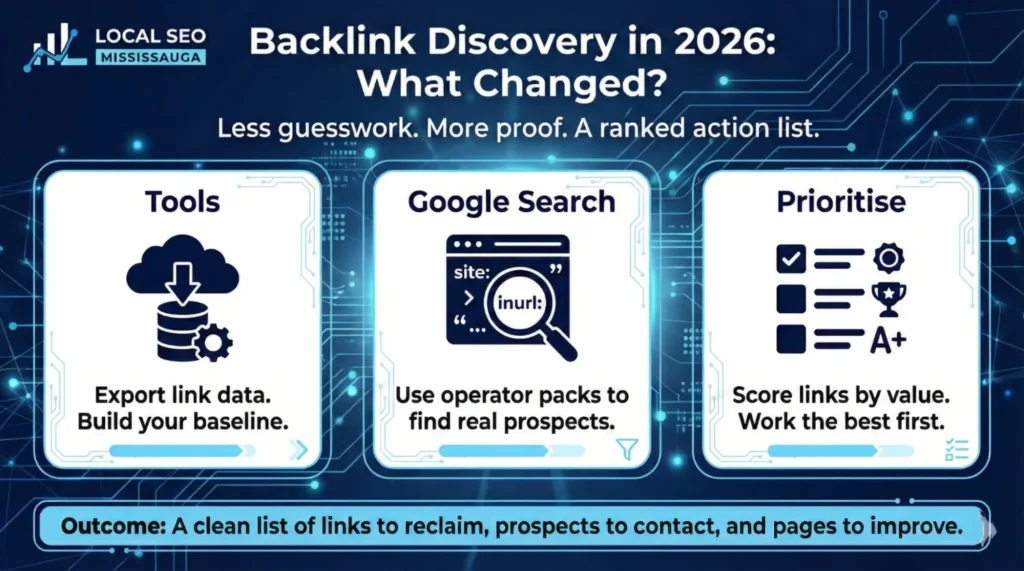
- Best method in 2026: combine exports from tools + Google search operators, then prioritize by value, not volume.
If you want to see backlinks today, start with Search Console, cross-check with Bing, then use one third-party backlink tool to sort “new vs lost” and competitor overlaps.
Backlinks Basics: What They Are, and What They Are Not
Backlinks are links from other websites to your pages. They matter because links help search engines discover pages, understand what pages are connected, and interpret relevance over time. That is why backlinks for SEO are still part of the picture.
But backlinks are not a shortcut to results. A stack of random links from unrelated sites will not build real trust. You want links that make sense to humans first. When humans trust a reference, search engines usually have an easier job trusting it too.
Key terms you must know
You will move faster if you know these basics. Backlink for website, is one link from one page to your page. A referring domain is the website sending that link, and one domain can send many links. Anchor text is the clickable text people see. Sitewide links show up across many pages (often in footers), while contextual links sit inside the main content where the reference makes sense. New vs lost links tells you what you gained and what disappeared in a time window.
You will also see “follow” and “nofollow.” In simple terms, “nofollow” can signal that the site owner does not endorse the target page in the usual way. The definition is explained clearly in the rel attribute just head to the Mozilla HTML attribute: rel to explore more.
What a “good” backlink looks like in 2026
This is the part that saves you from wasting hours. A good backlink for a website usually has four traits, and these are also the reasons it works.
It is relevant to your topic and audience, not a random placement. It sits in a real spot, inside useful content, not tucked into a footer. It comes from a site with trust signals, like real authorship and clear standards. And it sends the right visitors, not empty clicks. When a link can send even a small stream of qualified visitors, it is often worth more than a large batch of weak links.
The Tools You Will Use and What Each One Is Good At
You will get better results by combining tools instead of relying on one report. Think of this as building a stronger “truth set” from multiple angles.
Google Search Console
Search Console is your best free baseline for your own site. The Links report shows top-linked pages, which helps you see which pages get backlinks from other sites. This is a direct way to find backlinks for a site you own and manage.
One key limit: Search Console is extremely useful, but it is not designed to show every link on the internet. Use it for direction and patterns, then cross-check elsewhere for coverage.
Bing Webmaster Tools
Bing also provides a Backlinks report. It shows which anchor texts are used to link to your site and provides backlink counts, plus export options. This matters because it can surface links you do not notice in other places.
A third-party tool to check about backlink for website
A third-party tool is most useful for deeper sorting and comparisons. It helps you see new and lost links, anchor patterns, and competitor overlaps in one place. You do not need a pile of subscriptions. One good tool used consistently beats switching tools every week.
A simple spreadsheet
This is where the whole system becomes repeatable. Your spreadsheet is your “source of truth” for decisions. It should capture the source domain, source URL, target URL, anchor text, link type, date found, date lost (if applicable), and a score.
The 2026 Backlink Discovery Workflow
This workflow is designed to answer practical questions fast: what you have, what you lost, what you can reclaim, and what you should go after next. It is also the cleanest way to handle “how to find backlinks of a website” without falling into guesswork.
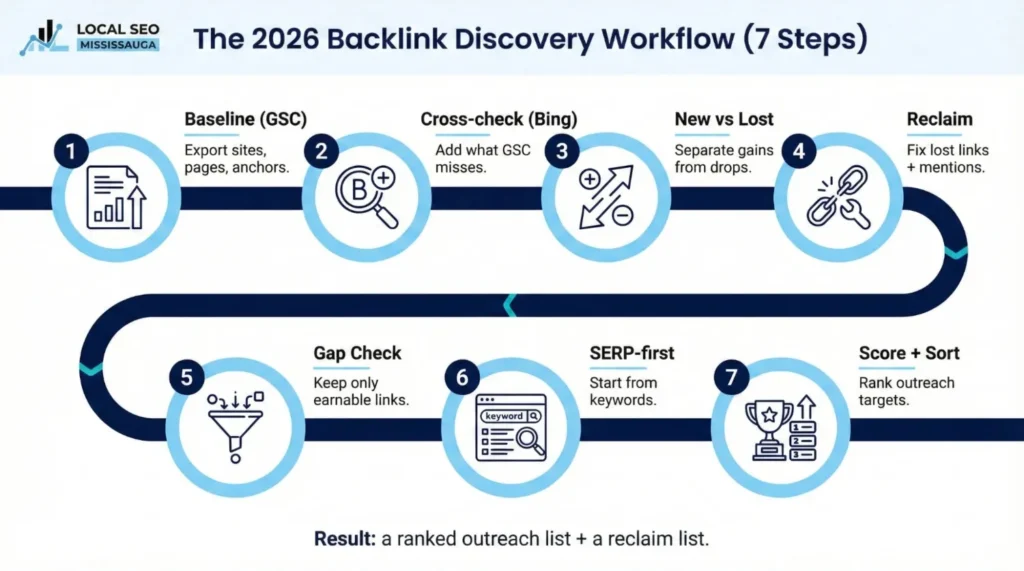
Step 1: Build your “baseline” in Google Search Console
Open Search Console and go to the Links report. Export the top linking sites, top linked pages, and top linking text. Then mark the top 10 pages on your site that already earn links. These are your strongest starting points because the web is already pointing at them, which means small improvements can pay off faster.
Step 2: Cross-check with Bing
Open Bing Webmaster Tools, pull the backlink domains, pages, and anchor data, and export it. Add anything new into your spreadsheet. If you find a domain in Bing that you did not see in Search Console, do not dismiss it. Treat it as a lead to investigate and confirm.
Step 3: Pull “new vs lost” from your backlink tool
In your third-party tool, create two lists: new links from the last 30–90 days and lost links from the last 30–90 days. For each lost link, tag the most likely reason: removed page, changed URL, replaced content, or site down. This is what turns “lost links” from a scary report into a fixable task list.
Step 4: Win the fastest links first
Start with reclaiming before you chase brand-new links. It is usually faster and has a higher success rate.
A) Lost-link reclaim: check if the target URL on your site is broken. If it is, fix it or 301 redirect it cleanly to the closest match. Then revisit the linking page. If the link still points to the old URL, reach out with a polite note and the correct URL. Keep the request short and specific.
B) Unlinked brand mentions (the overlooked gold): find pages that mention your brand, product, or team without linking. Then ask for a simple source link so readers can find what was referenced. This is one of the cleanest outreach angles because you are not asking for a favour out of nowhere. You are completing a citation.
Step 5: Competitor gap, but with a reality filter
Pick 3–5 direct competitors. Export their referring domains in your backlink tool, then filter hard. Keep only the links you could earn ethically and realistically. If the source looks like a paid placement disguised as editorial, or a pattern that exists only to push links, remove it from your list. Your goal is not to copy everything. Your goal is to copy what is earnable.
Step 6: SERP-first prospecting
This is one of the best answers to “how to search for backlinks” opportunities. Start with 5–10 keywords you care about. Search them on Google. Collect the page-one sites that publish guides, lists, and resources. Then look for the ones that already link out to references. Sites that cite sources are far more likely to add another relevant reference when it helps their readers.
Step 7: Score every prospect
Before you send outreach, score each prospect so you contact the best targets first. This one step prevents wasted time and keeps your list focused on quality.
Google Search Operators That Find Link Prospects
Google operators help you find pages with predictable patterns, like resource lists and contribution guidelines. If you want a quick refresher on Google Search Operators, Colgate University’s library guide is a clean reference to take a look.
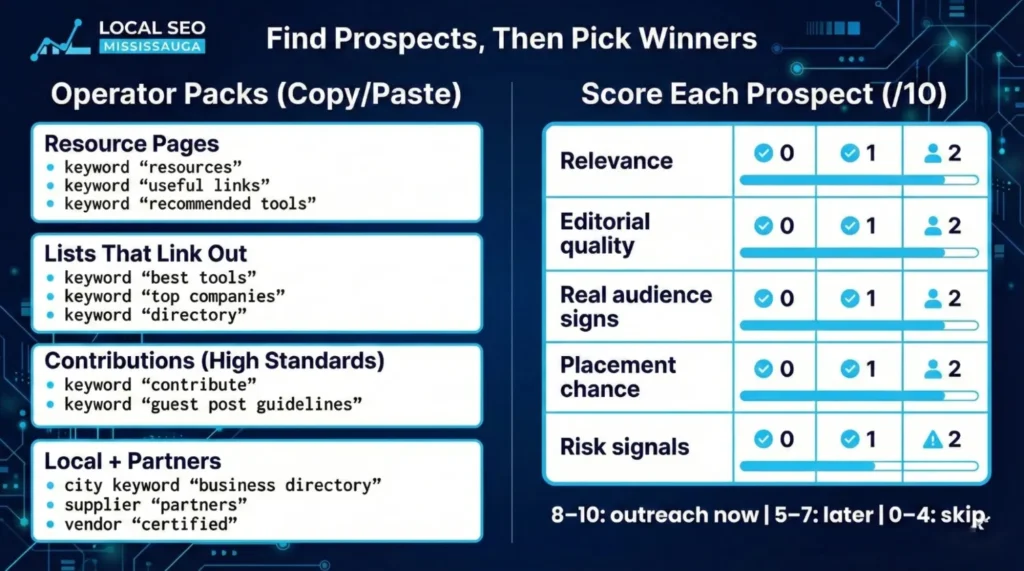
Use these packs as copy/paste starters:
Pack 1: Resource pages
keyword “resources”
keyword “useful links”
keyword “recommended tools”
Pack 2: List pages that already link out
keyword “best tools”
keyword “top companies”
keyword “directory”
Pack 3: Guest contribution opportunities (high caution, high standards)
keyword “write for us”
keyword “contribute”
keyword “guest post guidelines”
Pack 4: Local and partner links (easy wins)
city keyword “business directory”
supplier “partners”
vendor “certified”
This approach helps you build a prospect list that is not random. It also makes it easier to find backlinks for a site in your industry because you are targeting pages that already collect and cite resources.
The Prospect Scoring Rubric
Use a simple 0–2 scoring for five factors. Total is out of 10.
| Factor | 0 | 1 | 2 |
| Relevance | Off-topic | Some overlap | Strong match |
| Editorial quality | Thin | Mixed | Clear standards |
| Real audience signs | None | Some | Strong |
| Link placement chance | Low | Medium | High |
| Risk signals | High | Medium | Low |
Then act on the score. If it is 8 – 10, outreach now. If it is 5 – 7, nurture first or outreach later. If it is 0 – 4, skip. This is how you keep backlinks website work clean and productive.
Risk Control
It is easy to get tempted by shortcuts. Do not. Google is clear that spam tactics can cause pages or entire sites to rank lower or be omitted from search results.
Red flags worth avoiding
If a site exists mainly to publish low-quality posts for links, it is a warning sign. If link placement feels forced, hidden, or unrelated to the page’s topic, it is another warning sign. If the link offer includes “guaranteed placement” with no editorial review, treat it as risky. Quality links look like real references, not transactions.
If you find harmful links: a safe decision tree
Start by confirming if the link is actually harmful or just ugly. Then fix what you control first, like broken URLs and messy redirects, because those cause “lost links” and wasted authority. If a link is truly spammy and you can contact the site owner, request removal. Keep a simple log in your spreadsheet with the date, domain, reason, and action taken. That record keeps your work organized and defensible.
What to Track in 2026 So Backlinks Connect To Outcomes
Total backlink counts are not a business metric. You want signals tied to outcomes.
Track referring domains over time, especially relevant ones. Track new vs lost links so you can see momentum and decay. Track which pages earn links so you know what content people trust. Then connect it to results by tracking referral conversions like calls, forms, and booked meetings.
This is what separates “interesting SEO data” from progress you can measure.
Monthly Backlink Discovery Routine
A steady routine beats a once-a-year panic audit. Week one is exports and merging your lists. Week two is reclaim, focusing on lost links and unlinked mentions. Week three is prospecting using Google operators and scoring targets. Week four is outreach, follow-ups, and updating your spreadsheet with outcomes. After two to three months, you will see patterns clearly, and your process will feel much lighter.
Final Note
If you want this to work, keep it simple: baseline first, cross-check second, reclaim third, then build a scored prospect list before outreach. That is how you stop guessing and start making steady gains.
If you want a clean backlink audit and a ranked action list done the right way, Local SEO Mississauga can help. You will get a clear view of what you have, what you lost, what you can reclaim fast, and which links are worth pursuing next, without stepping into risky tactics.
FAQs
Why do different tools show different backlink counts?
Because they crawl and refresh on different schedules and they do not all see the same slice of the web at the same time. Use overlap and trends, not one “perfect” number.
How many backlinks do you actually need?
There is no universal number. Compare the quality of links supporting the pages ranking above you for your target keywords, then aim to earn better, more relevant references.
Are nofollow links useless?
No. They can still send valuable visitors and build credibility, even if they do not pass signals in the usual way.
When should you use disavow?
Only when there is clear link spam risk and you cannot resolve it through cleanup or removal. Most sites do not need to start there.
Search Here
More Categories
Latest Posts
March 17, 2026
Turab Talha
March 13, 2026
Turab Talha
March 9, 2026
Turab Talha
March 5, 2026
Turab Talha
March 3, 2026
Turab Talha