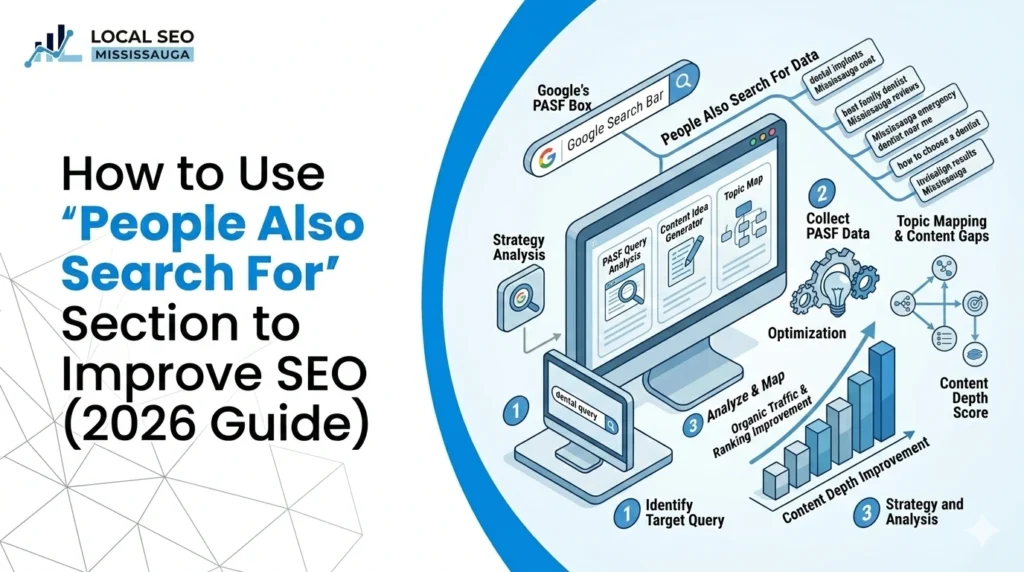
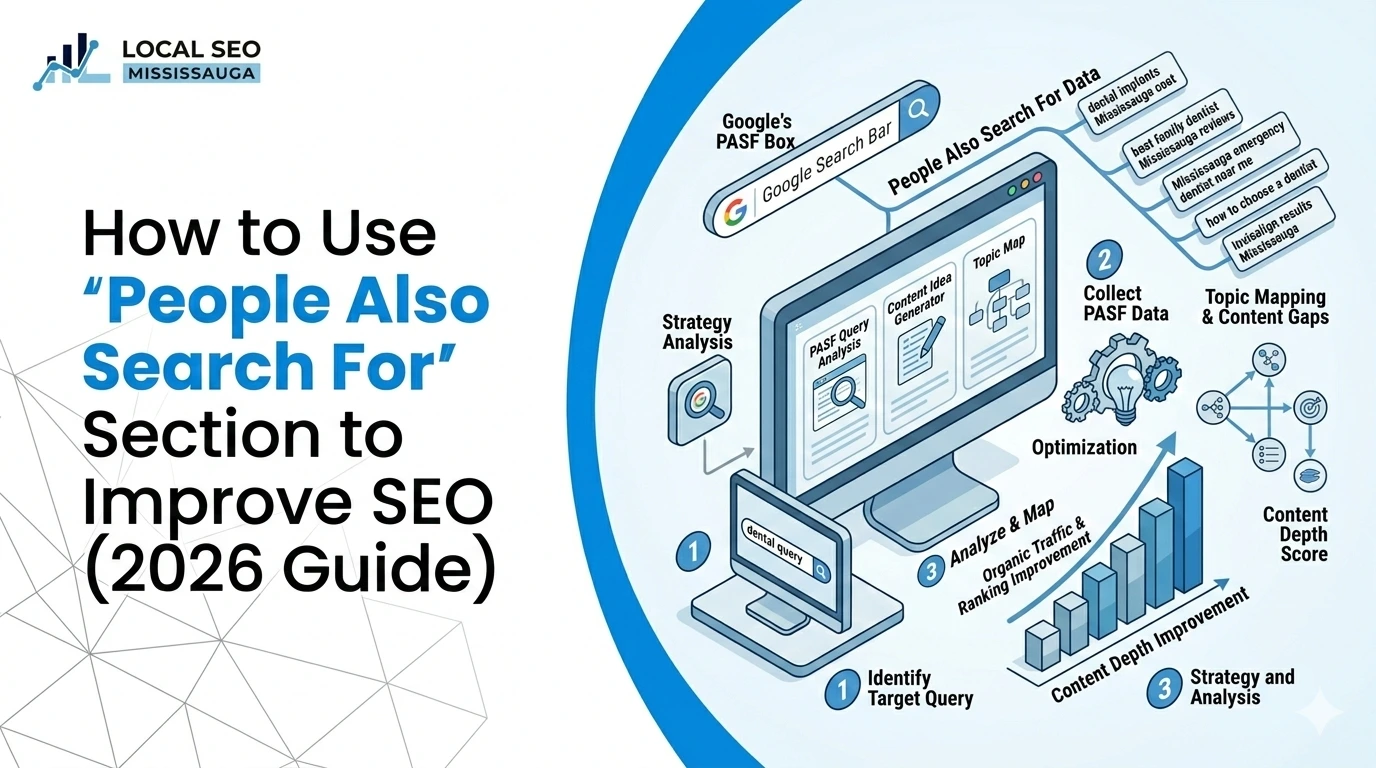
How to Use “People Also Search For” Section to Improve SEO (2026 Guide)
March 13, 2026
| Turab Talha | Reviewed by {acf_subject_expert}
For years, Google’s search results pages have evolved from simple blue links into feature‑rich experiences. One of the most useful but under‑utilized features is the “People Also Search For” (PASF) box. Introduced in 2018, the PASF section appears when a user clicks a result and quickly returns to the search results.
Google uses this moment of unsatisfied intent to display additional queries that other users frequently search for after similar queries.
This guide explains how the PASF feature works, why it’s vital for SEO in 2026 and how to harness it to drive organic traffic. We’ll break down the differences between PASF and People Also Ask (PAA), show you how to find PASF keywords manually and with tools, and outline strategies to integrate these insights into your content marketing.
What Is Google’s People Also Search For Feature?
The People Also Search For section is a SERP feature that shows related queries based on a user’s original search. According to All‑In‑One SEO, the PASF box appears as a small list beneath the main results and contains queries that Google deems relevant. These suggestions are based on historical search data and reflect how real people refine their searches. For example, searching for “best coffee shops in New York” might trigger suggestions like “top‑rated cafes in NYC,” “coffee shops with free Wi‑Fi in New York” and “best coffee shops near me”.
PASF usually appears when Google thinks the user’s intent wasn’t fully satisfied by the first click.
Users who quickly bounce back to the results send a signal to Google that the original result didn’t meet their needs. Google then offers follow‑up queries that may better match the original intent. On desktop, the PASF box appears directly below the clicked result; on mobile it often appears further down the page.
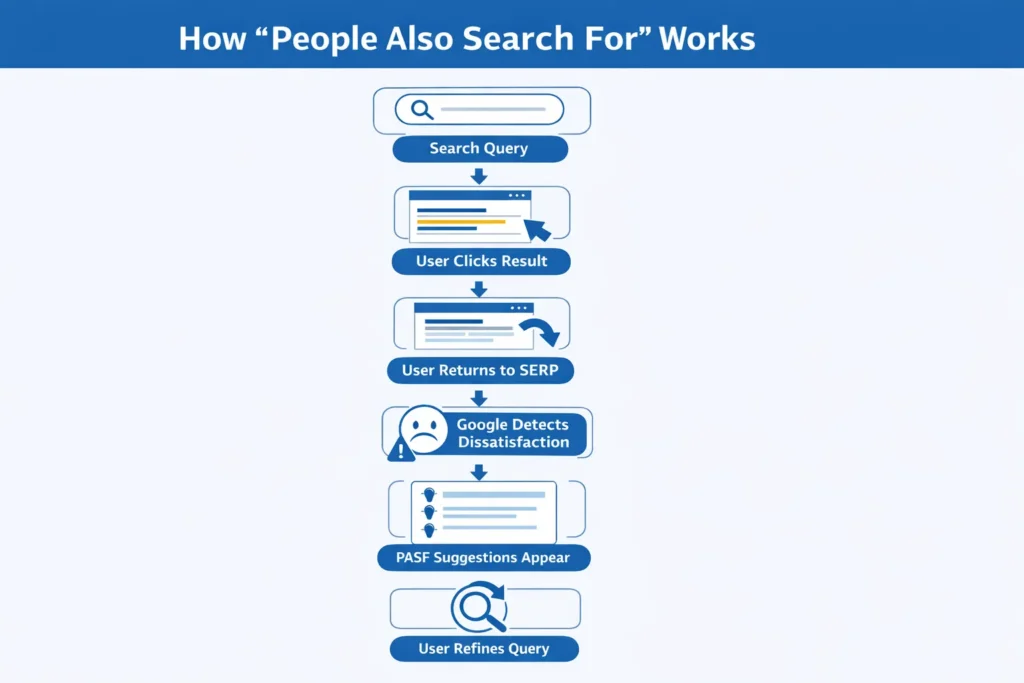
How Google Generates PASF Suggestions
Google’s algorithm for PASF relies on multiple factors:
- User behaviour signals repeated patterns of users clicking a result and returning quickly influence which PASF suggestions appear. The algorithm learns from these patterns to refine suggestions over time.
- Contextual and semantic relevance: Google considers related entities, topic relationships and semantic clusters when generating suggestions. Factors like location, device type, language and personal search history may affect which queries show up.
- Search intent suggestions span different levels of intent, from informational to transactional. Many PASF queries are long‑tail and reflect specific decision‑making stages.
Difference Between People Also Search For and People Also Ask
Although PASF and People Also Ask (PAA) both appear on the SERP, they serve different roles. The PAA box contains questions related to the original search and provides short answers pulled directly from ranking pages.
In contrast, PASF offers follow‑up queries triggered when Google detects dissatisfaction with a result. PAA questions appear with drop‑down arrows and supply immediate answers; PASF suggestions do not display answers but redirect users to new search results.
Understanding this distinction helps you tailor content for both features: PAA optimization focuses on concise answers, while PASF optimization focuses on related topics and long‑tail keywords.
Why the People Also Search For Section Is a Goldmine for SEO
In the past, keyword research relied heavily on search volume data from tools like Google Keyword Planner. PASF gives marketers a new perspective by revealing the hidden questions and qualifiers that people use after their initial search. Here are several reasons PASF is so valuable:
1. Reveal Long‑Tail Keywords & Hidden Opportunities
PASF often surfaces long‑tail phrases with low competition but high intent. The All‑In‑One SEO guide notes that PASF suggestions can reveal long‑tail keywords that reflect specific user needs, pain points and niche topics. For example, if your main keyword is “organic skin care,” the PASF box might reveal “best organic face creams” or “chemical‑free moisturizers”. Targeting these specific phrases allows you to capture searchers who are closer to a purchasing decision and less likely to be swayed by competitors.
2. Understand Audience Behavior and Intent
PASF queries provide a window into the user’s thought process. By analyzing these suggestions, you can discover what users are truly looking for and create content that addresses different stages of the buyer’s journey.
For example, if PASF suggestions after “train my dog” include “how to crate train a dog” or “best dog treats for training,” you know users want practical guides and product recommendations. Matching your content to these intents reduces bounce rates and signals to Google that your page satisfies searchers.
3. Expand Content Depth & Build Authority
Google rewards content that covers topics comprehensively. Using PASF suggestions to guide your content ensures you cover a subject from multiple angles. Nightwatch notes that adding subtopics from the PASF box, such as questions about booster dog food and preparation tips, helps create in‑depth articles that rank for multiple keywords. The more complete your coverage, the more likely you are to secure featured snippets, capture multiple positions in the SERP and build topical authority.
4. Identify Content Gaps and Refresh Existing Posts
PASF can expose questions your current articles fail to answer. If an older post on “gardening tools for women” drops in rankings, checking the PASF box may reveal new searches like “best gardening gloves for women” or “lightweight garden tools for seniors”. Updating your article to address these gaps provides more value and helps reclaim lost rankings. This is an easy way to conduct a content gap analysis without expensive software.
5. Build Topic Clusters & Improve Internal Linking
Topic clusters are groups of related articles that link back to a pillar page. PASF suggestions can guide cluster creation by revealing which subtopics belong on separate pages. For instance, a pillar article on AI‑driven SEO might spawn sub‑articles on “AI SEO tools,” “best AI SEO tools” and “SEO AI writing tools”. Building clusters improves topical authority and ensures your internal links follow a logical structure.
6. Enhance User Experience & Reduce Bounce Rates
When users can’t find what they need, they quickly bounce back to the SERP. Filling your content with answers from PASF suggestions keeps readers engaged and reduces bounce rates. Better engagement sends positive signals to Google, improving rankings. You can also use PASF terms to anticipate what readers will search for next and build internal links that guide them through your site.
7. Complement Other SERP Features
PASF isn’t the only feature that offers insight. Pairing PASF data with other SERP features, such as PAA boxes and featured snippets, creates a powerful strategy. AIOSEO advises structuring content using lists or tables, incorporating PASF and PAA keywords in headings, and answering questions concisely to secure featured snippets. Using multiple features together increases your chances of ranking in various parts of the SERP.
Pro tip: Keep track of the zero‑volume keywords that appear in PASF. Many of these phrases may not appear in keyword research tools but still attract qualified visitors. Monitoring performance via Google Search Console helps you identify which of these hidden gems drive traffic.
How to Find People Also Search For Keywords
Manual Method (Free)
You can gather PASF keywords yourself without any tools. To use this method:
- Search your primary keyword on Google: Perform the search in a fresh browser or incognito window to avoid personalization.
- Click on one of the organic results: Allow the page to load fully.
- Return to the SERP quickly: The PASF box will appear below the result you clicked. On desktop it shows immediately below the result; on mobile you may need to scroll.
- Record the suggestions: Note down the queries or copy them into a spreadsheet. Typically you’ll see about eight suggestions.
- Repeat for multiple results: Each clicked result reveals its own set of PASF terms. Collecting suggestions from several results helps you build a richer keyword list.
This simple process is effective for quick research but can be time‑consuming for large keyword lists. It also doesn’t show search volumes or competition metrics.
Using SEO Tools
Various tools make PASF research more efficient. Consider the following:
- Browser extensions: tools like the Keywords Everywhere extension automatically collect the PASF terms for each result and display them in a widget. Keywords Everywhere reports that each search result has six PASF keywords, and their extension aggregates these while removing duplicates. It can also show search volume, cost per click (CPC) and competition metrics.
- Keyword Rank Trackers & Search Console integrations: AIOSEO’s Keyword Rank Tracker pulls related keywords directly from Google and allows you to track rankings over time. This integration with Google Search Console simplifies PASF tracking and lets you add keywords to your monitored list.
- Dedicated PASF finders: Some dashboards display all PASF suggestions for a given keyword and indicate search popularity and difficulty. Free options include Google’s own SERP and tools like AnswerThePublic, Ubersuggest and Dashword. Paid tools such as Ahrefs and SEMrush estimate user intent and help you prioritize high‑value PASF keywords.
When using tools, remember that PASF keywords often have low or zero reported search volume. Don’t disregard them; instead, test them in content and use Search Console to see how they perform.
Strategies to Use People Also Search For Data to Enhance SEO
PASF keywords are only useful when they guide your content strategy. The following strategies help you turn raw data into SEO gains.
1. Discover Long‑Tail Keyword Opportunities
Long‑tail keywords are phrases of three or more words that target specific intent and often have lower competition. PASF suggestions regularly highlight these gems. For example, a broad query like “ceramic cookware” might yield PASF terms such as “ceramic cookware vs stainless steel,” “ceramic cookware dangers” and “ceramic cookware pros and cons”. Because fewer websites target these exact phrases, you can more easily rank and attract high‑intent traffic.
How to implement:
- Use the manual method or tools to gather PASF phrases related to your main keyword.
- Cross‑check these phrases in a keyword research tool to understand relative search volume and competition.
- Prioritize long‑tail phrases that clearly indicate specific intent (e.g., “best organic face cream for sensitive skin”).
- Incorporate them naturally in headings, subheadings and body text; avoid stuffing them unnaturally.
2. Understand and Target Search Intent
Each PASF suggestion reflects a different stage in the searcher’s journey. According to 1702 Digital, there are four broad intent categories: information, navigation, commerce and transaction. Informational queries seek definitions and explanations; navigational queries research brands or platforms; commercial queries compare products; and transactional queries indicate readiness to purchase.
Recognizing which intent category a PASF term falls into helps you align content appropriately. For instance, informational PASF like “how to crate train a puppy” requires a comprehensive how‑to guide, whereas a transactional PASF like “best CRM software pricing” calls for a product comparison or landing page.
Action steps:
- Classify your collected PASF keywords by intent.
- Map informational terms to blog posts, guides and tutorials; map commercial terms to comparison pages or case studies; map transactional terms to product pages.
- Include internal links between these content types to guide users through the purchase funnel.
3. Expand Content Depth & Fill Gaps
PASF suggestions highlight subtopics your existing content may be missing. Nightwatch suggests using these terms to broaden articles and answer additional questions. For example, an article on dog food can be expanded to include sections on “how to prepare booster dog food,” “booster dog food price” and “best dog food for fast growth”. This approach not only improves content depth but also increases the number of keywords you can rank for. Running a periodic PASF gap analysis ensures your content stays comprehensive and competitive.
Pro tip: Keep a spreadsheet of your existing articles with associated keywords. Every quarter, collect PASF suggestions for those keywords and update articles with new sections, FAQs or examples.
4. Build Topic Clusters & Pillar Pages
Topic clusters involve creating a main “pillar” page that targets a broad keyword and supporting pages that delve into related subtopics. PASF suggestions can guide the creation of these clusters by revealing which subtopics belong on separate pages. For example, a pillar page on “AI‑driven SEO” could link to sub‑pages on “AI SEO tools,” “AI SEO writing tools free” and “best AI SEO tools”. This structure signals topical authority to search engines and improves user navigation.
How to implement:
- Use PASF suggestions to brainstorm subtopics that don’t fit into your main article.
- Create separate, optimized pages for these subtopics and interlink them with the pillar page.
- Use clear anchor text derived from the PASF suggestions to create relevant internal links.
5. Optimize Internal Linking & Anchor Text
Internal links help distribute authority throughout your site and make it easier for search engines to crawl your pages. AIOSEO recommends identifying opportunities for internal linking based on PASF suggestions. When writing an article, type the target keyword into Google, review the PASF terms and identify other articles on your site that match those terms. Link relevant pages using anchor text that aligns with the PASF phrase to improve topical relevance.
Quick wins:
- Add internal links to related PASF topics at the end of each article.
- Use descriptive anchor text that matches the PASF keyword; avoid generic terms like “click here.”
- If you haven’t created content for certain PASF suggestions, add them to your content calendar to build internal link opportunities later.
6. Combine PASF Data with Other SERP Features
PASF works best when integrated with other SERP features such as People Also Ask and featured snippets. AIOSEO’s guide advises structuring content using lists, tables and concise paragraphs to maximize your chances of appearing in featured snippets. At the same time, include PASF and PAA keywords in headings and subheadings to capture multiple SERP features. Optimizing for both features improves visibility and drives traffic from different sources.
7. Track & Measure PASF Performance
Using Google Search Console, you can monitor clicks and impressions for queries related to your PASF keywords. By segmenting pages that target PASF phrases, you can compare their performance against broader keywords. Metrics like dwell time, bounce rate and assisted conversions help quantify the impact of PASF optimization. Periodic analysis will show which PASF terms drive traffic and conversions, enabling you to refine your strategy.
Best Practices for Using PASF Keywords in Content
- Place PASF keywords strategically. Include them naturally in H2 headings, subheadings, meta descriptions and image alt text. Avoid keyword stuffing; the phrases should flow with the content.
- Group related topics. If multiple PASF keywords overlap, create a hub page that covers the overarching theme and links to detailed articles. This approach prevents duplicate content and demonstrates expertise. Use canonical tags on sub‑pages to consolidate authority when similar topics exist.
- Guide users with clear navigation. Add internal links from your hub page to related pages and vice versa. This helps visitors find relevant content quickly and signals to Google that your site is well organized.
- Align with user intent. Always consider the type of intent (informational, navigational, commercial or transactional) when placing PASF terms. Ensure that the content around a PASF keyword matches what users expect when they search for that phrase.
- Update regularly. PASF suggestions change as user behaviour evolves. Revisit your keyword list periodically, refresh content and add new sections or FAQs to maintain relevance.
Common Challenges & How to Overcome Them
- Frequent changes & duplication. PASF results can change quickly and overlap with People Also Ask suggestions, leading to potential duplication. Use spreadsheets or SEO tools to track changes and avoid content cannibalization.
- Limited search volume data. Many PASF queries show no measurable search volume, making it hard to prioritize. Address this by testing keywords in content, monitoring performance with Search Console and prioritizing those that drive engagement.
- Manual effort for large sites. Gathering PASF data at scale requires manual or semi‑automated scraping. Streamline this by using browser extensions, scripts or APIs (where allowed) to collect suggestions.
- Indirect attribution. It can be difficult to attribute conversions directly to PASF keywords since they often support broader queries. Use assisted conversion metrics and multi‑channel attribution models to assess their impact.
Future of PASF & AI‑Driven SERPs in 2026
Google is constantly evolving its search interface with AI‑powered features like AI Overviews and generative search experiences. Although these features may change how results are displayed, behaviour‑based suggestions like PASF remain valuable. 1702 Digital notes that PASF supports topical authority when combined with PAA and related searches. In AI‑driven SERPs, PASF helps align content with actual search journeys rather than static keyword lists. As AI continues to personalize results, expect PASF suggestions to become even more tailored to individual behaviour.
To future‑proof your strategy:
- Focus on E‑E‑A‑T (Experience, Expertise, Authoritativeness, Trustworthiness) and semantic relevance. Comprehensive, well‑cited content is more likely to be surfaced by AI assistants.
- Combine PASF research with other data sources, such as Search Console, site analytics and user surveys, to understand how audiences search and refine queries.
- Adapt quickly to changes by monitoring new SERP features and integrating them into your workflow.
Conclusion
The People Also Search For section is more than a curiosity, it’s a powerful source of insight into how users refine their searches. By understanding how PASF works and integrating its suggestions into your SEO strategy, you can uncover hidden keywords, align content with search intent, deepen topic coverage and build stronger internal links.
In 2026, as Google introduces AI‑driven features and search behaviour continues to evolve, staying ahead means embracing every tool at your disposal. PASF doesn’t replace traditional keyword research; it complements it, adding a behavioural layer that aligns content with real user journeys. Use the strategies and best practices in this guide to make PASF a cornerstone of your SEO efforts.
Ready to put these strategies into action?
Start by collecting PASF keywords for your top three pages this week. Then, map them to intent categories and update or create content accordingly. For personalized help, contact our SEO specialists for a free consultation.
Frequently Asked Questions (FAQs)
What is the “People Also Search For” section?
It’s a box of related queries displayed on Google’s results page when a user clicks a result and quickly returns to the SERP. The suggestions are based on how other users refine their searches.
How is it different from the “People Also Ask” section?
PAA shows questions with drop‑down answers and appears without any click‑back needed. PASF only appears after click‑back behaviour and lists follow‑up queries without answers.
Do PASF keywords have search volume?
Many PASF queries don’t show measurable search volume because they are behaviour‑based. However, they often drive highly qualified traffic and can lead to conversions. Use Search Console to track their performance.
How can I find PASF keywords quickly?
Use the manual method: search your primary keyword, click a result, then return to the SERP to see the PASF box. For efficiency, use tools like browser extensions (Keywords Everywhere), AIOSEO’s Keyword Rank Tracker or paid platforms such as Ahrefs and SEMrush.
How should I integrate PASF keywords into my content?
Include them naturally in headings, subheadings and body text. Create separate pages for distinct PASF topics to build topic clusters and avoid duplication. Ensure the content matches the search intent of each keyword.
Search Here
More Categories
Latest Posts

March 17, 2026
Turab Talha
March 13, 2026
Turab Talha
March 9, 2026
Turab Talha
March 5, 2026
Turab Talha
March 3, 2026
Turab Talha