Technical SEO
· 8 min read
HTTP 401 Error: Meaning, Causes & Fixes
See what an HTTP 401 error means, how it differs from 403 and how users or developers can fix authentication problems. Check the steps now.
Read article
Schema markup helps Google understand your pages and can unlock rich results. See what it is, why it matters, and how to add it, no coding degree needed.

Type your business name into Google and look at what shows up beside a competitor's listing. Star ratings. A price range. Maybe a little dropdown with three FAQ questions sitting right there in the results, no click required. Yours probably doesn't have any of that, and it's not because their writing is better. It's schema markup, or the lack of it on your end.
Schema markup is code that tells search engines exactly what your content means, not just what it says. Google doesn't have to guess whether "4.9" next to your business name is a star rating, a price, or a random number sitting in the HTML. The markup says so directly. Schema.org, the shared vocabulary most of this runs on, now lists more than 800 types and over 1,500 properties, covering everything from a blog post to a chicken parmesan recipe.
For a business trying to get noticed on a results page crowded with ads, map packs, and AI summaries, that gap between having schema and not having it is often the difference between a plain blue link and a listing people actually stop on. This guide covers what schema markup is, how it works, which types are worth your time, and exactly how to add it, whether you're comfortable with code or not.
Schema markup is structured data added to a page's HTML that labels content for search engines, using a shared vocabulary called Schema.org: marking a phone number as a phone number, a price as a price, and a review score as a review score.
Search engines read web pages the hard way. They crawl raw text and try to figure out what's a headline, what's an author name, what's a price. Most of the time they get it close enough. Schema markup removes the guesswork. You're handing Google a label for every piece of information that matters, in a format built specifically for machines to parse.
That's the whole idea. Nothing mystical about it. A recipe page without schema is just a wall of text with an ingredients list somewhere in it. A recipe page with schema tells Google exactly which lines are the cook time, which are the calories, and which is the star rating, and Google can then decide to show all three directly in the search results.
People use these three terms interchangeably and it causes more confusion than it should. Structured data is the umbrella term: any data organized in a predictable format that machines can read. Schema markup is one specific implementation of structured data, built on the vocabulary maintained at schema.org. JSON-LD is the file format schema markup is usually written in today.
So when someone says "add schema to your site," what they almost always mean is: write JSON-LD using the Schema.org vocabulary and drop it into your HTML. That's the version this guide focuses on, because it's what Google's own documentation recommends, and it's the easiest to maintain without breaking your page layout.
Schema markup works by sitting in a script tag in your page's HTML, invisible to visitors, read by search engine crawlers as they index the page and matched against the Schema.org vocabulary to confirm what each labeled value represents.
You write a block of JSON-LD, wrap it in a script tag, and place it in the page's head or body. A crawler hits the page, reads the regular HTML for content the way it always has, and then reads the JSON-LD block separately as a structured summary of what's on that page. Nothing about the visible design changes. Nobody browsing your site sees a single line of it.
Everything in Schema.org descends from one root type called Thing. From there it branches into broad categories: CreativeWork, Organization, Event, Product, and Person. Each of those branches further into specific types. Article and Recipe both sit under CreativeWork. LocalBusiness sits under Organization. Review sits under Product-adjacent types.
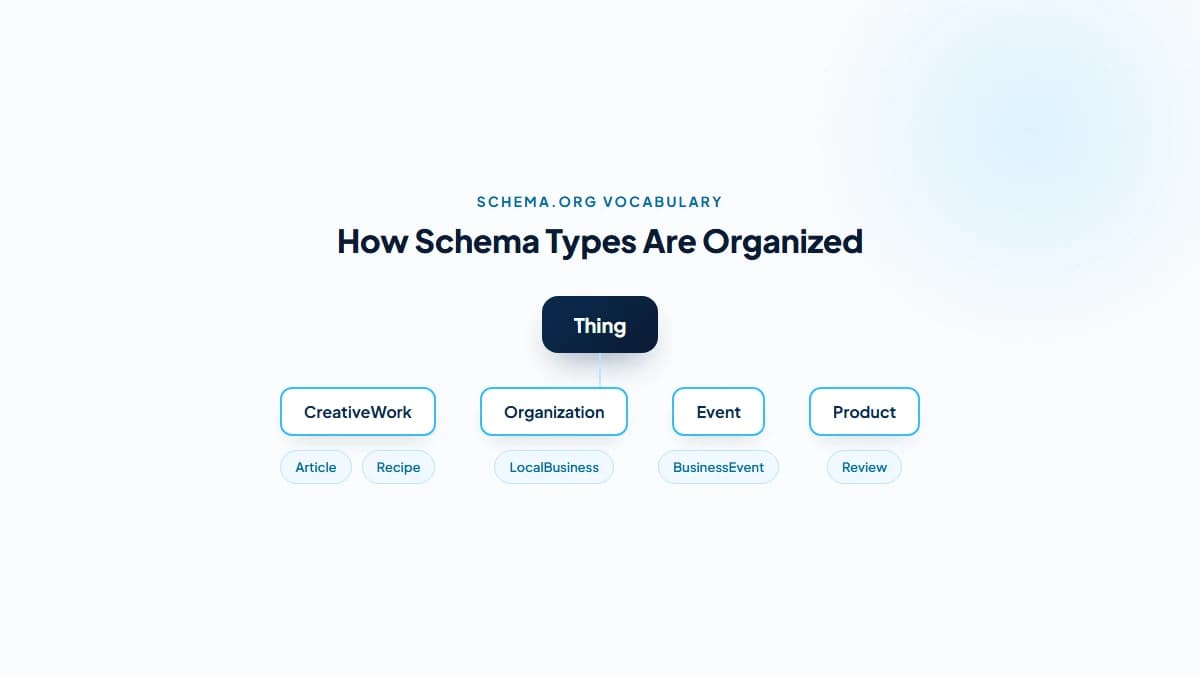
Knowing the hierarchy matters for one practical reason: a more specific type almost always beats a general one. LocalBusiness tells Google more than Organization does. BlogPosting tells it more than Article. Pick the narrowest type that's still accurate. Schema.org's own type list is the reference to check against when you're not sure.
Schema markup matters because it can unlock rich results such as star ratings, FAQ dropdowns, and breadcrumb trails, all of which increase click-through rate, and because AI systems like Google's AI Overviews lean on structured data to pull accurate facts about your business into their answers. It's one small piece of a much larger search engine optimization strategy, not a replacement for it.
Here's the honest part most guides skip past: Google has said, repeatedly, that schema markup is not a direct ranking factor. Adding it will not, by itself, move you from position eight to position two. Anyone who tells you otherwise is selling something. But that's the wrong question to be asking in the first place.
The real value isn't ranking position. It's what happens once you're already on the page. Two listings at position four and five, same rough content, same rough relevance. One has a 4.8-star rating and a breadcrumb trail sitting under the blue link, and the other doesn't. Guess which one gets clicked more.
Rich results are the visual extras schema markup can trigger: stars under a listing, a recipe card with a photo and cook time, an FAQ section you can expand right in the results page without visiting the site. None of them are guaranteed just because you added the code, since Google decides case by case whether to show them. But you can't get considered for them at all without the underlying markup.
A plain listing and a rich listing sitting next to each other are not competing on equal footing. The rich one takes up more visual space, answers part of the searcher's question before the click, and looks more trustworthy simply by looking more complete. That's the entire game.
AI Overviews, ChatGPT search, and Perplexity all have the same basic problem: they need to extract clean facts from a messy web page fast, and they need to trust the source. Structured data hands them exactly that: a pre-labeled name, address, phone number, or FAQ answer instead of a paragraph they have to interpret.
Nobody outside Google, OpenAI, and Anthropic can prove exactly how much weight schema carries in an AI-generated answer, and any SEO who claims certainty here is guessing. What's fair to say is that a well-labeled entity is easier for a language model to lift cleanly, and an unlabeled one forces the model to infer. That's exactly the kind of gap a technical SEO audit is built to catch before it costs you visibility.
Most small businesses only need four or five schema types done well, rather than every type Schema.org offers. LocalBusiness, Article or BlogPosting, Product or Review, and FAQPage or BreadcrumbList cover the majority of real-world SEO value for a typical website.

| Schema Type | What It Labels | Rich Result It Can Unlock |
|---|---|---|
| LocalBusiness | Name, address, phone, hours, price range | Knowledge panel details, map pack context |
| Organization | Company name, logo, social profiles | Logo in search, sitelinks search box |
| Article / BlogPosting | Headline, author, publish date, image | Article carousel, top stories eligibility |
| Product | Price, availability, brand, SKU | Price and stock shown directly in results |
| Review / AggregateRating | Star rating, review count | Star ratings under the listing |
| FAQPage | Question and answer pairs | Expandable FAQ dropdown in results |
| BreadcrumbList | Page hierarchy / navigation path | Breadcrumb trail replacing the raw URL |
| Event | Date, location, ticket info | Event card with date and venue |
This is the one to get right first, especially if most of your customers find you through local search. LocalBusiness schema tells Google your name, address, phone number, hours, and price range in a format that lines up exactly with your Google Business Profile. Consistency between the two is worth more than either one perfect on its own.
Mismatched details between your website's schema and your Google Business Profile create the exact kind of confusion that hurts local pack rankings. If your GBP says one phone number and your schema says another, Google has to guess which is current. It won't always guess right, and that's the kind of detail we check line by line in local SEO work for small businesses.
Every blog post benefits from Article or BlogPosting schema: headline, author, publish date, and featured image, all labeled clearly. It's a small lift with a real payoff: publish dates in search results build trust, and a consistent author signal across your content supports the experience-and-expertise case Google is increasingly weighing for informational content.
If you sell anything online, Product schema is close to non-negotiable. Price, availability, and brand pulled straight into the results page save a searcher a click and a guess. Pair it with Review or AggregateRating schema and you're looking at genuine star ratings under your listing, one of the few rich results that measurably moves click-through rate in independent studies of SERP behaviour.
One line worth being direct about: never fabricate review data. Google's guidelines explicitly prohibit self-serving ratings that aren't genuinely collected from real customers, and getting caught risks a manual action against your entire site. If you don't have real reviews yet, skip this schema type until you do.
FAQPage schema is the easiest win on this whole list. Most of your service pages already answer a handful of common questions, especially if you've done a proper SEO audit. Any of them can add this schema in about ten minutes and become eligible for an expandable dropdown right in the search results.
BreadcrumbList schema does something quieter but useful: it replaces the raw, ugly URL under your listing with a clean navigation trail, like Home > Services > Technical SEO. It's a small trust signal. Searchers scanning a results page process a clean breadcrumb faster than a URL string full of slashes.
There are three practical ways to add schema markup: write JSON-LD by hand and paste it into your HTML, generate it automatically through a CMS plugin like Yoast or RankMath, or fire it through Google Tag Manager without touching your site's code base directly.
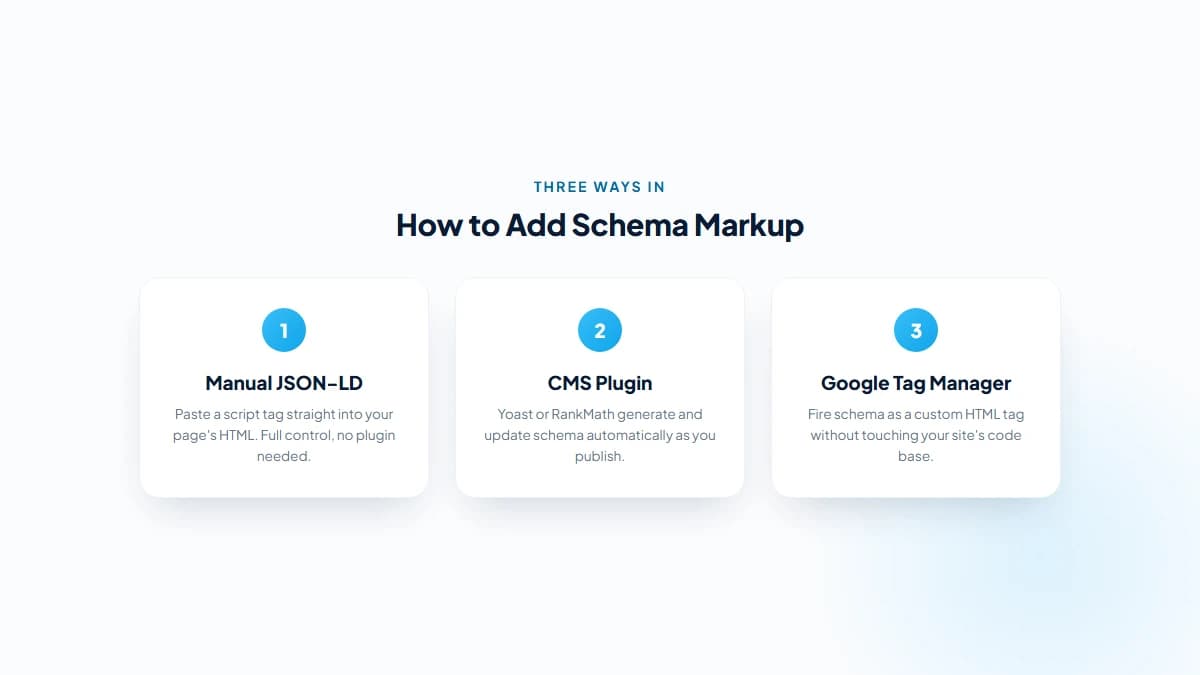
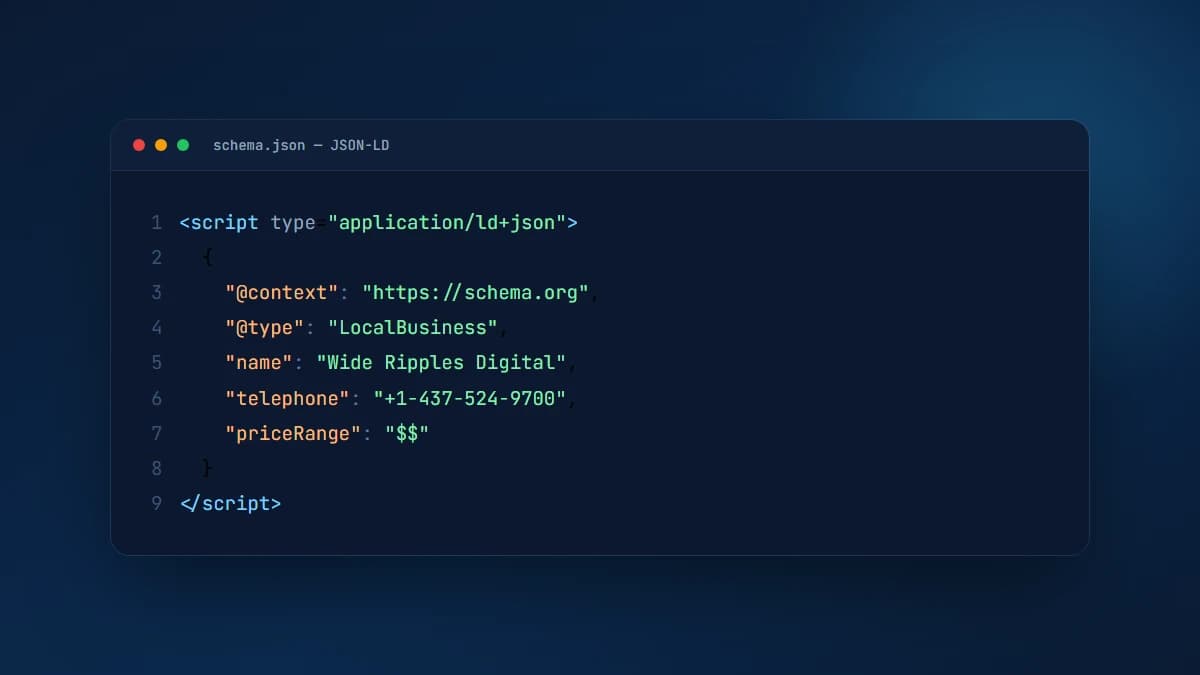
This is the most direct route and the one most developers reach for. You write a JSON object describing your entity, wrap it in a script tag with the type set to application/ld+json, and place it anywhere in the page. The head is conventional, but Google reads it from the body just as reliably.
A basic Organization schema, stripped down to the essentials, looks like this in practice: an @context pointing to schema.org, an @type of Organization, then name, url, and logo as the core properties. Nothing more complicated than filling in a form, just written in a stricter syntax than plain English allows.
If you're on WordPress and coding isn't your thing, this is the sane default. Yoast SEO and RankMath both generate schema markup automatically based on the content type of the page: a blog post gets Article schema, a product page gets Product schema, and you can extend or override it through the plugin's settings without ever touching raw code.
The tradeoff is control. Plugin-generated schema is generic by design, built to work across millions of different sites. It'll cover the basics correctly. It won't always capture the specific nuance a custom-built page needs, which is where working with an SEO consultant earns its keep.
Google Tag Manager lets you fire schema markup as a custom HTML tag, triggered on specific pages, without requesting a code change from your developer every time. It's a reasonable middle ground for marketing teams who need to move fast but don't have direct access to the site's codebase.
It's worth saying plainly: GTM-injected schema loads after the page's initial HTML, via JavaScript. Google can generally still read it, since Googlebot renders JavaScript before indexing, but it's a slower, less certain path than schema baked directly into the server-rendered HTML. For anything mission-critical, hardcoded JSON-LD is the more reliable choice.
Test schema markup with Google's free Rich Results Test and the Schema Markup Validator. Paste in a URL or the raw code, and both tools flag missing required properties, syntax errors, and whether the page actually qualifies for the rich results you're aiming for.
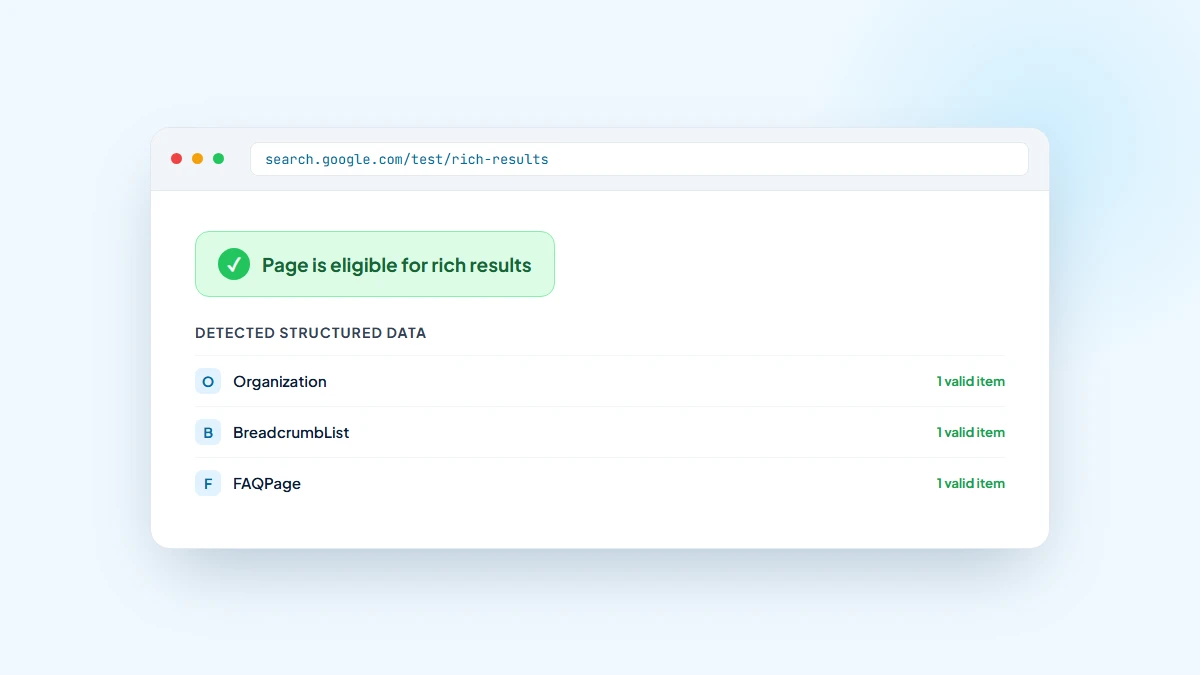
Run every page through the Rich Results Test before you call the job done, and check back in periodically, since a theme update, a plugin conflict, or a content edit can silently break markup that was working fine last month. Google Search Console also reports structured data errors under its Enhancements section, which is the easiest way to catch a site-wide problem before it spreads across every page. It sits alongside canonical tags as one of those small technical details that's invisible when it's right and costly when it's wrong.
No, and be skeptical of anyone who says it does. Schema markup is not a ranking factor Google counts directly. What it does is make your existing content easier to understand and easier to present attractively. That indirectly supports rankings by improving click-through rate, dwell time, and how cleanly your entity gets represented across Google's systems.
Think of it less like a lever you pull and more like cleaning up your paperwork. Good paperwork doesn't make your business better. It makes the good business you already have easier for someone else to verify, trust, and act on quickly. Schema does the same thing for a search engine.
That's exactly why we treat structured data as a standard part of every technical SEO engagement rather than an optional add-on. It's rarely the single reason a site starts ranking, and it's almost never the reason one doesn't. But paired with solid on-page SEO and a site that actually loads fast, it's one more signal working in your favour instead of sitting blank.
No. Schema markup is one small piece of technical SEO, not the whole discipline. SEO covers content quality, site speed, backlinks, and dozens of other factors. Schema just helps search engines understand and present what's already there.
Not necessarily. A CMS plugin like Yoast or RankMath can generate basic schema automatically with zero code. Manual JSON-LD gives more control but does require comfort editing HTML, or a developer willing to do it for you.
Google needs to recrawl and reindex the page first, which typically takes anywhere from a few days to a few weeks depending on how often your site gets crawled. Even after that, rich results are never guaranteed. Google decides case by case whether to display them.
Badly implemented schema can. Markup that misrepresents your content, fake review data, or code with broken syntax can all trigger manual actions or simply get ignored. Correctly implemented schema carries no downside.
Not by default. WordPress core doesn't generate schema on its own. An SEO plugin like Yoast SEO or RankMath is what actually adds it, automatically labeling posts, pages, and products once installed and configured.
Google typically ignores the broken portion and either shows no rich result or falls back to a standard listing. It rarely penalizes the page outright for an honest error. The fix is to check Search Console's Enhancements report and correct it as soon as you spot it.
Get a free SEO audit and a clear, prioritized plan for your Mississauga business — no long-term contract required.
Get a Free SEO Audit· 8 min read
See what an HTTP 401 error means, how it differs from 403 and how users or developers can fix authentication problems. Check the steps now.
Read article· 11 min read
Improve brand mentions in ChatGPT, Gemini and AI Overviews with stronger entities, citations and answer-ready content. Use the 2026 checklist.
Read article· 14 min read
Build a keyword plan around search intent, competition and business value, then map terms to the right pages. Follow the step-by-step process.
Read article