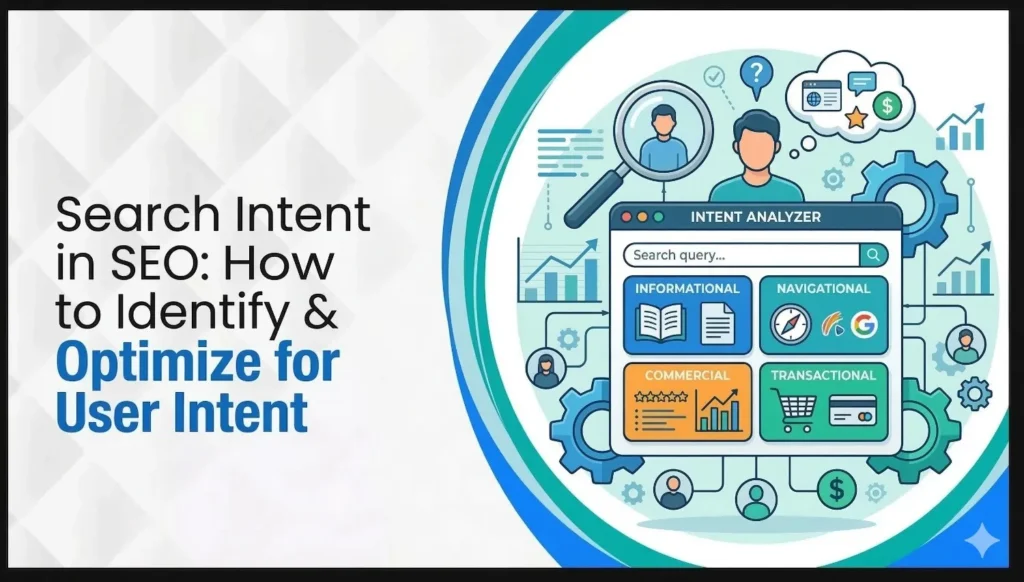
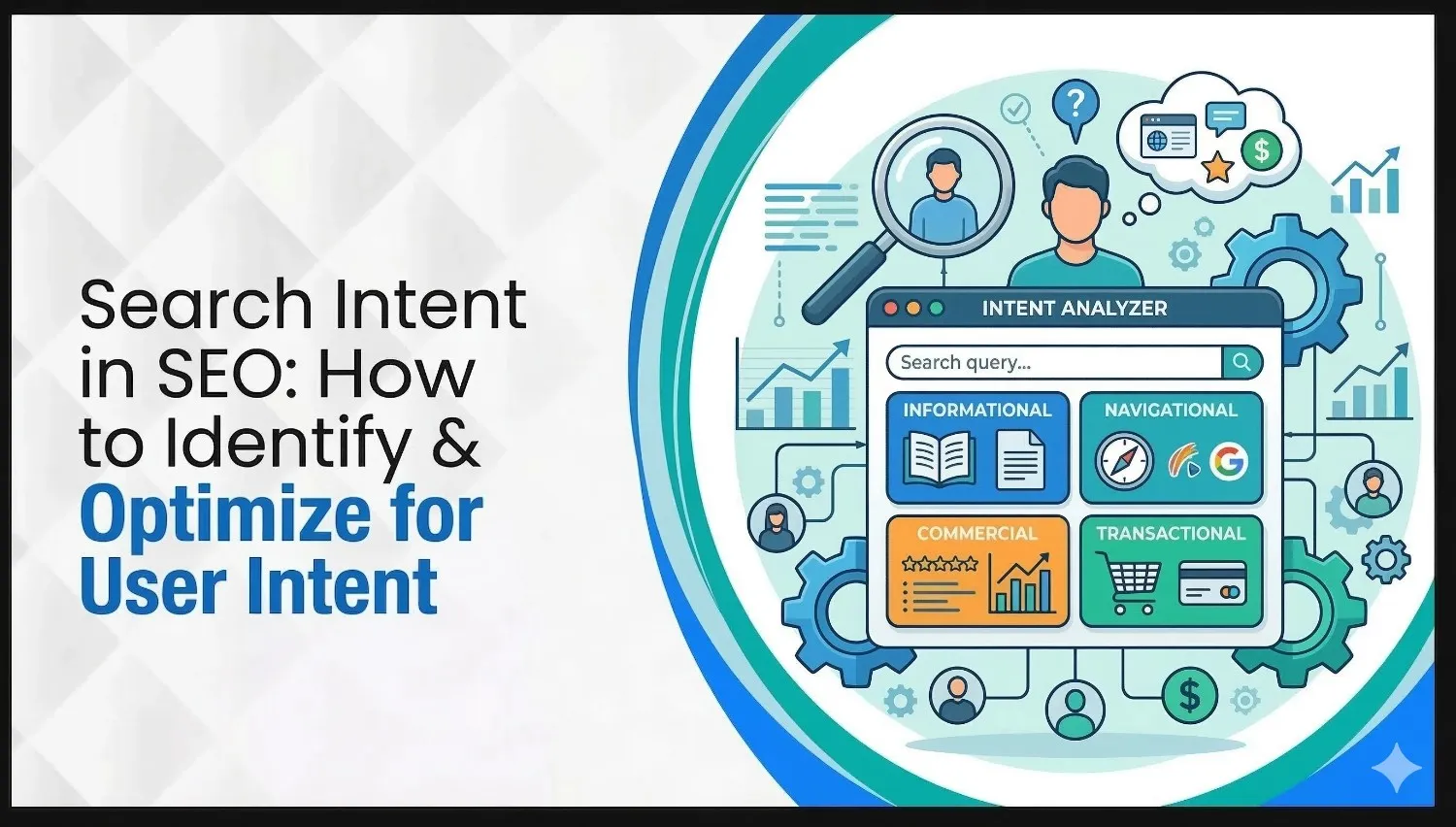
Search Intent in SEO: How to Identify & Optimize for User Intent
March 17, 2026
| Turab Talha | Reviewed by {acf_subject_expert}
Understanding why people search and what they really want to achieve is at the heart of modern SEO. Search intent (also called user intent) refers to the goal behind a search query. Is the searcher looking for information, a specific website, a local business or to make a purchase? Search engines have become adept at interpreting this intent and prioritize pages that satisfy it. For brands and bloggers in Canada, aligning content with user intent isn’t optional; it’s essential to ranking, conversions and long‑term visibility.
In this comprehensive guide you’ll learn what search intent is, why it matters for SEO, the four main intent types, how to determine and optimize for each, and why local and mixed intents add another layer of nuance.
What Is Search Intent?
Search intent is the underlying purpose or goal a person has when they type a query into a search engine. Someone searching “tax filing deadline Canada 2026” likely wants up‑to‑date information on deadlines and forms, whereas a person searching “buy snowboard boots Calgary” intends to find a retailer. These motivations correspond to stages in the user journey, learning, comparing, deciding or taking action.
Search engines use semantics and contextual signals to understand these intentions. As one SEO resource notes, semantics helps the engine recognize synonyms, disambiguate words with multiple meanings and interpret relationships between concepts. Modern AI models and search algorithms analyze entire phrases rather than isolated keywords. This means stuffing pages with exact-match keywords no longer works; your content must answer the question behind the query.
Why Search Intent Matters
Google’s ranking systems are built around satisfying user intent. The search quality evaluator guidelines devote an entire section to identifying different intents, and Google’s own documentation states that ranking systems first determine intent before returning results. In other words, you can have a page with strong backlinks and on‑page optimization, but if it doesn’t satisfy the user’s goal, it will struggle to rank.
Matching intent benefits users and site owners:
- Higher relevance and click‑through rates: Pages that reflect what searchers want attract more clicks, which signals quality to Google.
- Reduced pogo‑sticking: When users land on a page that meets their needs they’re less likely to return to the results page. Pogo‑sticking (bouncing back and forth between results) is a sign that pages don’t satisfy intent and can hurt rankings.
- Better engagement and conversions: Understanding whether a query is informational, commercial or transactional lets you tailor calls to action. A how‑to article can link to relevant products; a commercial investigation article might include comparison tables and sign‑up options.
The Four Core Types of Search Intent (and Beyond)
SEO professionals often categorize search intent into four main buckets. Google’s guidelines use similar categories, Know, Do, Website and Visit‑in‑Person, but the SEO naming convention is slightly different. Here’s what each type means, how to recognize it and how to optimize accordingly.
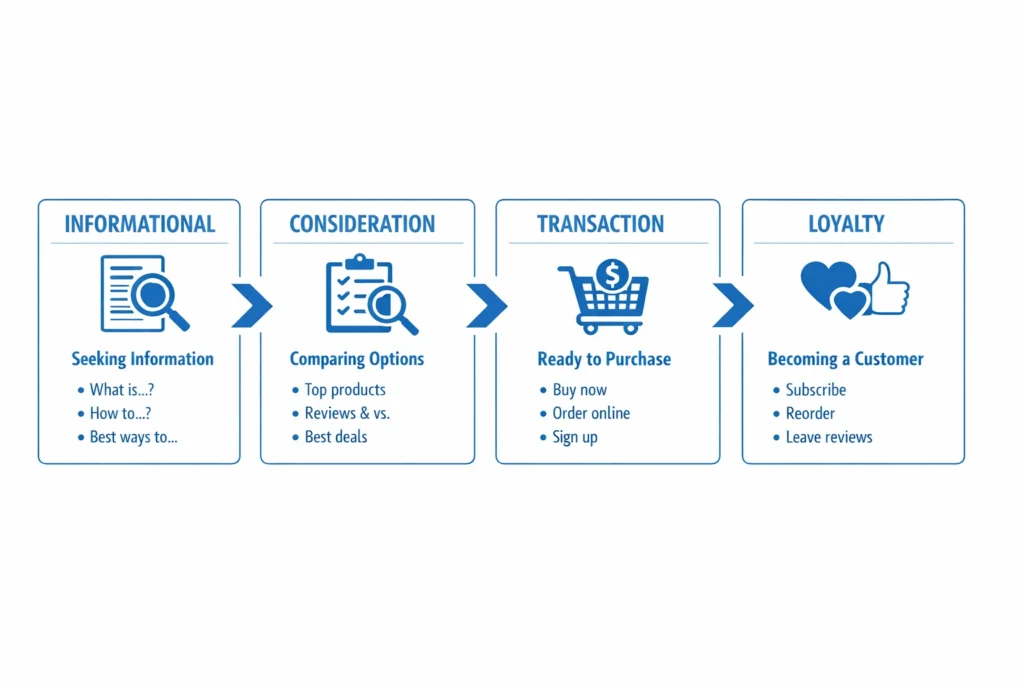
Informational Intent
People search with informational intent when they want to learn something. Queries often include words like how to, what is, why or best way to. They might be looking for instructions, definitions, historical facts or simple explanations. Examples include:
- “How to renew a passport in Canada”
- “What is the Canadian Charter of Rights and Freedoms”
- “Toronto weather in February”
How to optimize:
- Provide clear, comprehensive answers in short paragraphs with descriptive subheadings. Start with a concise summary, then expand with details. Use bullet lists or numbered steps for processes.
- Include visuals like infographics or step‑by‑step images to enhance understanding and engagement.
- Add internal links to related guides and resources to support the user’s learning journey.
- Incorporate FAQ sections to cover related questions users might ask (look at People Also Ask boxes for inspiration).
Navigational Intent
Navigational intent occurs when someone wants to reach a specific website or page. These queries often include brand names or specific product names. For instance:
- “CRA My Account login”
- “CBC News Ottawa”
- “Tim Hortons menu”
How to optimize:
- Ensure your home page and key landing pages are well‑optimized for your brand name and important products or services.
- Provide clear meta titles and descriptions so users recognize your result quickly.
- Use site links (structured data) to help search engines generate additional links underneath your main result for important pages.
Note that ranking for navigational keywords that target another brand can yield low click‑through rates because users typically click the official result. Focus on navigational queries where your brand is the target.
Commercial Investigation (Commercial Intent)
Commercial intent (sometimes called “commercial investigation”) sits between learning and buying. Users are comparing products, reading reviews and looking for the best options. Searches often contain words such as best, top, review, compare or alternatives. Examples:
- “Best snow tires for Canadian winters”
- “Compare Toronto gyms memberships”
- “iPhone vs. Google Pixel camera quality”
How to optimize:
- Create comparison guides, product reviews and listicles. Provide pros and cons, pricing, and feature tables. If you sell products, include links or call‑to‑action buttons that lead to product pages.
- Use schema markup (e.g., Product, Review) to help search engines present rich results such as star ratings and prices.
- Address questions that buyers ask during the research phase, ensuring content is unbiased and authoritative.
Transactional Intent
When people are ready to take action-buy, sign up, or download-transactional intent is at play. Queries usually include words like buy, order, subscribe, download or the specific product name. Examples:
- “Buy electric vehicle charger online Canada”
- “Subscribe to The Globe and Mail digital”
- “Download CRA T1 general form”
How to optimize:
- Use clear calls to action, straightforward product pages and streamlined checkout processes. Keep forms short and load speeds fast.
- Include high‑quality images, product specifications, shipping details and return policies.
- If you’re in a regulated industry or operate across provinces, clarify any region‑specific information (e.g., tax rates or shipping limitations).
Mixed Intent and Subtypes
Not every query fits neatly into one category. Some keywords exhibit mixed intent-a blend of informational and commercial, or commercial and transactional. For example:
- “Best laptops for students under $1,000” combines research (best options) with purchase intent.
- “Running shoes for beginners” could include general advice, product comparisons and links to buy.
- “Canada immigration 2026 requirements” may combine informational and transactional (preparing to apply).
To serve mixed intent:
- Cover multiple needs: Provide definitions, comparisons and actionable next steps. Use clear headings so users can jump to the section that matches their goal.
- Add internal links: Direct readers to separate pages that focus specifically on each intent (e.g., a detailed review page or a product page).
- Prioritize clarity: Use on‑page navigation (e.g., table of contents) so users can easily find relevant sections.
Local and Visit‑in‑Person Intent
Google’s guidelines also identify visit‑in‑person intent: users want to find a location or business near them. For local Canadian businesses, these queries are crucial. Examples:
- “Coffee shop near me open now Toronto”
- “Calgary physiotherapist reviews”
- “Vancouver electricians 24/7”
How to optimize for local intent:
- Claim and fully optimize your Google Business Profile with accurate name, address, phone number, hours and photos.
- Encourage happy customers to leave reviews; star ratings influence click‑through rates.
- Create location pages for each city or province you serve, including directions and local keywords.
- Ensure your site uses schema markup such as LocalBusiness and have consistent NAP information across directories.
How to Determine Search Intent
Identifying search intent isn’t guesswork; it involves analysis, research and tools. Here are practical strategies to understand what your target audience is looking for.
1. Analyze the SERP (Search Engine Results Page)
Google’s ranking systems have already determined which pages satisfy a query. By examining the top results you can infer the dominant intent. Here’s how:
- Search your keyword and review the first page of results.
- Identify content formats (blog posts, tools, product pages, videos).
- Check SERP features such as People Also Ask, Featured Snippets, shopping ads or local packs.
- Note common themes in titles and descriptions. Are they guides, comparisons or product pages?
- Click through to top pages and examine how they are structured, what topics they cover and how they call the reader to act.
For example, if the SERP for “backlink checker” is dominated by tools and software, creating a blog post explaining how backlink checkers work will not rank. Instead, you’d need to offer an actual tool or a landing page.
2. Study the Query Language
Certain modifiers signal intent. Long‑tail keywords containing words like who, what, how, best, affordable, buy and learn often indicate informational, commercial or transactional intent. Even the order of words can change intent, for example, “dog food ingredients” suggests a searcher wants to know what ingredients are in commercial dog foods, whereas “ingredients for dog food” suggests they want homemade recipes. Use keyword research tools to find variations and pay attention to localised phrases like “near me” or “in Vancouver.”
3. Use Tools and Analytics
SEO platforms and browser extensions can help identify intent. Many keyword research tools label intents (informational, commercial, etc.), and some, like Semrush, display an Intent widget that shows the dominant intent and top ranking pages. Analytics can reveal what users do on your pages, high bounce rates or short session durations may signal a mismatch between page content and the searcher’s intent. Use heatmaps to see which sections users engage with most and adjust your content accordingly.
4. Listen to Your Audience
Beyond SERP analysis, understanding your audience requires feedback. Look at questions from your customer support team, comments on your blog, social media interactions, and on‑site surveys. A simple poll asking, “What were you hoping to find here?” can uncover mismatches in content and intent.
Optimizing Content for Search Intent
Once you’ve identified the intent behind a keyword, the next step is to tailor your content. Below are strategies that apply across intent types.
Use the Dominant Content Format
During SERP analysis, note whether top results are blog posts, product pages, videos or tools. Aligning your content format with the dominant type can improve ranking. For example, “how to save money” is dominated by listicles, so creating a listicle of money‑saving tips is more likely to succeed.
Consider the Full Intent
Intent often has layers. A searcher looking up “how to start a vegetable garden” wants step‑by‑step instructions but may also appreciate tips on tools, soil preparation and pest control. Provide supplemental information without veering off into unrelated topics. Use People Also Ask questions to identify what else users want to know.
Improve Readability and User Experience
Easy‑to‑read content keeps users on your page and signals quality. Some best practices include:
- Plain language: Avoid jargon; use clear, concise sentences and short paragraphs.
- Headings and subheadings: Break up content so users can scan for relevant information.
- Visuals: Add images, diagrams or videos to explain complex ideas.
- Lists: Use bullet or numbered lists to make key points stand out.
- Responsive design and fast load times: Ensure your pages are mobile friendly, especially important for on‑the‑go searchers.
Avoid intrusive pop‑ups or heavy ads. Google dislikes pop‑ups that hinder user experience.
Optimize Titles and Meta Descriptions
Title tags and meta descriptions appear in search results and influence click‑through rates. Keep titles under 60 characters and include your main keyword near the beginning. Write meta descriptions under 120 characters, summarizing what users will find on the page and aligning with their intent. Avoid fluff words like “discover” or “learn”; instead, directly address the benefit (e.g., “Step‑by‑step guide to filing taxes in Canada”).
Craft Appropriate Calls‑to‑Action
Each intent requires a different CTA:
- Informational: Suggest related articles or a subscription for more guides (e.g., “Stay informed on Canada’s tax updates, sign up for our newsletter”).
- Commercial: Encourage comparisons or downloads (“Download our free winter tire comparison chart”).
- Transactional: Directly invite the purchase (“Buy winter tires online and get free shipping across Ontario”).
Place CTAs after providing value, not before, to avoid disrupting the user’s learning flow.
Update and Re‑Optimize Existing Content
Search intent changes over time. If a page’s rankings drop, revisit the content to ensure it matches current intent. A case study highlighted how revising content to align with user intent helped a previously mid‑ranking article achieve a featured snippet and top position. Use content audits to identify pages with declining metrics and rework them for relevance.
Search Intent Examples: A Canadian Perspective
Understanding search intent becomes clearer with real‑world examples. The table below categorizes common queries by intent and suggests content formats. Note: keep queries short; the explanation is in the body.
| Query | Intent Type | Recommended Content |
| “How to file taxes in Canada online” | Informational | Step‑by‑step guide with screenshots of the CRA portal and filing deadlines, plus links to relevant forms |
| “CRA My Account login” | Navigational | Optimized landing page explaining how to access CRA services, with login links and troubleshooting tips |
| “Best winter tires for snow in Quebec” | Commercial | Comparison article featuring top tire brands, performance in icy conditions and pricing; table of pros and cons |
| “Buy winter tires Calgary” | Transactional | Product page listing available tires with size filter, price, customer reviews and purchase button |
| “Dentist near me Toronto” | Visit‑in‑person | Local business page with map, opening hours, reviews, and an online appointment booking form |
| “Best Canada Day events Vancouver 2026” | Mixed (informational + commercial) | List of events with details, ticket links, accommodation suggestions and tips on getting around |
Search Intent in the Era of AI and Changing User Behaviour
The way people search is evolving. With generative AI tools like ChatGPT and Gemini, users phrase their needs as longer, natural prompts that combine multiple intents. Queries such as “Compare three affordable smartphones and recommend the best one for students” blend commercial investigation with transactional intent. AI assistants summarize answers, contributing to zero‑click searches where users get the information they need without visiting a website.
For SEO practitioners, this shift means:
- Provide concise, structured answers: Use headings, lists and summary boxes so AI models can extract relevant snippets easily.
- Serve multiple intents: Pages that cover related intents-definitions, comparisons, purchase options, tend to perform better because AI and users value completeness.
- Keep content fresh: AI tools prioritize up‑to‑date information and trustworthy sources. Regularly update statistics, policies and local details.
- Consider voice search and local queries: Canadians asking their smart speakers for “closest pharmacy open now” require a Google Business Profile and schema markup to appear in voice results.
Conclusion: Aligning with Intent to Win in SEO
In 2026 and beyond, optimizing for search intent is not a trend, it’s the foundation of effective SEO. Search engines analyze queries to understand whether users want information, a specific site, a comparison or a purchase. Content that aligns with this intent earns higher rankings, more clicks and deeper engagement.
For Canadian businesses and content creators, the stakes are high. Whether you run an e‑commerce store in Vancouver, a local café in Toronto or a legal firm in Calgary, matching your content to the goals of your audience, seasonally, geographically and contextually, will help you stand out. By analyzing SERPs, studying query language, leveraging tools and listening to your customers, you can craft pages that not only rank but also serve and convert.
Ready to elevate your content? Our team specializes in creating search‑intent‑driven content that resonates with Canadian audiences. Contact us to discuss how we can help you dominate the SERPs and turn curious searchers into loyal customers.
Frequently Asked Questions (FAQ)
What is the difference between search intent and keyword intent?
They are essentially the same concept. Search intent (also called keyword intent or user intent) is the purpose behind a query. Understanding this purpose allows you to create content that satisfies the query rather than simply repeating keywords.
How do I find the search intent for a keyword?
Start by analyzing the search results for that keyword. Identify the dominant content types, SERP features and common themes. Study the query language-words like how, best, buy or near me hint at intent. Use SEO tools with intent labels, and consider your audience’s journey. For ambiguous queries, look at People Also Ask to identify subtopics.
Does search intent apply to local SEO?
Yes. Local search combines informational, commercial and visit‑in‑person intents. Queries such as “plumbers near me” have a strong local intent. Optimize by claiming your Google Business Profile, using consistent NAP information, and creating location‑specific pages. Encourage customer reviews and include local keywords.
Can a single page target multiple intents?
Yes, particularly when targeting mixed or layered intent. A comprehensive guide on “best electric bikes in Canada” can include definitions, buyer’s guide sections and direct links to purchase. Use clear headings and an on‑page table of contents so users find the information they need.
How does search intent affect voice search?
Voice queries are typically conversational and often include local or immediate needs (e.g., “Where is the nearest coffee shop?”). To rank in voice results, ensure your business information is up‑to‑date in local directories, provide concise answers to common questions, and structure content with natural language.
Search Here
More Categories
Latest Posts
March 17, 2026
Turab Talha
March 13, 2026
Turab Talha
March 9, 2026
Turab Talha
March 5, 2026
Turab Talha
March 3, 2026
Turab Talha