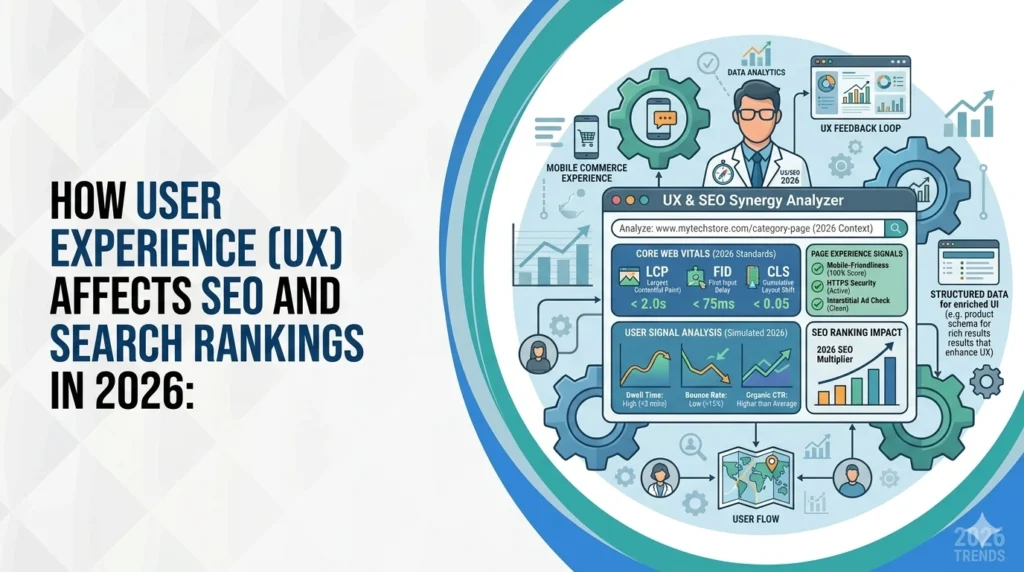
How User Experience Affects SEO and Search Rankings in 2026
April 8, 2026
Search engines have grown up. In 2026, Google and Bing do not just look at keywords, backlinks, and technical SEO. They also look at how real people experience your website.
That changes the game!
When people land on your site, search engines can measure what happens next.
Do pages load fast?
Does the site work well on mobile?
Can visitors find what they need without getting stuck?
Do they stay, explore, and take action, or leave within seconds?
Those behaviours help search engines judge whether your page actually deserves visibility.
That is why understanding how user experience affects SEO is no longer optional. It is part of modern search performance.
A smooth website experience sends strong quality signals. A slow, confusing, or frustrating one does the opposite. If users struggle, rankings often follow. If users move through the site easily, engage with the content, and find the page useful, search engines are more likely to treat that page as valuable.
In this guide, we will break down the UX factors that influence SEO and search rankings in 2026.
Let’s First Start By Understanding User Experience
User experience (UX) describes the impressions, emotions and satisfaction a visitor feels when interacting with a product or service.
For websites and apps, UX includes everything from layout and navigation to loading speed, readability and accessibility. As our experts explain, UX refers to a person’s impressions and emotions when using a product or service; it covers practical, experiential and meaningful aspects of human‑computer interaction.
A positive experience means things are easy to use and satisfying; poor UX frustrates visitors and causes them to abandon the site. Notably, research shows 88 % of online shoppers are unlikely to revisit a site after poor usability, underscoring the commercial impact of UX.
UX vs UI: What Is the Difference, Really?
People often mix up UX and UI, but they are not the same thing.
UI, or user interface, is what people see and interact with on a website. That includes buttons, colours, fonts, spacing, icons, and page layouts. In simple terms, UI is the visual layer.
UX, or user experience, is the overall feeling of using the site. It covers how easy the website is to understand, how fast it loads, how smooth the navigation feels, how clearly the content is organised, and how easily a visitor can complete a task.
Here is the easiest way to think about it:
UI is how the website looks.
UX is how the website works.
UX vs UI
| Aspect | UI (User Interface) | UX (User Experience) |
| What it means | The visual design people see | The overall experience people have |
| Focus | Looks and interactive elements | Ease, clarity, speed, and usability |
| Includes | Buttons, colours, fonts, icons, layout | Navigation, page speed, structure, content flow |
| Main goal | Make the site look appealing | Make the site easy and useful |
| SEO impact | Encourages trust and first impressions | Affects engagement, satisfaction, and behaviour signals |
| Simple way to remember | How it looks | How it works |
Example: a stylish homepage with bold visuals and fancy buttons may look impressive at first glance. But if users cannot find the pricing page, the site loads slowly on mobile, or the text is hard to read, they will likely leave. Search engines may read that poor behaviour as a sign that the page is not helping users well enough.
How User Experience Affects SEO
Search engines keep getting better at spotting websites that genuinely help people. In 2026, ranking well is not just about matching keywords. It is also about delivering a smooth, useful experience once someone lands on the page.
That is where UX and SEO start to overlap.
Let us look at how it influences rankings, engagement, and overall visibility.
Engagement Signals: Bounce Rate and Dwell Time
Search engines monitor behavioural metrics such as bounce rate (the percentage of visitors who leave after viewing one page) and dwell time (the time spent on a page before returning to the search results). High bounce rates and short dwell times signal that content may not be relevant or engaging. Conversely, longer sessions and deeper navigation indicate that users find value in your content.
The bounce rate formula:
Single‑page visits ÷ Total visits
Shows that bounce rates decrease when visitors explore multiple pages. To reduce bounce rate and increase dwell time:
- Optimize loading speed: slow pages lead users to abandon the site.
- Write clear, relevant content: users should understand your page’s purpose within seconds.
- Provide intuitive navigation: visitors should easily find what they need.
- Use engaging visuals: break up text with images or video.
Page Speed and Core Web Vitals
Page speed is a confirmed ranking factor for both desktop and mobile searches. Studies show that ideal load times should not exceed 2.5 seconds; otherwise, users return to the search results and your conversion rate drops. Google’s Core Web Vitals measure key aspects of UX such as Largest Contentful Paint (LCP), Cumulative Layout Shift (CLS) and Interaction to Next Paint (INP). Low performance on these metrics leads to more users leaving the page and lower SEO rankings.
The average load time on desktop is 2.5 seconds and 8.6 seconds on mobile. Fast pages also improve business metrics, Walmart found conversion rates increase by 2 % for every second of improvement in page load time. To optimise page speed:
- Compress images and serve next‑generation formats like WebP.
- Minify HTML, CSS and JavaScript to reduce file sizes.
- Enable browser caching and use content‑delivery networks (CDNs).
- Monitor Core Web Vitals via Google PageSpeed Insights or Search Console.
Mobile‑First Design and Responsiveness
Mobile devices drive more than half of global web traffic.
Statistics Canada says internet use among Canadians aged 15+ reached 95% in 2022 and it continues to grow. Google’s mobile‑first indexing now uses the mobile version of a site for ranking and indexing. A responsive design ensures that content adapts to different screen sizes and that navigation elements are tap‑friendly. The Baymard Institute’s Mobile UX study found that 66 % of mobile websites have tappable elements placed too closely, making navigation difficult. It also found high percentages of sites lacking optimized keyboard layouts and well‑styled error messages. Address these issues by:
- Using a mobile‑first approach: design for small screens first, then scale up.
- Ensuring responsive layouts adapt to any screen.
- Providing ample spacing between buttons and links.
- Testing forms with mobile‑friendly keyboard layouts.
Navigation & Site Architecture
Clear navigation helps users find information quickly and signals to search engines how content is organised. Pages should be accessible within four clicks from the homepage, and internal links should distribute authority to important pages.
Consider these practices:
- Organize content logically using categories and subcategories.
- Use breadcrumbs and descriptive menu labels so visitors always know where they are.
- Link related pages to encourage exploration and reduce bounce rates.
- Avoid deep hierarchies; if users have to click through many layers, they may abandon the process.
Content Quality and Relevance
Search engines assess content quality based on how well it satisfies search intent. High‑quality copy guides users around your site without forcing them to search too hard. If users can’t find what they need, they will leave, signalling low relevance. To enhance content quality:
- Answer search intent early in the page so visitors immediately see the information they need.
- Use clear headings and bullet lists to improve readability and scannability.
- Incorporate relevant internal links to related pages to keep users engaged.
- Update content regularly to reflect current information and maintain freshness.
Responsive Design & Accessibility
Accessibility ensures your site caters to all users, including those with disabilities. A well‑designed user experience does more than please search engines; it caters to diverse needs. Improving accessibility also broadens your reach and enhances usability. To improve accessibility:
- Ensure sufficient colour contrast and readable typography.
- Add alt text for images so screen readers can describe them.
- Provide keyboard‑friendly navigation and skip links.
- Follow Web Content Accessibility Guidelines (WCAG) for compliance.
Conversion Optimisation and Calls‑to‑Action
User experience doesn’t just influence rankings; it affects your ability to convert visitors into customers. UX design directly impacts conversion rates, clear calls‑to‑action, fast loading pages, and intuitive navigation encourage desired actions. Poor UX, such as non‑responsive design, hidden CTAs, or cumbersome forms, reduces conversions and increases bounce rates. To optimise conversion:
- Place prominent, descriptive CTAs above the fold and within the content.
- Use consistent design cues (colours, shapes) so buttons are recognisable.
- Test CTAs on mobile to ensure they are large enough to tap.
- Limit form fields; ask only for essential information.
UX Metrics to Monitor for SEO
Data informs decisions. Tracking the right metrics helps you measure the impact of UX improvements on SEO.
Behavioural Metrics
- Dwell time: measures how long users stay on a page; longer dwell time suggests the content is engaging and relevant.
- Bounce rate: the percentage of users who leave after viewing one page; high bounce rates may indicate irrelevant content or poor usability.
- Average engagement time: available in Google Analytics 4 (GA4), this metric shows how long a page remains in the browser’s focus; longer engagement signals higher interest.
Technical Metrics
- Core Web Vitals (CWV): track LCP, CLS and INP to assess loading performance, visual stability and interaction responsiveness.
- Internal link distribution: pages with more internal links signal importance and improve crawling; pages with no internal links risk not being indexed.
- Click depth: measures the number of clicks required to reach a page; pages within three to four clicks of the homepage generally rank better.
Strategies and Best Practices for UX‑Driven SEO
1. Optimize Page Speed
- Run a site audit using tools like Google PageSpeed Insights or SE Ranking’s Website Audit.
- Compress images and use lazy loading for off‑screen images.
- Use caching and CDNs to deliver content closer to users.
- Minify code and eliminate render‑blocking resources.
Pro tip: Track the effect of speed improvements on conversion rates; even a one‑second reduction can lead to a 2–3 × increase in conversions.
2. Prioritise Mobile Experience
- Build mobile‑first, ensuring the layout, typography and navigation are optimised for small screens.
- Maintain consistent functionality across devices (no hidden content).
- Test with real devices and emulators for responsiveness and tap targets.
- Keep forms short and provide appropriate keyboard types (e.g., numeric for phone numbers).
3. Simplify Navigation and Architecture
- Create a clear hierarchy with logical categories.
- Limit click depth; avoid burying important pages deep in the site.
- Use internal linking to distribute authority and encourage exploration.
- Include sitemaps and breadcrumbs to aid both users and search engines.
4. Deliver Engaging, Optimised Content
- Conduct search intent research and align content accordingly.
- Use descriptive headings and lists to improve readability.
- Incorporate multimedia like videos, charts or infographics; engaging formats can increase dwell time.
- Update content regularly to keep it fresh and accurate.
5. Make Accessibility a Priority
- Ensure high colour contrast for readability.
- Provide text alternatives for images and video transcripts for multimedia.
- Allow keyboard navigation and avoid keyboard traps.
- Test with screen readers and follow WCAG 2.1 guidelines.
6. Design Effective CTAs & Encourage Conversion
- Place CTAs at logical points, after explaining benefits or at the end of sections.
- Use action‑oriented language (e.g., “Get Your Free Audit”).
- Ensure CTAs contrast with surrounding text and are easy to tap on mobile.
- Offer multiple contact options (forms, chat, phone) to suit user preferences.
7. Use Analytics and Heatmaps
- Monitor GA4 metrics like engagement time, bounce rate and conversion rate.
- Use tools like Hotjar or Microsoft Clarity to generate heatmaps and session recordings.
- Run A/B tests to compare different layouts or CTA designs and iteratively improve UX.
8. Localise and Personalise
- If you operate in specific regions, tailor content, language and imagery to local audiences. For businesses in Karachi or Pakistan, mention local search preferences and integrate Urdu or Sindhi language options when appropriate.
- Use AI‑driven personalisation to recommend content based on user behaviour (e.g., “You might also like…”). This keeps visitors engaged longer.
Need Expert Help?
In 2026, the link between UX and SEO is no longer up for debate. Search engines reward websites that are fast, easy to use, mobile-friendly, and genuinely helpful.
That means better user experience does more than make a site look polished. It improves how people interact with your pages, how long they stay, how easily they find what they need, and how likely they are to take action. Those outcomes support stronger search performance and better business results at the same time.
Want to see where your site is helping users and where it is quietly losing them? Start with a website audit and uncover the UX issues that may be holding back your SEO performance. For expert guidance tailored to your business, contact the team at Local SEO Mississauga and build a site that is easier to use, easier to trust, and easier to rank.
FAQs
How does user experience affect SEO?
Great UX reduces bounce rate, increases dwell time and encourages engagement. These behavioural signals tell search engines your content is relevant and trustworthy. Conversely, poor usability causes users to leave quickly, signalling low quality.
What are the most important UX factors for SEO?
Key factors include page speed, mobile responsiveness, intuitive navigation, high‑quality content, accessibility and clear CTAs. Addressing these areas improves user satisfaction and search rankings.
Is UX an official ranking factor?
UX itself isn’t a direct ranking factor, but it influences many signals—bounce rate, dwell time, click‑through rate and Core Web Vitals—that search engines use to determine rankings. Improving UX indirectly boosts SEO.
How can I measure UX improvements?
Track behavioural metrics (bounce rate, dwell time, average engagement), technical metrics (Core Web Vitals, click depth, internal link distribution) and conversion rates. Use GA4, PageSpeed Insights and heatmap tools to gather data.
Do I need a separate mobile site?
No. A responsive design that adapts to any screen is recommended. Google uses mobile‑first indexing, so your primary site should be optimised for mobile devices
Search Here
More Categories
Latest Posts

June 18, 2026
Sanawar Ali

June 15, 2026
Sanawar Ali
June 11, 2026
Sanawar Ali
May 21, 2026
Sanawar Ali
May 19, 2026
Sanawar Ali