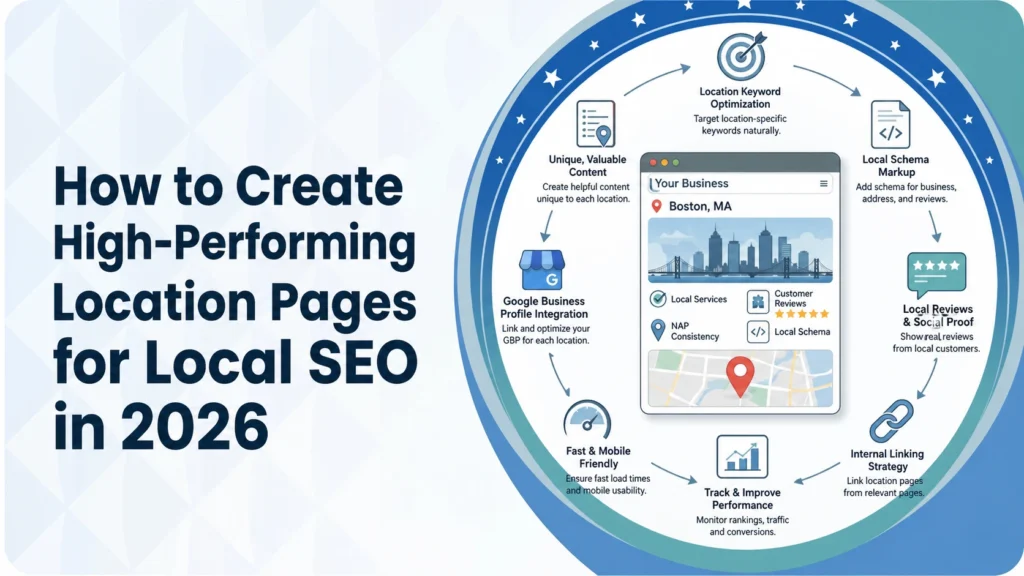
How to Create High-Performing Location Pages for Local SEO in 2026
April 28, 2026
Local search has changed dramatically since early in the decade. Search engines now integrate AI‑generated overviews, generative results, and personalized recommendations. Studies show that 88 percent of location‑based mobile searches lead to an offline purchase within 24 hours. In 2026, businesses that operate in multiple cities or service areas need dedicated location pages to win those local queries, general “service areas” pages or cookie‑cutter paragraphs will not cut it anymore.
Below is a step‑by‑step framework for creating location pages that rank highly, convert visitors into customers and prepare your business for the future of local search.
What are location pages and why are they important?
A location page (sometimes called a local landing page) is a web page that gives detailed information about a specific physical location of your business. According to BrightLocal, location pages help customers find the nearest branch and give search engines enough information to index and rank the page for “near me” and “city + industry” searches.
BrightLocal stresses that the majority (40‑60 %) of the page content should be unique to that location. Location pages differ from geo pages (service‑area pages) because they are tied to a real address, whereas geo pages cover a service area without a physical office. Geo pages can become doorway pages if created in bulk with thin content. High‑performing location pages provide:
- Unique, localized content: details about that branch’s staff, products, services, directions and local events.
- Search visibility: they help you rank for bottom‑of‑funnel searches like “plumber in Seattle,” which deliver high‑intent leads.
- Conversion focus: they should address the specific pain points of local customers and explain why your business is the best choice.
Step‑by‑step guide to building high‑performing location pages
1. Research and define service‑area keywords
Before creating any page, identify the queries your local customers use. Backlinko recommends scanning the SERPs and your Google Business Profile (GBP) to find popular keywords and questions. Look at the “People also ask” boxes and the keywords used in competitor GBPs. Use a keyword research tool (e.g., Semrush or an AI‑powered keyword generator) to find high‑intent phrases with local modifiers (city, neighborhood, zip code, “near me”).
2. Draft location‑specific, unique content
BrightLocal warns that copying and rephrasing content across several locations produces “diluted‑value content”. Aim for at least 40–60 % unique content per page. Include:
- NAP details (Name, Address, Phone number) – consistent across your website and listings.
- Local description – opening hours, services, local staff bios, inventory/menus and accessibility or parking information.
- Testimonials from locals – highlight reviews from residents in that location to build trust.
- Localized expertise – mention unique aspects (e.g., “coastal roofing challenges in Carlsbad”).
- Community connections – references to nearby landmarks, neighborhoods or events.
3. Optimize on‑page elements for each location
Boulder SEO shows how an optimized location page for “Longmont SEO company” includes tailored title tags, meta descriptions and a compelling H1 that addresses the local audience’s pain points. Follow these practices:
- Page URL – incorporate the city or neighborhood in the slug (e.g., /locations/longmont-seo-company).
- Title tag (≈60 characters) – mention the service and location.
- Meta description (≈150–160 characters) – include the local keyword and a call‑to‑action.
- H1 and headings – use natural language with the location name. Structure content with H2/H3 sections to help visitors scan.
- Image optimization – add alt‑text and file names containing the location. Show photos of the actual office or team.
- Internal linking – avoid orphaned pages by linking to location pages from navigation menus, service pages or a “Location Finder” tool. BrightLocal suggests adding a dropdown “Locations” menu or a module of nearby locations.
4. Add structured data and AI‑ready markup
Schema markup is a critical technical signal. Boulder SEO calls it “the 2026 technical SEO priority”. Use LocalBusiness schema to mark up each location page with name, address, phone, hours and geo‑coordinates. Include additional attributes like “HardwareStore” or “Dentist” as appropriate. Test your markup with Google’s Rich Results testing tool.
Mat Nelson highlights adding an FAQ section with schema to capture AI overviews. Provide concise Q&A entries such as “What regulations apply to roofing projects in Escondido?” This makes it easier for generative engines to cite your page.
5. Embed a map and driving directions
Backlinko explains that embedding a Google Map on your Contact or About page reinforces local signals. Copy the embed code from Google Maps and insert it near your NAP details. For service‑area businesses without a physical office, embed a map that covers the service area and add driving directions to your nearest hub.
6. Build consistent NAP citations and local listings
NAP consistency remains a major ranking factor. Backlinko advises running an NAP audit across your website, GBP, directory listings and local citations to ensure your name, address and phone number are identical everywhere. Update inconsistent citations and discover new citation opportunities on local sites to reinforce relevance. Mat Nelson also emphasises NAP consistency across social media profiles.
7. Encourage and highlight customer reviews
Reviews are among the strongest local ranking signals. Boulder SEO recommends using Google’s “Ask for reviews” feature, sending direct links to customers or displaying QR codes at your location. Engage with customers and respond to reviews a key part of demonstrating E‑E‑A‑T (Experience, Expertise, Authoritativeness, Trustworthiness) and building trust. Add a testimonials section on each location page and use schema markup for reviews.
8. Create deep, geo‑modified pages for service areas
Mat Nelson proposes creating geo‑modified pages for each service area even if you don’t have a physical office. These pages target city‑specific keywords, signal relevance to search engines and highlight unique local expertise. Elements to include:
- Local map embed.
- Hyper‑local details such as zoning regulations and neighborhood distinctions.
- Testimonials and references to local landmarks.
- Q&A structured content targeting generative search.
9. Prioritize mobile UX, speed and accessibility
Most local searches happen on mobile devices. Ensure your pages load quickly, are fully responsive and accessible. Avoid intrusive pop‑ups and ensure fonts and buttons are easy to read and tap.
10. Unique strategies for 2026: go beyond the basics
The guides above share similar tactics. To stand out in 2026, incorporate innovative elements that competitors often overlook:
- Voice‑search optimization – With smart speakers and voice assistants ubiquitous, optimize copy for conversational queries (e.g., “Hey Siri, where is the closest family dentist?”). Use question‑answer formats and natural language.
- Interactive content & AR – Include 360‑degree virtual tours of your store or service area, or augmented reality previews (e.g., visualizing roofing materials on a home). Such interactive content increases engagement and dwell time.
- Personalized, dynamic modules – Show different call‑to‑action banners based on the user’s device, time of day or referring keyword. For example, display a “Call now” button during business hours and an appointment‑request form after hours. Use privacy‑compliant first‑party data to personalize offers.
- Integrate local social proof – Embed geo‑tagged Instagram posts or TikTok videos from satisfied customers. This adds authenticity and helps with generative search results that pull from multiple platforms.
- Sustainability and inclusivity signals – Highlight eco‑friendly practices, accessibility features and community involvement. These attributes often appear in AI‑generated overviews and influence purchase decisions.
Common mistakes to avoid
- Duplicating content across pages – rewriting the same text for different cities creates diluted‑value content.
- Orphaned location pages – failing to link them from menus, sitemaps or service pages makes them difficult for users and search engines to find.
- Thin geo pages with minimal content – placeholder pages such as “We serve Longmont” do not rank. Provide deep content that addresses local pain points.
- Ignoring schema markup – missing or invalid structured data reduces your chances of appearing in AI overviews.
- Inconsistent NAP and outdated citations – mismatches undermine trust and ranking.
Conclusion
High‑performing location pages in 2026 do more than list an address and phone number. They provide unique, location‑specific content, align with local search intent, use structured data and internal links, solicit genuine customer reviews and adapt to new search paradigms like AI overviews and voice search.
By following the steps outlined here, and integrating innovative elements such as virtual tours, dynamic CTAs and sustainability signals, your business can dominate local SERPs, earn citations in AI responses and, most importantly, convert local searchers into loyal customers.
Search Here
More Categories
Latest Posts
June 18, 2026
Sanawar Ali
June 15, 2026
Sanawar Ali
June 11, 2026
Sanawar Ali
May 21, 2026
Sanawar Ali
May 19, 2026
Sanawar Ali