What are Canonical Tags? Why They are Important for SEO (2026 Guide)
April 28, 2026
You work hard on one blog post. But Google ends up seeing five or six versions of it. One has a slash at the end. One carries a tracking code. Another sits inside a category archive, and one more shows up as a tag page. Before you notice, your rankings start slipping, your analytics look weird, and Google picks a URL you never wanted to rank in the first place.
This tiny problem creates big damage. Your crawl budget gets wasted. Your best page starts losing traffic to a weaker copy of itself. The worst part? Most site owners never know it is happening until their traffic drops.
The fix is smaller than most people expect. A short line of code called the canonical tag tells Google which version of a page is the main one. It is one of the first things we check inside our Technical SEO work, because clean signals always lead to clean rankings.
This 2026 guide explains what canonical tags are, when to use them, when to skip them, and how to check them properly without guessing.
Canonical Tag Basics and How Google Picks a Winner
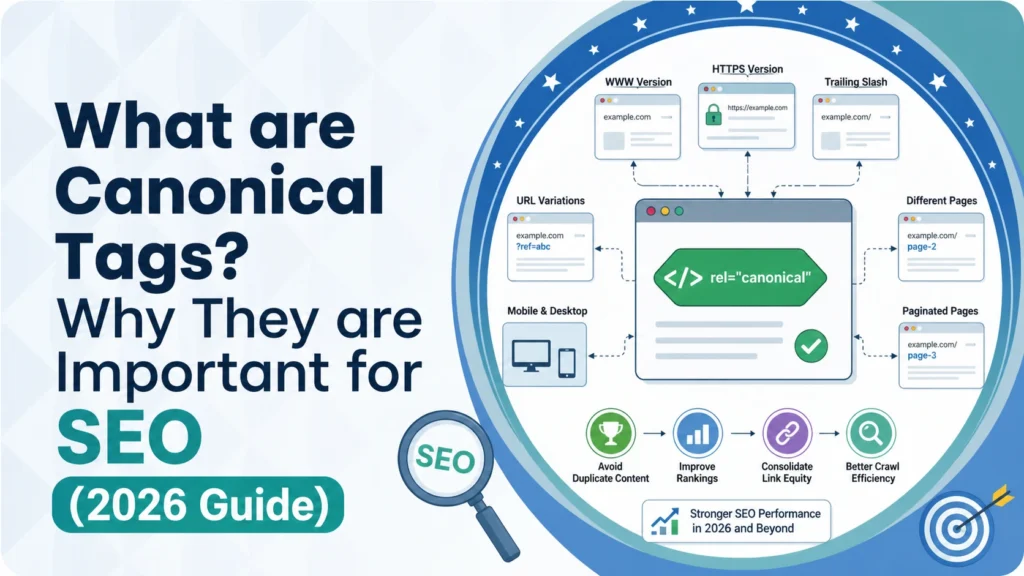
A canonical tag is a short piece of HTML code that points to the “main” version of a page. If your site has two or three pages that look almost the same, the canonical tag tells search engines, “This is the one I want you to treat as the original.”
You may see different names for the same thing. Canonical link, canonical link tag, canonical meta tag, and canonicalization tag all mean the exact same small piece of code. The “rel canonical” part simply means “relationship: canonical.” It shows the connection between two URLs.
Here is the part most people miss. A canonical tag is a hint, not a rule. Google takes your preference, then checks other signals before making a choice. Signals like internal links, redirects, sitemap entries, and HTTPS status all play a role.
As explained in Google Search Central’s guide on URL canonicalization, when Google finds several URLs serving the same content, it groups them and selects one URL as the canonical for search results. Your tag is one of the strongest signals it checks, but other factors can push Google to pick a different URL.
The goal is simple. Make your canonical tag and all your other signals agree. When they match, Google almost always listens.
When Canonical URLs Help and When They Fall Short
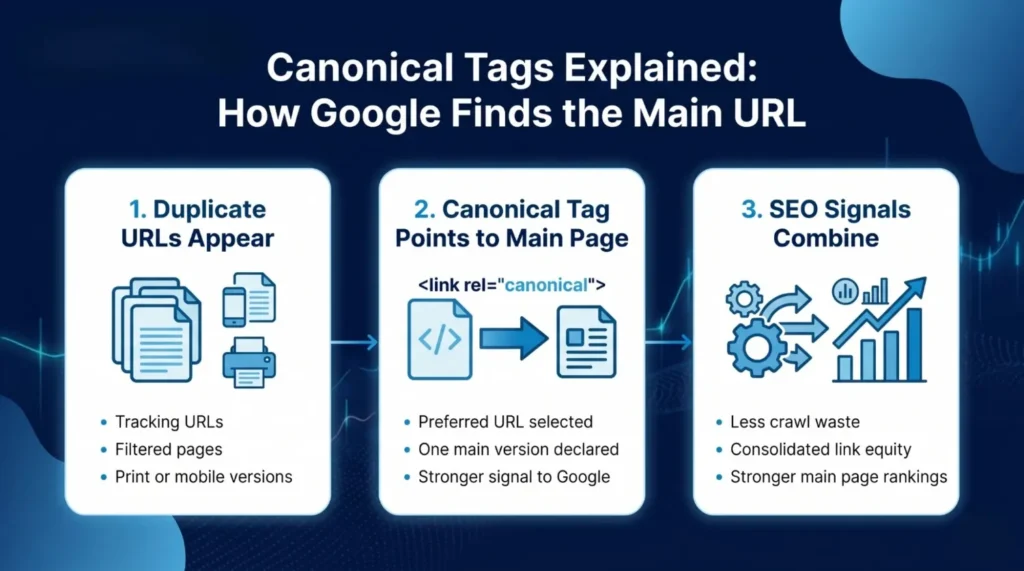
A canonical URL works best when two or more pages carry the same or very similar content. Think of product pages with color filters, printer-friendly versions, session IDs, UTM tracking codes, and mobile or desktop versions of the same article.
In these cases, the canonical tag tells Google, “All these URLs are really the same page. Please count the signals for this main one.”
But canonicals are not always the right answer. If a page has moved for good, a 301 redirect is the better choice. A redirect sends both users and search bots to the new page and passes almost all ranking strength. A canonical tag only moves signals. The old URL still loads, and users can still land on it by accident.
Canonicals are also the wrong fix for thin or different content. If two pages cover different topics, pointing one at the other only confuses Google. And if your page has almost no content, a canonical will not save it. You need real content, not a tag.
So the short rule is: use canonicals for near-duplicate pages, use 301 redirects for pages that moved for good, fix thin content with real content, and use noindex for pages you never want in search results.
How Rel Canonical Tags Guide Indexing the Right Way
Search engines crawl your site with a limited crawl budget. Small or large, every site has one. When Google spends time crawling five versions of the same page, it has less time for your fresh content.
A rel canonical link fixes this by pulling signals together. Backlinks, shares, and user engagement from all duplicate URLs flow toward the main one. This is called signal consolidation. Instead of five weak pages fighting each other, you end up with one strong page.
This matters for canonical tag SEO because Google ranks URLs, not topics. If your link equity is split across three copies, all three stay weak. Pull them together with canonicals, and the main page collects every bit of credit.
It also helps Google classify near-duplicates properly. Product variants, paginated lists, and filtered category pages often look almost identical. Canonicals help Google understand which one deserves the spotlight and which ones are just different views of the same page. The result is cleaner crawling, sharper indexing, and better page ranking without your own pages fighting each other.
Duplicate Content, URL Control and Proper Tag Rules
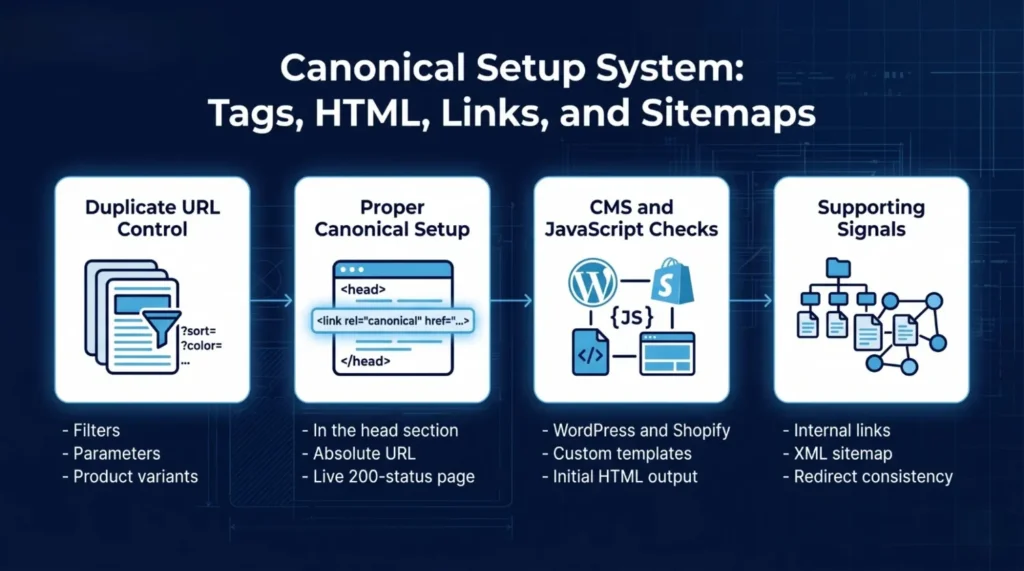
Duplicate content is the most common reason people reach for canonical tags. Parameters like ?sort=price, filters like ?color=red, session IDs, and tracking codes all create new URLs with the same page. Search engines see each one as its own page unless you tell them otherwise.
For product and category pages, the cleanest setup is:
- Point every filtered or sorted URL to the main category URL
- Point every product variant to the main product URL
- Point tracking URLs (with ?utm_source=…) back to the clean URL
- Let paginated pages self-canonicalize, not point to page 1
A proper canonical setup has four traits. The tag sits inside the <head>. It uses an absolute URL, not a relative one. It points to a live page that returns a 200 status. And it matches your sitemap, internal links, and redirects.
Inside Google Search Console, you may see a status called “alternate page with proper canonical tag.” This is not an error. It means Google found a duplicate URL and followed your canonical to the main page. In most cases, the alternate page with proper canonical tag fix is no fix at all because your setup is already working. You only need to act if the tag points to the wrong URL, in which case you update the canonical to the correct target.
Meta Canonical Tags in HTML, CMS and JavaScript Sites
Here is what a canonical tag looks like in HTML:
<link rel=”canonical” href=”https://example.com/main-page/” />
That line sits inside the <head> of your page, not the body. If your CMS places it in the body, search engines will ignore it.
Most modern CMS platforms handle this for you. WordPress sites with Yoast, Rank Math, or All in One SEO set self-referencing canonicals by default. Shopify, Wix, and Squarespace do the same. Your job is to check that the tag exists and points to the right URL, then spot-check it across product, category, and blog pages.
For custom-built sites, your developer adds the tag to the page template. For JavaScript-heavy sites built on React, Next.js, Vue, or Angular, there is one extra rule. The canonical must appear in the initial HTML, not only after JavaScript runs. Googlebot reads the page in stages, and canonicals added in the late render often get missed.
Google’s own guide on consolidating duplicate URLs with rel=canonical covers every supported method, including link tags, HTTP headers, and sitemaps. Pick one method per page. Mixing two methods with conflicting targets confuses Google and usually cancels out your signal.
How Internal Links and Sitemaps Strengthen Canonicals
A canonical tag on its own is not enough. It works best when every other signal on your site points the same way.
Internal links should always lead to the preferred URL. If your canonical says /blog/seo-guide/ but your menu links to /blog/seo-guide/?ref=home, you are sending mixed signals to Google. Fix your internal links first, then set your canonicals. This order matters more than most people realize.
Your XML sitemap should only list canonical URLs. Never add alternate, filtered, or parameter versions. When Google sees the same URL in your sitemap, your canonical tag, and your internal links, it becomes very confident about which page to index and rank.
Think of it as a full system. The canonical tag is one vote. Internal links, sitemaps, redirects, and hreflang tags are more votes. When every vote agrees, Google accepts your choice. When they conflict, Google picks what it thinks is best, which may not be the URL you wanted.This is why canonical tag SEO is never about a single line of code. It is about making every signal on your site agree. If you want a deeper walkthrough of duplicate URLs, crawl clarity, redirects, and indexation control, our Technical SEO Mississauga: Fix the Site, Win the Call page breaks down the full system step by step.
Canonical Tags, Hreflang and Alternate Page Signals
Things get tricky when you run a site in more than one language or region. An English page, a French page, and a Spanish page are not duplicates. They are alternate versions for different audiences. Here, hreflang tags come in.
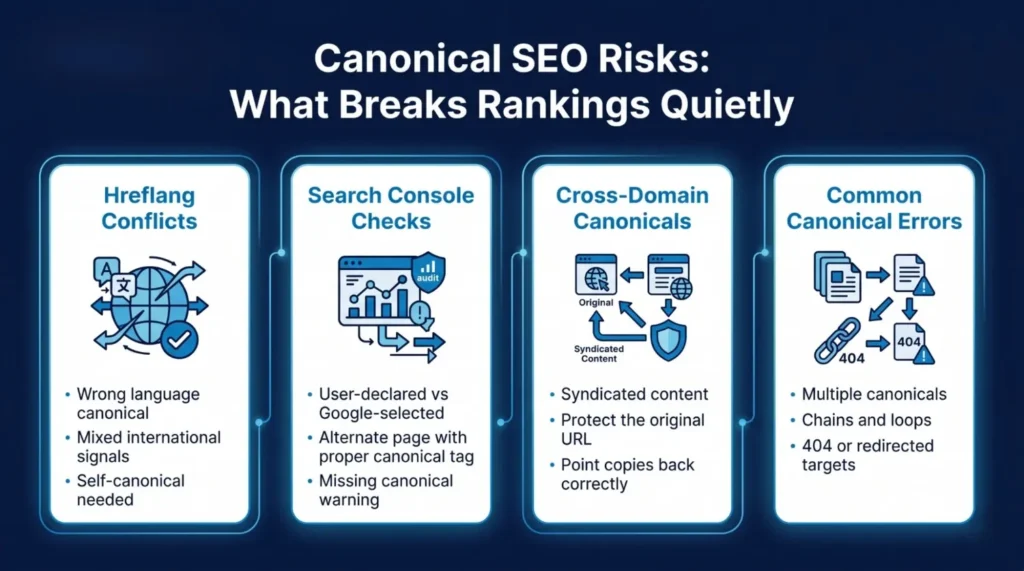
Hreflang tells Google, “Show this version to French users, this one to Spanish users, and this one to English users.” Each language page should have a self-referencing canonical. That means the French page canonicalizes to itself, the Spanish page to itself, and so on.
The most common mistake is pointing every language version at the English URL. This tells Google only one version matters, and your other language pages may drop out of search in their regions. Always keep canonical and hreflang working in the same direction. Each language stands on its own, and hreflang links them as equals.
For regional variants like US English versus UK English, the same rule applies. Self-referencing canonicals first, hreflang tags second. Mixing these up is one of the quiet reasons international sites lose traffic in markets they should easily own.
How to Check Canonical Issues in Search Console
Google Search Console is your main canonical tag checker. It is free, accurate, and shows you what Google actually sees, not what you assume it sees.
Start with the URL Inspection tool. Paste any page URL, and Search Console shows you the canonical you declared and the one Google picked. If they match, you are fine. If Google chose a different URL, something elsewhere on your site is pointing away from your preferred page.
Next, open the Pages report under Indexing. Three notes matter most:
- Duplicate without a user-selected canonical means no canonical tag exists on the page
- Duplicate, Google chose a different canonical than the user means your signals conflict, and Google overruled your tag
- Alternate page with a proper canonical tag means everything is working the way it should
For a full audit, run a crawler like Screaming Frog, Sitebulb, or Ahrefs Site Audit. These tools find missing tags, self-conflicting tags, canonical chains, and tags pointing to broken URLs across every page at once. Ahrefs’ large-scale technical SEO research shows that canonical and duplicate content errors rank among the most widespread issues found during site audits, affecting a large share of the websites they scan.
Check Search Console every week for small sites and daily for large stores. Canonical issues rarely explode overnight, but they quietly drain rankings over weeks and months if nobody is watching.
Cross-Domain Canonicals for Syndication and Republishing
A canonical tag does not have to stay on the same domain. You can point a page on Site A to a page on Site B. This is called a cross-domain canonical, and it is very useful when the same content lives on two different websites.
It helps in three common cases:
- You republish a blog post on Medium, LinkedIn Pulse, or a partner site
- A news outlet shares your press release word for word
- You let guest content appear on multiple sites at once
The republished version adds a canonical pointing back to the original. This protects your page authority because Google gives ranking credit to the original URL, not the copy.
But be careful. If you set the canonical incorrectly, pointing your own main page to a republished copy on someone else’s domain, you hand over your ranking strength to them for free. Always point syndicated or republished copies back to your original page, never the other way around. This small detail has saved many publishers from losing rankings to bigger sites that reprinted their work and outranked the source.
Canonical Issues That Quietly Hurt Your Rankings
Most canonical problems are not big mistakes. They are small, quiet errors that slowly drag rankings down over months.
The most common ones you want to catch early:
- Multiple canonical tags on one page: Google ignores all of them and picks its own
- Canonical chains: Page A points to B, which points to C. Google may stop following halfway
- Canonical loops: Page A points to B, and B points back to A. Both get confused
- Pointing to a 404 or redirected URL: Your main page gets lost from the index
- Non-HTTPS canonical on an HTTPS site: Security mismatch weakens your tag
- Relative URLs instead of absolute ones: Easy to break during a site migration
- Canonicalizing to a noindex page: You tell Google to rank a page you also told it to hide
SEMrush’s technical SEO research, based on audits of millions of websites, shows that duplicate content and canonical tag errors consistently rank among the top technical problems on the web, with a meaningful share of sites carrying broken or missing canonical tags that quietly reduce their search visibility.
Fix them in this order. Duplicates with no canonical first. Wrong targets second. Chains and loops third. Then the smaller issues like relative URLs and protocol mismatches.
Better Canonicals Create Cleaner SEO Signals
Canonical tags look small, but they shape how Google sees your whole site. They decide which URL gets ranked, which one collects backlink strength, and which one represents your content in search results every single day.
Remember, a canonical tag is a hint, not a command. It only works when your sitemap, internal links, redirects, and hreflang tags all point the same way. Clean canonicals, clean internal signals, and a clean site structure together make your pages easier to crawl, index, and rank.
If you want a team that handles canonicals and the full technical SEO layer for you, Local SEO Mississauga runs audits and fixes built for the 2026 search environment. Cleaner canonicalization is not a one-time job. It is an ongoing habit, and the sites that sit at the top of search results are the ones that treat it that way.
Frequently Asked Questions
1. What does canonical tag mean?
A canonical tag is a small line of HTML code that tells search engines which version of a page is the main one. It is used when the same or very similar content sits on more than one URL, so Google knows which page to rank and which ones to treat as copies.
2. Is a canonical tag important for SEO?
Yes. Canonical tags stop duplicate content confusion, pull ranking signals together on one URL, save your crawl budget, and help Google pick the right page to show in search. Without them, your ranking power can split across multiple URLs and weaken every version of the page.
3. How to use canonical tags in HTML?
Place <link rel=”canonical” href=”https://example.com/main-page/” /> inside the <head> section of your page. Use the full absolute URL, make sure the target page returns a 200 status, and double-check that there is only one canonical tag per page, not two or three.
4. Can Google ignore canonical tags?
Yes. A canonical tag is a hint, not a rule. If your internal links, sitemap entries, or redirects point to a different URL, Google may override your tag and pick another page as canonical. Keeping every signal aligned is the only way to stop this from happening.
5. How to check canonical tags in a website?
Use Google Search Console’s URL Inspection tool to see the canonical you declared and the one Google actually picked. Then run a full site crawl with Screaming Frog, Sitebulb, or Ahrefs Site Audit to catch missing tags, loops, chains, and wrong targets across every page of your site.
Search Here
More Categories
Latest Posts
June 18, 2026
Sanawar Ali

June 15, 2026
Sanawar Ali
June 11, 2026
Sanawar Ali

May 21, 2026
Sanawar Ali
May 19, 2026
Sanawar Ali