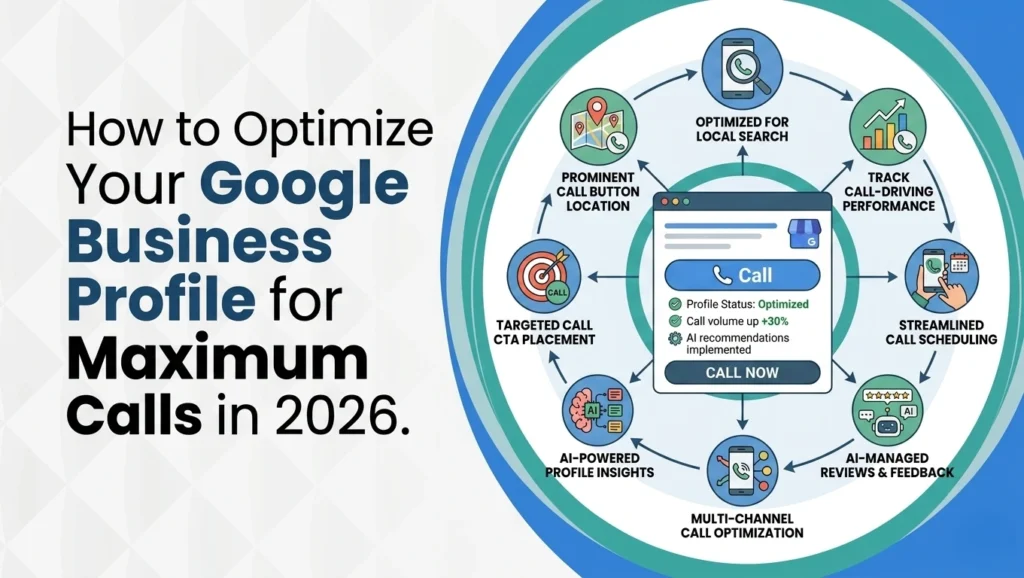
How to Optimize Your Google Business Profile for Maximum Calls in 2026
May 5, 2026
Picture two pizza shops on the same street. Same menu. Same prices. Both show up on Google Maps. One phone rings all day. The other sits quiet. What’s going on?
The answer has nothing to do with who ranks first. The shop pulling in calls has a Google Business Profile built to make people tap that Call button. The other one might rank just fine, but it loses the customer in the final three seconds before the call happens.
That’s what this guide unpacks. Not another checklist. A real playbook for Google Business Profile optimization in 2026, when Ask Maps hands out AI answers, Vision AI reads your photos, and listings that go quiet for a month start sinking fast. You’ll get the mobile friction test most owners skip, how reviews feed Google’s AI engines, and how to track calls so you know what actually works. For the website side, this breakdown shows how to build high-performing location pages that perfectly pair your GBP pairs with every step below.
Why Your Google Business Profile Gets Views But No Calls
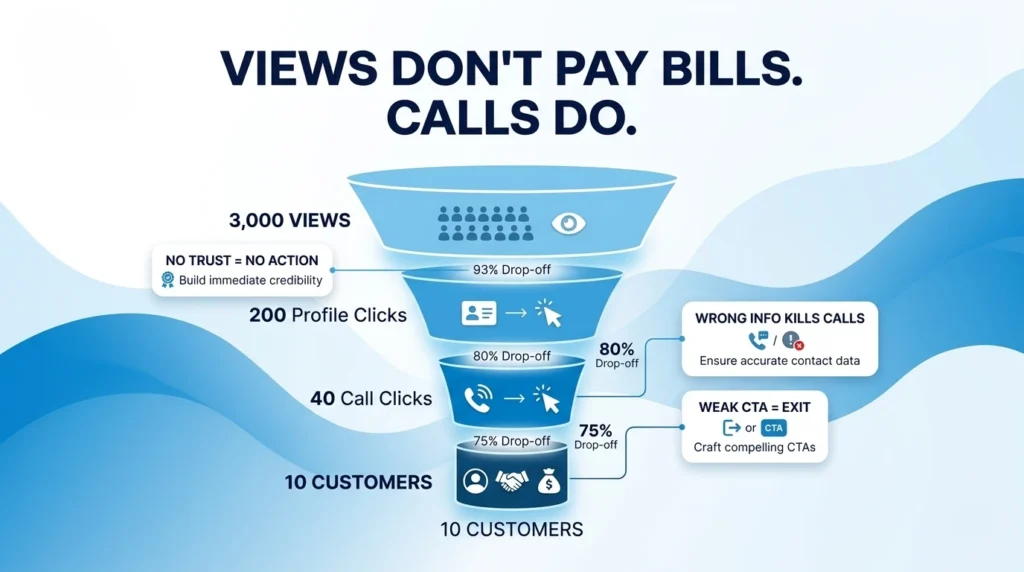
Most owners open their profile insights, see 3,000 monthly views, and feel great. The phone still doesn’t ring. Views don’t pay bills. Calls do.
Search visibility and phone calls are two separate outcomes. Someone seeing your listing is step one. Picking up their phone is step ten. A lot of things can break between those steps — wrong number, closed hours showing, zero photos, a bland description that makes them scroll right past.
If your profile ranks well on Google Maps but nobody calls, ranking is not the issue. The issue is friction, clarity, or trust. Sometimes all three.
Think of it this way. Your Google Business Profile is not a billboard. It’s a sales page. Every sales page has one job — move the reader toward one action. For local businesses, that action is a phone call. The rest of this guide treats your profile like what it really is: a conversion tool.
Shift From Ranking Chasing to GBP Call Engineering
Most advice online teaches you how to rank higher. Pick this category, stuff that keyword, build more citations. But ranking higher with a broken profile just means more people see you and still don’t call.
Google Business Profile optimization in 2026 needs a new frame. Stop chasing ranking alone. Start engineering for calls. Every element on your profile is either pulling a call in or pushing one away.
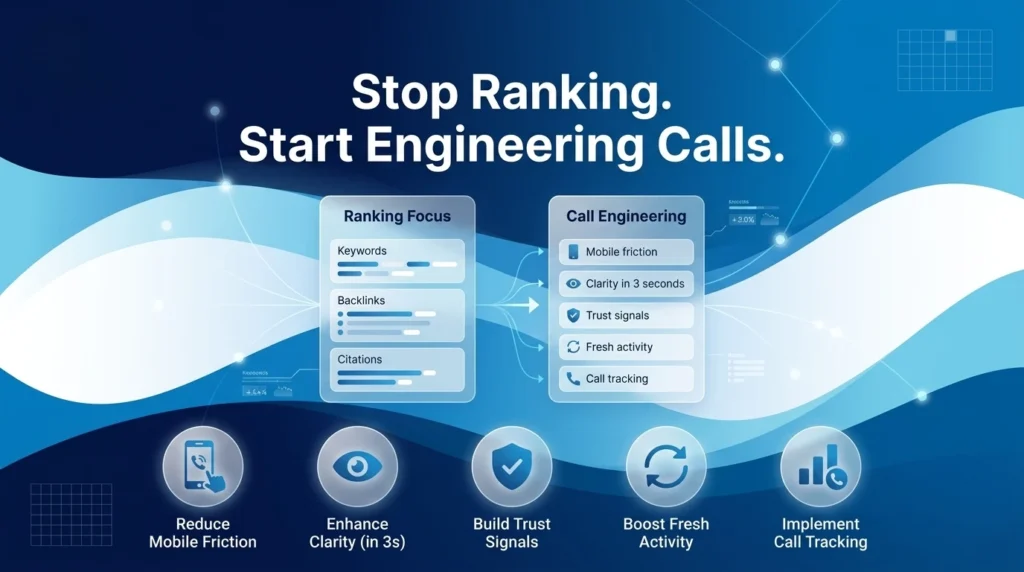
Five things decide whether someone calls:
- Mobile friction — how easy it is to tap Call
- Clarity — does your profile answer their question in three seconds
- Trust — photos, reviews, and consistency across the web
- Freshness — how active your profile looks right now
- Attribution — knowing which calls came from where
The rest of this playbook walks through each one. You don’t need to be a marketer. You need a phone, 30 minutes a week, and the willingness to stop guessing.
Key 2026 Shifts in Google Business Profile for Calls
A few big changes hit local search this year. Miss them, and you fall behind fast.
First, Ask Maps. Google replaced the old Questions & Answers box with a Gemini-powered conversational layer. Gemini reads your profile, your reviews, and your website to write its own answers for searchers. You don’t control the wording. You control the source material.
Second, Vision AI now reads your photos. It looks at what’s inside each image and tags your business for services based on what it sees. A picture of a tankless water heater can rank you for “water heater repair” even if those words appear nowhere in the text.
Third, chat and call-history features were shut down. The new customer path is simple — Call, Get Directions, Book.
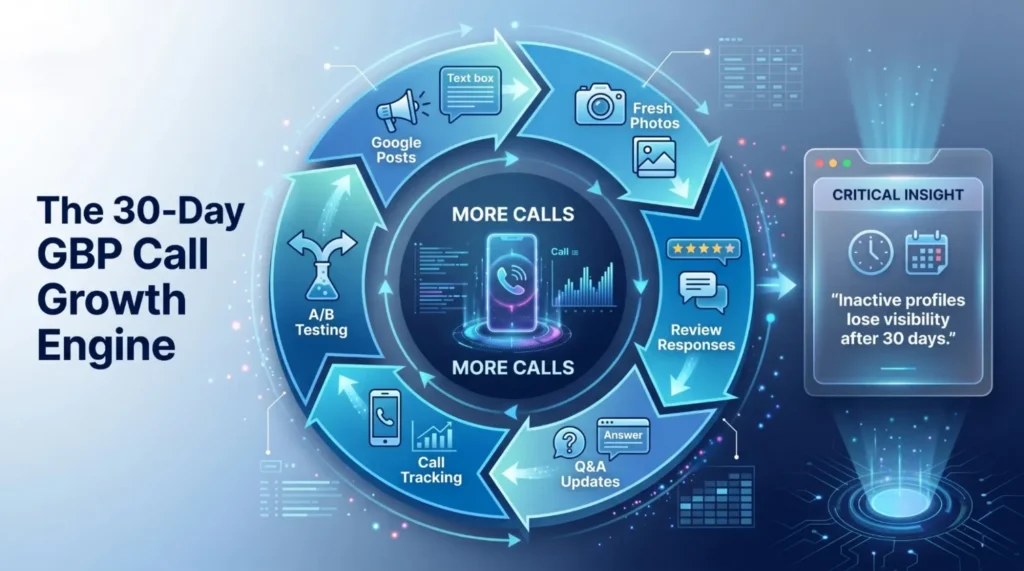
Fourth, Google now applies a decay rate. Profiles inactive for 30 or more days lose impressions. Google’s official local ranking guidelines still use Relevance, Distance, and Prominence as the model, but Prominence now tilts heavily toward recent activity.
Fix GBP Foundations, NAP, Categories, and Description
Before we talk about advanced call tricks, the basics need to be right. Skip this section if your foundation is already solid.
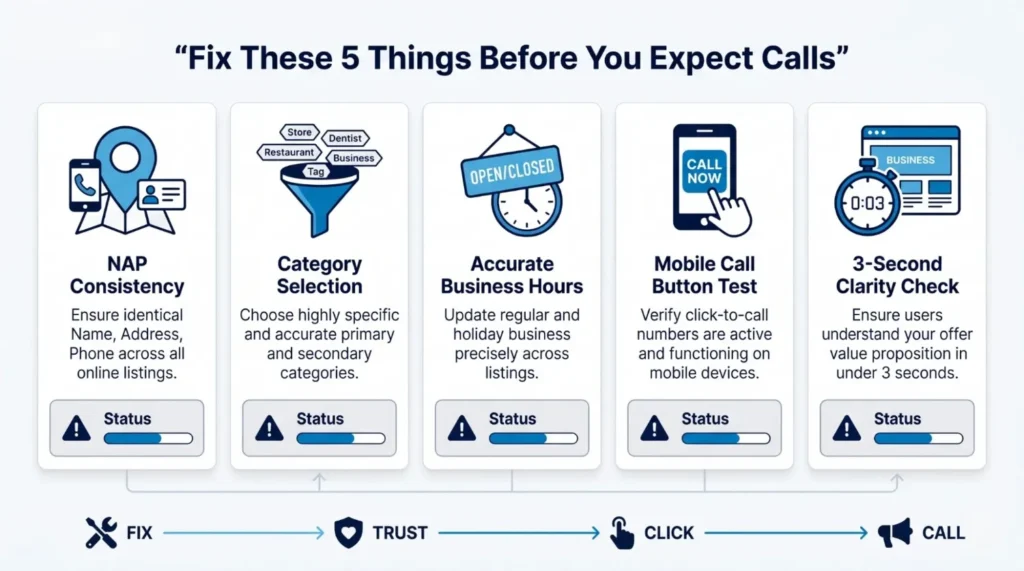
NAP stands for Name, Address, Phone. These three details must match everywhere — your website, GBP, Yelp, Yellow Pages, industry directories, any citation Google finds. One wrong digit in your phone number on one site can quietly suppress your Call button. Fix every listing you can find.
Your business name should be exactly what’s on your sign. No added keywords. No city tacked on. Google got stricter in 2026 about keyword stuffing in business names. Violators get suspended fast.
The primary category is the single most important ranking signal you control. Pick the one matching your main service. Add secondary categories for other services.
Write a 750-character description that talks to the customer, not the robot. Say what you do, who you help, and where you serve. No filler.
Service-area businesses should turn off the address display and list the actual cities served.
Run a Mobile Call Button Friction Audit on Your GBP
Here’s a test most owners have never run. Pull out your phone. Turn off Wi-Fi. Search your business name on Google. Count the taps to reach Call.
Two taps is the gold standard. You tap the listing, then tap Call. Three or more taps means something is broken. Maybe Call is hidden behind a “More” menu. Maybe your number isn’t set as primary. Maybe a weird attribute turned off the button.
Next, actually make the call during business hours. Does it ring? Does a real person answer? Plenty of businesses have dead forwarding numbers that haven’t worked in years. Every call going to voicemail is a lost customer.
Quick fix checklist:
- Confirm the number on your profile matches the line someone actually picks up
- Remove any secondary numbers confusing the routing
- Make sure Call shows on mobile, not buried under another menu
- Test from both Android and iPhone — both should behave the same
Fixing friction is the fastest way to add calls this week.
Business Hours, the Silent Google Profile Call Killer
Wrong business hours are one of the quietest call killers out there. When Google shows your listing as closed, the Call button turns grey. Nobody taps a grey button.
This hits hard for businesses that took a long weekend and forgot to update holiday hours. It hits harder for HVAC companies, plumbers, locksmiths, and law firms handling emergency calls after hours without any after-hours setting on their profile.
Fix it by going into your profile and setting regular hours, special hours for holidays, and the right time zone. If you work by appointment, use the “by appointment only” attribute so Google shows you as available even without set hours.
Add a monthly five-minute audit to your calendar. First of every month, check regular hours are still accurate, upcoming holidays are set correctly, any seasonal hours are updated, and emergency availability is clearly marked if it applies.
Seasonal businesses lose the most calls from hour drift. One wrong holiday setting in December can cost a shop its biggest revenue day. Do the audit.
How Ask Maps Replaces GBP Q&A in 2026 Local Search
Ask Maps changed everything about how customers find answers before calling. Gemini scans three sources to build its response — your business profile, your website content, and your customer reviews.
What does this mean for calls? The answer Gemini gives future customers is basically a script Google wrote using your own content. If your reviews say “Mike was on time and fixed my sink in 20 minutes,” Gemini might tell the next searcher exactly that. Good reviews become marketing. Thin or missing content becomes a missed call.
Build an FAQ page on your website. Write the questions customers actually ask before calling — pricing ranges, response times, service areas, licensing, warranty terms. Write clear answers in direct sentences. Skip marketing speak.
Add LocalBusiness schema markup to that page. Schema tells Gemini what each content block means. The official LocalBusiness structured data documentation from Google shows exactly what properties to include.
This single move turns your website into a quote machine Gemini pulls from. Your site feeds the AI. The AI feeds callers to your phone.
Seed GBP Q&A to Handle Pre-Call Customer Objections
Even with Ask Maps in charge, the manual Questions section on your profile still matters. It handles the stuff people want cleared up before they commit to calling.
Think about what every customer asks before picking up the phone. Pricing range. Service area. Licensing. Emergency availability. Payment methods accepted. You already know these because you answer them five times a day.
Now seed them yourself. Go to your profile as the business owner, post the question, post your answer. Write answers that push toward a call instead of a reply.
Bad answer: “Our rates vary by job.”
Better answer: “Most repairs run $150 to $400 depending on scope. Call us for a free 5-minute phone estimate.”
See the difference? The first leaves them hanging. The second gives a number and a next step.
Do this for 5 to 7 common questions. Once they’re up, customers stop calling just to ask. They call to book. That shift — from information-seekers to buyers — is where real call volume lives.
How Vision AI Reads Your GBP Photos for Rankings
In 2026, photos are no longer decorations. They’re ranking signals and call generators rolled into one.
Vision AI scans your photo gallery and tags your business based on what it sees. A landscaper posting a high-resolution shot of a paver patio install starts ranking for “paver installation” without adding that phrase anywhere. The photo did the work.
According to Google’s own published data on Business Profiles, listings with photos receive 42% more requests for driving directions and 35% more click-throughs to their websites than profiles without photos. Visuals matter more than most owners realize.
Here’s what actually converts:
- Action shots — your team performing the service on a real job site, not staged
- Before-and-after photos — the highest call-converting category by a wide margin
- Team photos — faces build trust; a shot of Mike and Jen in front of the truck beats ten shots of your building
- Sharp logo and a clean exterior photo — helps brand recognition in the map pack
Skip stock images. Skip blurry phone shots. Skip dark photos taken at dusk. Vision AI flags low-quality images and pushes those listings down when better options exist elsewhere.
Use Google Posts to Drive Calls, Dodge Spam Filters
Google Posts are one of the most underused call drivers. But there’s a catch most owners don’t know.
Put a phone number or URL in the body text of a post, and Google’s spam filter flags it as “phone stuffing” or “URL spam.” Your post gets auto-rejected or buried. All that effort for nothing.
The fix is simple. Never type numbers or links into captions. Use the built-in action buttons — Call Now, Learn More, Book. Those are safe. Those convert.
Post cadence matters too. One post every five to seven days beats daily spam. Always pair the post with a photo. Always end with a clear action button.
Weekly offers, or specials, pull the highest engagement. New services, customer wins, and seasonal reminders also work — furnace tune-ups in fall, AC service in spring. Offer-based posts generate roughly three times more direction requests and call clicks than generic “we are here” updates. If you only post one thing this week, make it an offer with a Call Now button.
Customer Reviews as AI Fuel, Not Just Social Proof
Reviews in 2026 do two jobs. They build social proof for humans AND they feed the AI that writes answers about your business.
When you respond to a review saying “Thanks Sarah, glad we fixed your AC in Brampton same-day,” that response becomes indexable content. Gemini pulls from it. Future searchers asking about AC repair in Brampton may get pieces of your response inside their AI answer.
That means your reviews and responses are now SEO copy.
Ask customers to mention the specific service and neighborhood in their reviews. Not scripted — a simple prompt like “Mind mentioning which service we did and your area?” works fine.
Respond to every review within 48 hours. Google now tracks response rate as a trust signal. A profile with 200 reviews and 20 responses looks suspicious. A profile with 50 reviews and 50 responses looks real.
According to BrightLocal’s 2024 Local Consumer Review Survey, 88% of consumers say they would use a business that responds to all of its reviews. Response rate is no longer optional.
Stay inside Google’s review policies. Never offer incentives. Never review-gate.
The Paradox of Perfect 5.0 Google Reviews in 2026
Here’s something nobody tells business owners. A perfect 5.0 rating can actually hurt your calls.
Google’s AI filter sees 100% positive reviews with zero critical ones as a red flag. It looks manipulated. Listings flagged this way can get soft-suppressed or fully suspended.
The real sweet spot is a 4.5 to 4.8 average with steady review volume and a few honest, lower-rated reviews mixed in. That pattern looks human, and humans trust it.
When a bad review lands, don’t panic. Respond publicly with calm professionalism. Explain what happened. Offer to make it right. Never get defensive. Future customers reading that thread often call because of how you handled it, not despite the bad review.
A strong response pattern acknowledges the issue specifically, apologizes if you were at fault, offers a clear next step, and keeps it short — long responses read as defensive.
Review generation should be slow and steady. Ten real reviews a month for six months beats fifty in one week, which trips the filter. Ask every happy customer, one at a time. That’s how the profiles at the top of the map pack got there.
Beat the 30 Day GBP Decay Rate With Weekly Activity
The 2026 decay rate is real. Profiles inactive for 30 or more days can see impressions drop by 30% or more. Calls follow impressions down.
The fix is a 15-minute weekly routine. That’s it. Fifteen minutes.
The checklist: post one Google Post (offer, tip, or update), upload 2 to 5 fresh photos from the past week, respond to any new reviews with intent, scan Q&A for new questions and answer them, and make one small profile edit — update a service, tweak the description.
The real reason this works isn’t just the algorithm. It’s the customer landing on your profile. They see recent photos, recent posts, recent review responses. They decide in three seconds that you’re active and real. Then they call.
Put the 15 minutes on your calendar. Same day every week. Monday morning works for most businesses. Treat it like paying a bill — non-negotiable.
Miss a month, spend the next two climbing back. Keep up with it, your profile compounds.
Align Your Website With GBP to Multiply Call Volume
Your website and your Google Business Profile talk to each other. When they agree, Google trusts you. When they disagree, Google quietly turns down your volume.
Alignment means your homepage clearly states your primary service. Every service area city has a dedicated page. Your NAP in the website footer matches your GBP exactly, character for character. A Google Map is embedded on your contact page. Service descriptions on your website match the services on your GBP.
This is where your website carries the weight Gemini needs to confidently recommend you. Thin sites with one generic “Services” page give Gemini nothing to work with. Sites with real location pages and detailed service content give Gemini plenty to pull callers in with.
If you want the website side walked out step by step, this guide on how to build high-performing location pages that reinforce your GBP fits cleanly with everything covered here.
Alignment isn’t glamorous. It’s just doing the boring work everyone else skips. That’s why it works.
Track GBP Calls Using a Dedicated Phone Number Setup
Most business owners have no idea how many calls come from their Google Business Profile versus their website versus their ads. Without tracking, you’re guessing.
The fix is a tracking phone number. Get a second number, different from your main line, and place it only on your Google Business Profile. Every call to that number came from your profile. Clean data you can actually use.
Services like CallRail, CallTrackingMetrics, and WhatConverts handle this for under $50 a month. Calls forward to your main line so customers never notice a difference.
Metrics worth pulling every month:
- GBP-sourced calls vs website-sourced vs ad-sourced
- Call-to-booking conversion rate — your actual lead number
- Missed-call rate during business hours
That last one is a silent killer. Some businesses miss 30% of their calls during open hours and have no clue. Every missed call is a customer who went to a competitor.
Tracking ties every tip in this guide back to dollars. You stop guessing which changes helped. You start knowing.
A/B Test Google Business Profile Elements for Calls
Stop guessing. Start testing. The beauty of GBP is you can change one thing, measure for a month, and know if it worked.
The framework is basic. Change one variable at a time, not five. Hold it for 2 to 4 weeks. Compare call volume before and after. Keep winners, roll back losers.
Good test candidates include a team photo versus a storefront shot as your cover image, a benefit-led description like “We fix AC issues in under 2 hours” versus a service-led one like “HVAC repair in Mississauga,” an offer-based Google Post versus an update-style post, and a primary category swap if you have a clear secondary option.
Don’t test during known slow seasons — the seasonal drop can mask results. Test during steady months when call volume patterns are predictable.
Track results in a simple spreadsheet. Date. Change made. Calls before. Calls after. After six tests, you’ll have a map of what actually drives calls for your specific business in your specific city. That knowledge compounds. Every test makes the next decision easier.
Your 30 Day Google Business Profile Call Audit Plan
Here’s a week-by-week plan any owner can run without hiring an agency.
Week 1 — Foundations: Audit your NAP across all major directories. Run the mobile friction test. Fix business hours including holidays. Claim any duplicate or unverified listings.
Week 2 — Visual and Alignment: Upload 15 to 20 fresh photos focused on action shots, before-and-afters, and team images. Refresh your logo if it’s pixelated. Align your website to match your GBP — homepage, location pages, NAP footer. Install LocalBusiness schema.
Week 3 — Activity and Trust: Seed 5 to 7 Q&A entries answering pre-call objections. Launch your review generation system. Start the weekly Google Posts schedule. Respond to every unanswered review on your profile.
Week 4 — Measurement: Set up call tracking with a dedicated number. Launch your first A/B test with one variable. Pull performance insights from the GBP dashboard. Set priorities for month two.
End-of-month target: a 25 to 40% lift in call volume from baseline. If you’re below that, go back to Week 1 — usually mobile friction or hours is the cause.
Common Google Business Profile Mistakes Killing Calls
A tight list of 2026-specific traps that quietly bleed calls, each with the fix baked in:
- Still trying to use chat or messaging features — they were permanently retired on July 31, 2024. Remove them from your process.
- Letting Google’s AI-drafted description run unedited — AI descriptions rank poorly because they’re generic. Rewrite it yourself.
- Keyword-stuffing your business name, like “Bob’s Plumbing Mississauga Emergency 24/7” — 2026 enforcement is aggressive. Use your legal name only.
- Ignoring pseudonymous reviews now that Google allows them — they still count, so still respond.
- Treating your profile as set-and-forget when the 30-day decay rate is live — post weekly or lose impressions.
- Inconsistent NAP across directories — even one wrong citation can suppress trust signals.
- Suppressing the Call button with outdated hours — grey buttons don’t ring phones.
- Using a landline that nobody answers after hours — for emergency services, this is a deal-breaker.
Each of these is fixable in under an hour. Going through the list alone recovers calls you didn’t know you were losing.
Build a Call-Generating Google Business Profile
Here’s the reframe this guide hammered home. Google Maps ranking isn’t the scoreboard. The phone is. Every tactic we covered — mobile friction fixes, Vision AI photos, Ask Maps prep, weekly activity, review responses, call tracking — ties back to one outcome. Someone taps the Call button and your phone rings.
2026’s Google Business Profile optimization rewards clarity, activity, trust, and alignment across Google Search, Google Maps, and AI-generated answers. The businesses pulling in 40 calls a week aren’t smarter. They just stopped guessing and started engineering.
If running all of this on top of actually running your business feels like too much, getting help is worth it. Specialists who handle local SEO full-time get there faster. And if you’re scaling a local business and need the financial side handled properly — tax planning, bookkeeping, business structure guidance – Local SEO Mississauga is a solid team to have in your corner while you pour the rest of your energy into customer-facing growth.
Start this week. Fifteen minutes. One post. Five photos. Every review answered. Keep going. By month two, your phone will tell you it was worth it.
FAQs
How do you fully optimize your Google Business Profile?
Full optimization in 2026 runs in four steps. First, lock in the foundations — verified listing, accurate NAP, correct primary category, 750-character description written for customers. Second, engineer for calls — mobile friction test, clean phone number, correct hours every month. Third, feed the AI — photos built for Vision AI, reviews structured for Ask Maps, LocalBusiness schema on your website. Fourth, stay active — weekly posts, fresh photos, every review answered. Do all four and your profile becomes a call engine instead of just another listing.
What is Google Business optimization?
Google Business Profile optimization means setting up and maintaining your profile so it delivers real business outcomes — specifically phone calls, direction requests, and bookings. It’s not about chasing the number one map spot. It’s about turning the people who find you into paying customers. Optimization covers everything from accurate NAP to job-site photos, review management, schema, and weekly activity.
How can I improve my Google Business Profile?
The three fastest moves: run the mobile friction audit and fix anything taking more than two taps to reach Call; refresh your photo gallery with 15 to 20 current, sharp, job-site images; and start asking every happy customer for a review the day after service. These three changes alone can lift call volume within 2 to 4 weeks.
What are common Google Business Profile mistakes?
The top five mistakes bleeding calls in 2026 — keyword-stuffing the business name (triggers suspension), inconsistent NAP across citations (drops trust), outdated business hours (greys out the Call button), still using the retired chat feature (invisible to customers now), and zero weekly activity (triggers the decay rate).
How do you get 4.9 on Google reviews?
Don’t chase a perfect 5.0 — it actually hurts you in 2026. Aim for 4.5 to 4.8 with steady monthly review growth. Ask every happy customer within 48 hours of service. Make it easy with a short link or QR code. Respond to every review within two days. Handle bad reviews publicly with calm professionalism. Steady beats spiky.
Search Here
More Categories
Latest Posts
June 18, 2026
Sanawar Ali
June 15, 2026
Sanawar Ali
June 11, 2026
Sanawar Ali
May 21, 2026
Sanawar Ali
May 19, 2026
Sanawar Ali