Technical SEO
· 8 min read
HTTP 401 Error: Meaning, Causes & Fixes
See what an HTTP 401 error means, how it differs from 403 and how users or developers can fix authentication problems. Check the steps now.
Read article
Use clear H1, H2 and H3 hierarchy to improve readability, topical structure and accessibility without keyword stuffing. Check the fixes.
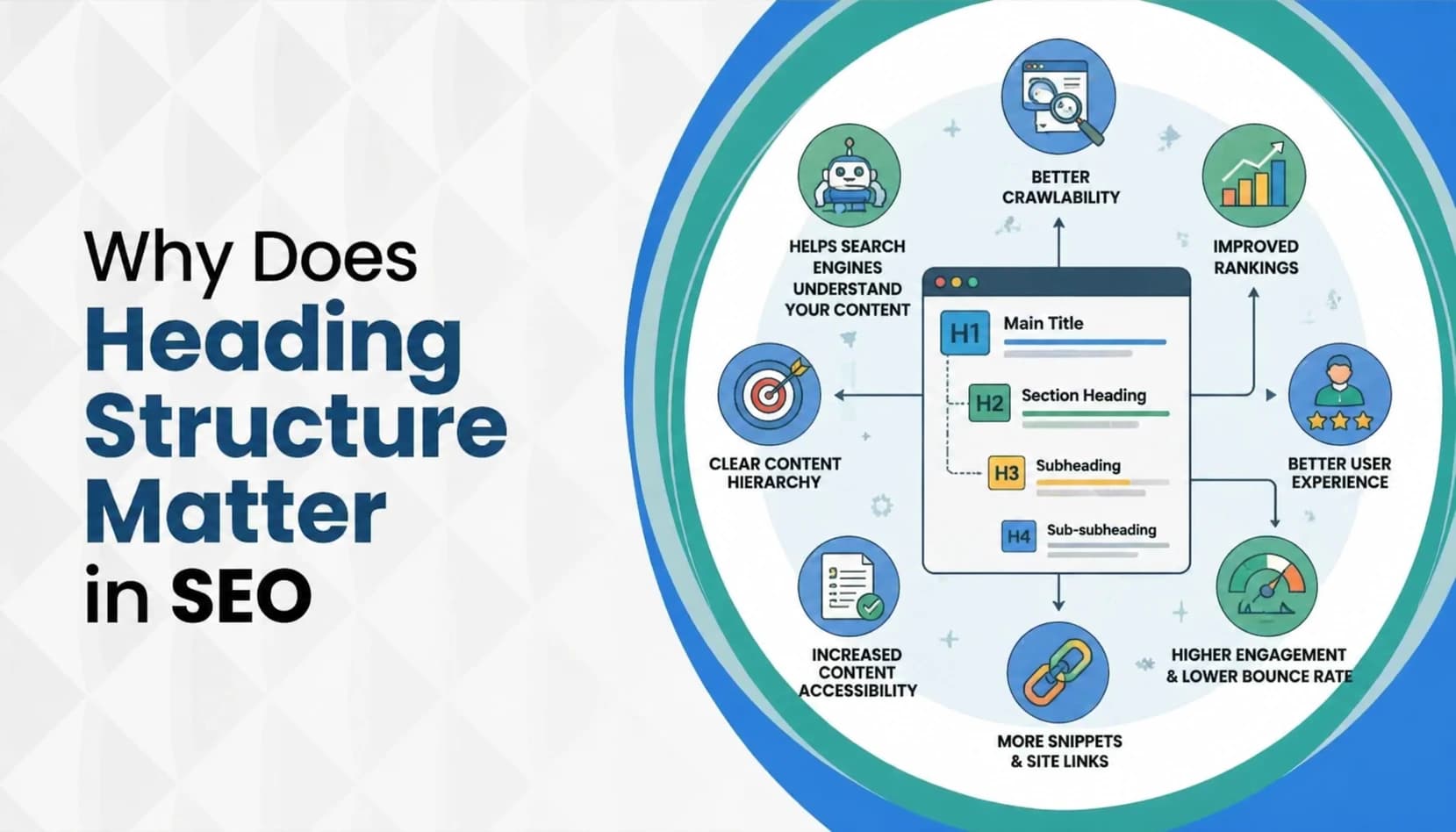
The wild part? Most people never check their headings. They pick a bold size that "looks nice" and move on. That one small habit is why strong content still ends up buried on page three, while weaker pages with cleaner structure sit at the top. This is where heading structure SEO does the quiet heavy lifting. Headings act like road signs for your page. They tell Google the topic, tell readers where to look, and tell assistive tools how to move around. This 2026 guide breaks it all down in plain words. What headings are, how Google reads them, how AI uses them now, and how to set them up so your pages become easier to read, easier to rank, and easier to trust.
HTML headings are the titles and subtitles marked inside your code using tags called H1 through H6. They look like <h1>, <h2>, <h3> and so on. The H1 is the biggest, most important heading on the page. H2 comes next. H3 sits below H2. Each level goes smaller and more specific.
The mistake most beginners make is treating headings as design. They pick an H2 because the text looks nice and bold, not because it is actually a section title. That breaks the whole system. Headings are structural markers, not styling tools. If you want big bold text for a design reason, use CSS. If you want to label a new section of content, use a heading tag.
Think of headings as the table of contents for your page. The H1 is the book title. H2s are the chapter names. H3s are the subsections inside each chapter. When this order is clean, Google, readers, and AI tools all understand your page in seconds. When it is messy, they all get lost in the same moment.
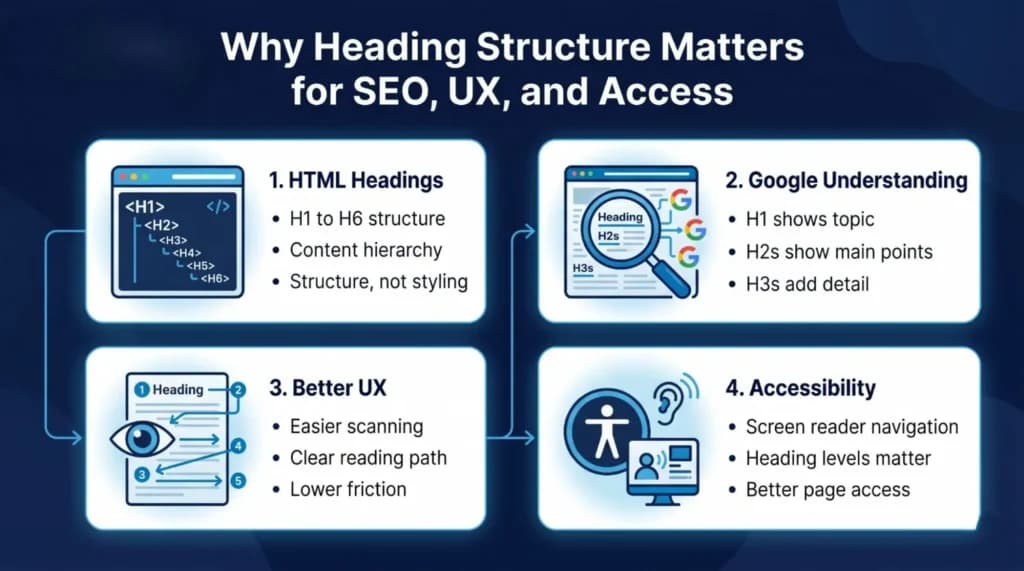
Google does not read your page the way you do. It scans the code first, picks up the structure, and uses headings as strong clues about the topic. Your H1 gives the main subject. Your H2s tell Google the main points that support that subject. Your H3s add detail to each H2.
This is why your H1 should clearly match the page topic. If your page is about "canonical tags" but your H1 says "Welcome to Our Blog," Google loses the most direct signal it has. Header tags and subheadings give extra context, but they all flow from that one top heading.
According to Google Search Essentials, using the words people actually search for in prominent spots like the main heading helps both users and search engines understand the page. The key word here is "natural." Stuffed headings filled with keywords no longer help. A clear heading that uses real language is what wins in 2026.
So every heading on your page has a small job. Tell Google the topic. Tell the reader what is coming next. Do both without sounding forced. When you hit that balance, your page starts showing up for searches you may not have even planned for.
Here is a truth most people miss. Readers do not read. They scan. Studies on web reading habits have shown this for years. Your visitor lands on the page, sweeps their eyes down the headings, and decides in three seconds whether to stay or leave.
A strong content hierarchy answers that scan instantly. The H1 tells them they are in the right place. The H2s promise specific answers. The H3s break those answers into smaller chunks they can jump into. No guessing. No digging. Just clear direction from the top of the page to the bottom.
This also helps your bounce rate. When a reader can find what they want in a few seconds, they stay. When they have to hunt through giant blocks of text with no signs to guide them, they leave. Google notices this behavior. Short stays and quick exits quietly tell search engines your page did not match the search, even when your content was actually good.
Better hierarchy is not fancy. It is just a page that reads like a well-organized list of answers. That is what keeps readers on your page and what pushes your rankings up over time.
Headings are not only for sighted readers and search bots. They are also how blind and low-vision users move around your page. Screen readers announce each heading and its level out loud, letting users jump from section to section with a single keystroke.
This is a huge deal. According to the WebAIM Screen Reader User Survey #10, 71.6% of screen reader users navigate web pages by headings, making it the most common method of finding information on a page. That same survey found 88.8% rate heading levels as useful. If your H1 is missing, if you skip from H2 straight to H4, or if your headings are just vague like "More Info," you lock these users out of your content.
Weak heading structure is not only an SEO problem. It is an access problem. It tells assistive tools that your page has no real organization, which means users cannot jump through it the way they need to. Fixing this helps real people, widens your audience, and also happens to be exactly what search engines reward.
In 2026, Google is not the only engine reading your page. AI answer tools, chat search, and summary features all pull content from websites to build their responses. They depend on clean structure even more than traditional search does.
When AI tools read your page, they look for heading-level signals to find the exact section that answers the user's question. If your H2 clearly says, "How to Fix a Leaky Tap," the AI grabs that section as the answer. If your H2 says something vague like "The Problem," the AI moves on to a competitor whose headings actually match the question.
This is why heading clarity now matters for visibility outside the normal blue links. Your page might get pulled into an AI answer, a featured snippet, or a voice assistant reply just because its heading was the cleanest match. Sites with vague or missing headings keep losing this free visibility without knowing why.
Short, direct, question-friendly headings are the new currency. Not keyword soup. Not clever wordplay. Just clear section titles that tell both humans and machines exactly what is inside.
Search intent is not just a page-level idea anymore. Every H2 on your page should answer a real question or meet a real need. This is one of the biggest mindset shifts that pushes average pages into top rankings.
Ask yourself two questions before you write any heading:
If your H2 is "Benefits," that is too broad. It does not match what anyone actually searches. But if your H2 is "Why Small Businesses Need a Clean Heading Structure," that is specific, it answers a real question, and it naturally includes related terms that Google already connects with your main topic.
This approach strengthens your keyword work without feeling forced. You are not stuffing keywords. You are writing headings that match how real people ask real questions. That is how long-tail traffic starts rolling in, page by page, section by section, without extra effort.
Here is a simple working model any writer or editor can apply today:
The rule is simple. Levels should nest logically. Never jump from H2 straight to H4. Never drop H3s inside H1s without H2s in between. A clean heading hierarchy SEO setup reads like a neat outline, not a random stack of bold text.
If you can read only your headings and still understand the full flow of your article, your structure is strong. If reading the headings leaves you confused, your readers will be confused too.
Most heading issues are not dramatic. They are small and repeated, and they pile up over time. These are the ones to watch:
Vague headings: "Introduction," "More Info," "Overview." These tell readers and Google nothing. Replace them with specific titles that describe what is actually in the section.
Multiple H1s: While Google says modern sites can handle more than one H1, most CMS themes still work better with a single clear H1. It keeps your topic focus sharp.
Skipped heading levels: Jumping from H2 to H4 skips H3 entirely. This breaks the outline for screen readers and confuses AI parsers.
Keyword stuffing: Packing the same phrase into every heading feels spammy. It hurts readability and now hurts rankings too. One natural keyword use per heading is plenty.
Headings used only for design. Using an H3 just because the font looks right is one of the most common mistakes. Always use paragraph styling or CSS for visual needs, never heading tags.
Each of these alone looks small. Together they quietly drop your pages down the rankings, month after month, while you are busy looking for bigger fixes that do not exist.
Semantic HTML simply means using tags that describe what the content actually is, not just how it looks. A heading tag says "this is a heading." A paragraph tag says "this is body text." A list tag says "these items belong together."
Search engines do not care about how big or bold your text looks on screen. They read the tags under the hood. If your "heading" is actually a paragraph with bold styling, Google sees a paragraph. If your "paragraph" is wrapped in an H3 because someone liked the font size, Google sees a heading where there is no real section.
This is the difference between meaning and appearance. The page that scores high on rankings is the one where the visual design and the HTML meaning match perfectly. Your H1 looks like a title and is marked as one. Your H2s look like section titles and are marked as H2s. Your paragraphs look like paragraphs and are tagged as such.
The W3C Web Accessibility Initiative guide on headings in page structure explains this clearly. Headings communicate the organization of the page content and allow assistive technology to jump directly between sections. Without proper tags, that structure disappears, even if the page looks perfect on screen.
Auditing headings is not hard. You just need a habit. Every time you publish or refresh a page, run through this quick check:
You can run this check manually for small sites. For larger sites, tools like Screaming Frog, Sitebulb, or Ahrefs Site Audit crawl every page and flag heading errors in one sweep. Run it monthly. Catch issues before they quietly drag your rankings down over time.
A 15-minute heading audit once a month does more for your SEO than most people realize. It is one of the cheapest, fastest, highest-return habits in the entire website optimization playbook.
Different page types need slightly different heading flows. Here is how to think about it:
Blog posts: Use a clear H1 matching the post title. Follow with H2s for each main idea or step. Add H3s inside longer H2 sections for examples, steps, or sub-points.
Service pages: Use an H1 that names the service and location if local SEO matters. Follow with H2s for benefits, process, pricing, and proof. Add one H2 for FAQs near the bottom. Keep H3s light and only where needed.
Landing pages: Use a single sharp H1 that matches the ad or search that brought the user. Follow with short H2s that guide the reader toward the call to action. Keep the hierarchy tight, because landing pages should not feel like long articles.
The framework stays the same across all three. One H1, clean H2s, helpful H3s, logical flow. Only the focus of each section changes. Once you learn to apply it, you can set up any new page in minutes with confidence.
Pull all of this together and the pattern becomes obvious. Headings are not small details. They are the framework holding your page up. They tell Google the topic. They tell readers where to look. They tell AI tools where to pull answers. They tell assistive tech how to move around the page.
When headings are sharp, every other piece of SEO works better. Your internal links make more sense. Your keyword placement feels natural. Your readers stay longer. Your bounce rate drops. Your AI visibility grows. None of this happens when your page is a wall of text with random bold lines pretending to be headings.
The sites climbing in 2026 are not the ones publishing more content. They are the ones publishing cleaner content with structure that actually helps people read and search engines index. Heading structure SEO is where that cleaner output starts.
Strong headings are not a bonus feature. They are the base layer of every page that ranks, reads well, and stays useful over time. They support meaning. They support scanning. They support access. They support search and AI visibility. One small layer is doing a lot of quiet work.
The takeaway is simple. Give every page one clear H1. Give every section an H2 that answers a real question. Add H3s only when they add clarity. Skip the keyword stuffing, skip the vague labels, and never skip heading levels. Cleaner headings lead to cleaner pages. Cleaner pages lead to better rankings. And better rankings come from one small habit repeated across every page you publish.
A heading structure is the order and hierarchy of titles and subtitles on a web page, marked using HTML tags from H1 through H6. It works like the outline of a book, with the H1 as the main topic and each level below it adding more detail. A clean heading structure helps readers scan the page, search engines understand the content, and assistive tools move through sections smoothly.
H1, H2, and H3 are HTML heading tags that show the importance and level of each section on a page. The H1 states the main topic. H2s break the topic into main sections. H3s divide H2 sections into smaller parts. Together they form the backbone of on-page SEO by giving Google, readers, and AI tools clear topic signals in the right order.
Use heading 1 once per page for the main title. Use heading 2 for each main section that covers a separate idea or question. Use heading 3 inside an H2 when the section has smaller parts, such as steps, examples, or grouped points. Never skip levels, and never use headings just to make text look bold or bigger.
Neither is better on its own. They do different jobs. H2s carry the main section weight and signal the main supporting topics of your page. H3s add depth and clarity inside H2 sections. A page with strong H2s and well-placed H3s always outperforms a page that uses only one type or mixes them randomly.
A good heading structure has one clear H1 that matches the page topic, H2s that each answer a specific question or cover one main point, and H3s only where they add clarity. It avoids skipped levels, vague labels, keyword stuffing, and design-only uses. If reading just the headings gives a clear summary of the whole page, the structure is doing its job.
Get a free SEO audit and a clear, prioritized plan for your Mississauga business — no long-term contract required.
Get a Free SEO Audit· 8 min read
See what an HTTP 401 error means, how it differs from 403 and how users or developers can fix authentication problems. Check the steps now.
Read article· 11 min read
Improve brand mentions in ChatGPT, Gemini and AI Overviews with stronger entities, citations and answer-ready content. Use the 2026 checklist.
Read article· 14 min read
Build a keyword plan around search intent, competition and business value, then map terms to the right pages. Follow the step-by-step process.
Read article