Technical SEO
· 8 min read
HTTP 401 Error: Meaning, Causes & Fixes
See what an HTTP 401 error means, how it differs from 403 and how users or developers can fix authentication problems. Check the steps now.
Read article
Choose the right Google Business Profile categories: one specific primary category, real secondary ones, and website support. Book a free audit.
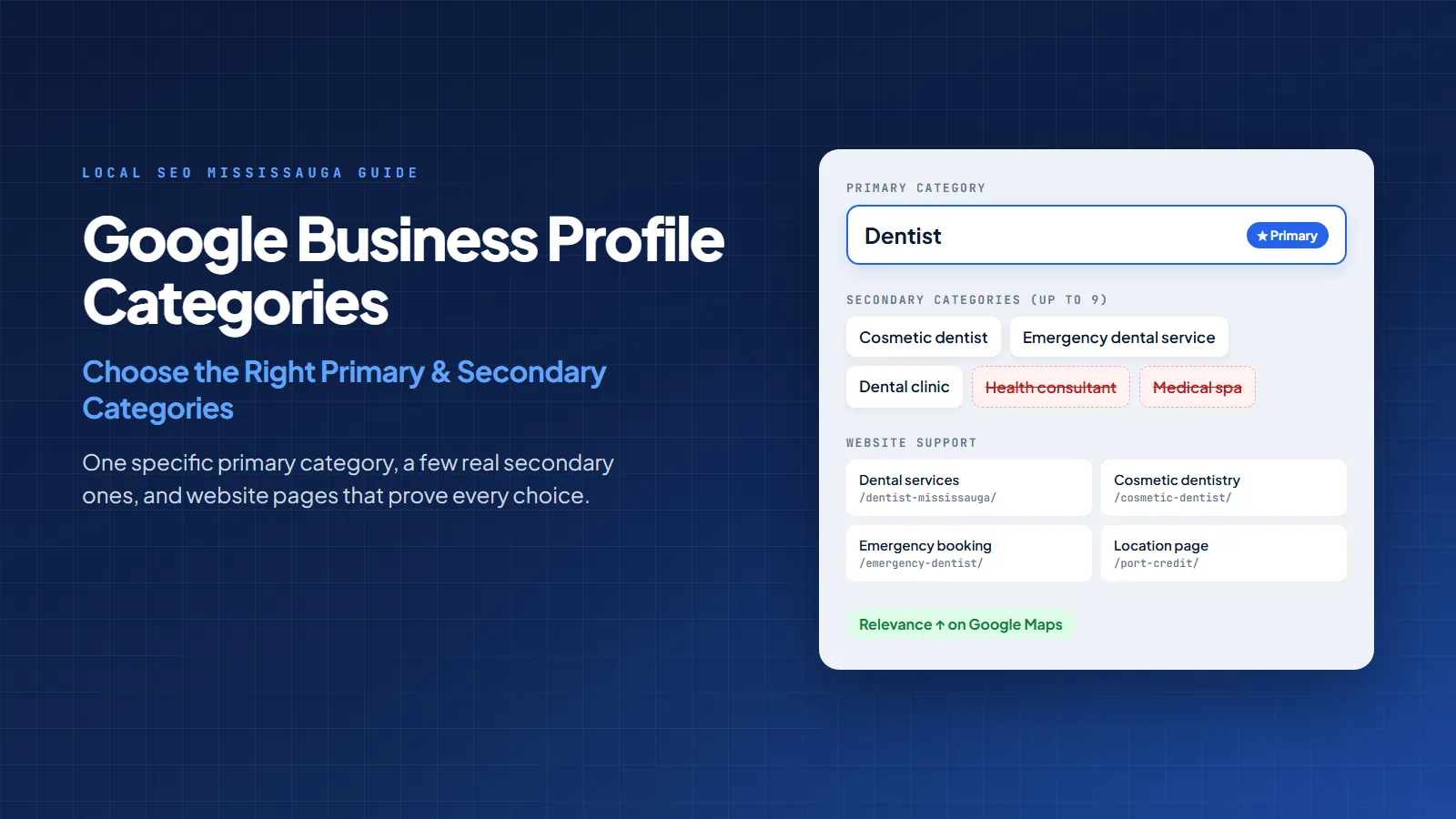
Google Business Profile categories tell Google what your business is, who you serve, and which local searches your profile should be considered for. Choose the right primary category and you help Google connect your profile with the right people.
Choose the wrong one and your business can look like a sushi restaurant wearing a plumber’s hard hat. Technically present. Spiritually confusing.
For business owners, this matters because Google Maps is not just a map. It is often the first buying screen. A customer searches “dentist near me,” “SEO agency Mississauga,” “emergency plumber,” or “tax accountant,” then decides who to call from the map results before visiting three websites. Google says local results are mainly based on relevance, distance, and prominence. Categories sit inside that first factor: relevance.
In Canada, Google still dominates search. StatCounter reported Google at 85.66% of Canada’s search engine market in August 2026. That means your Google business category is not a tiny admin field. It is one of the first labels Google and customers use to understand your business.
If your profile is underperforming, Local SEO Mississauga can review your categories, services, website signals, citations, and map visibility through a local SEO audit in Mississauga.
A business category is the official label you choose inside your Google Business Profile to describe what your business does. Google used to call this system Google My Business, so people still search for GMB categories, Google My Business categories, and Google business categories. They all point to the same thing today: Google Business Profile categories.
Google explains that categories help connect your business with customers searching for your products or services. It also says the categories you select affect local ranking. In simple words, your category helps Google answer this question:
Is this business a good match for the thing this person just searched?
For example, if you run a dental clinic, your primary category should not be “Health consultant” just because it sounds professional. If your real business is a dental clinic, use the closest specific category Google offers. Google’s business guidelines recommend choosing a specific category from the list that appears, such as “Nail salon” instead of the broader “Salon.”
Your primary category is the main category in the first category field. It is the strongest category signal on your profile because it defines the core business. Google’s editing guidance says the first category field becomes the primary category, and businesses can select up to nine more categories.
Here is the human version: your primary category is your opening sentence. Secondary categories are supporting details. If the opening sentence is wrong, the rest of the profile has to work harder to explain what should have been obvious.
This is why category work belongs inside a complete local SEO strategy, not as a five-second setup task after someone makes a logo.
| Category type | What it means | How to use it |
|---|---|---|
| Primary category | The main business type Google should associate with your profile. | Choose the most accurate, specific category for your core money-making service. |
| Secondary categories | Additional relevant categories that describe real departments or important services. | Add only categories that genuinely apply to the business. Do not use every possible related word. |
Think of it like a restaurant menu. The primary category is the restaurant type. Secondary categories are the menu sections. If you open an Italian restaurant, “Italian restaurant” is the identity. “Pizza,” “Pasta,” and “Catering” may support it, but they should not misrepresent the actual business.
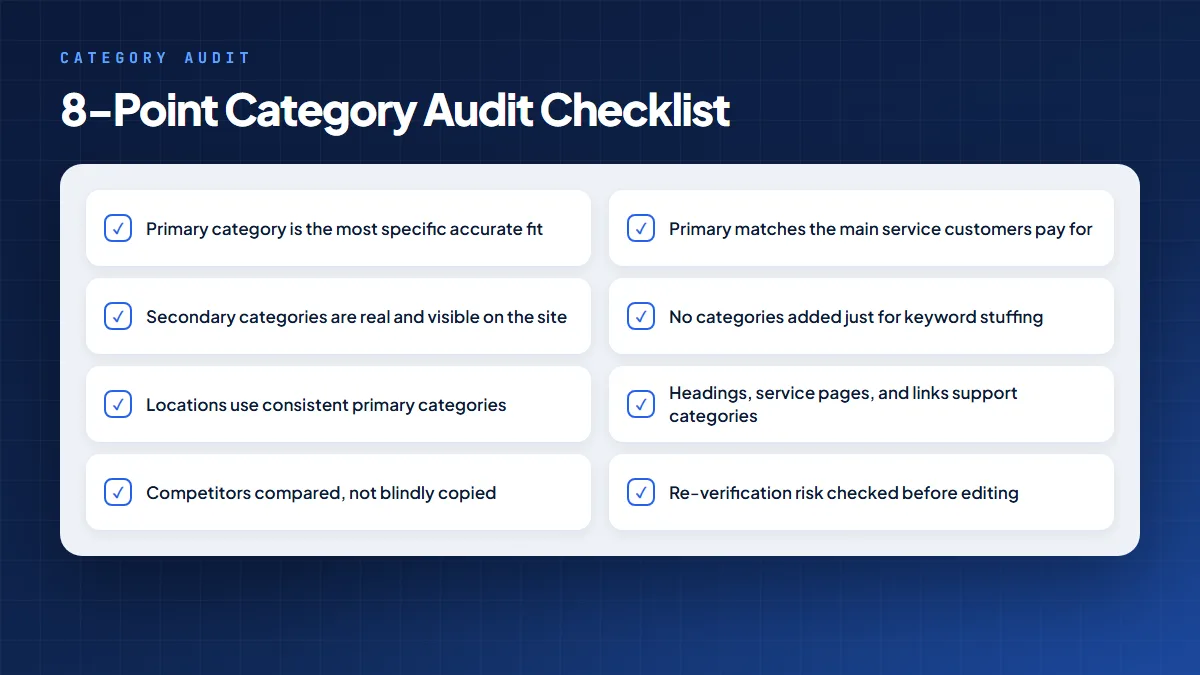
Use this five-step method before changing anything. It is simple enough for a business owner and structured enough for an SEO team.
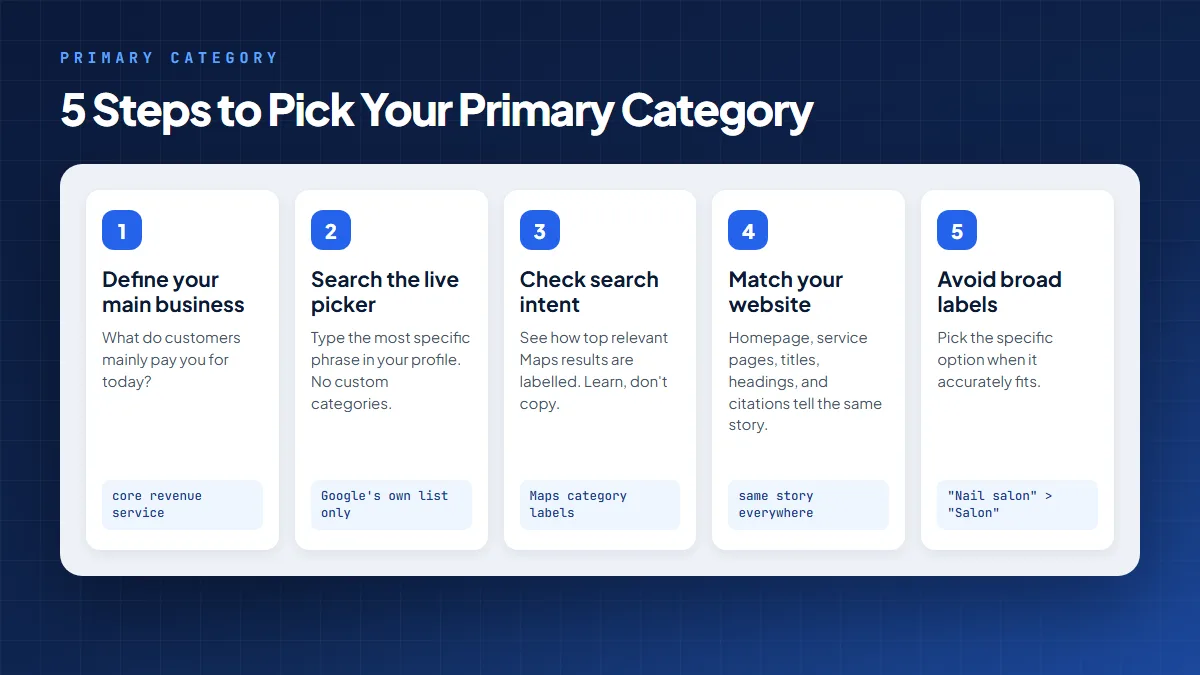
For Mississauga businesses, this should be aligned with the website too. A complete local SEO plan for small businesses should connect your Business Profile, service pages, reviews, citations, and local content.
Secondary categories help Google understand other important parts of your business. But they are not a keyword bucket. Google says you should not select a category for every product or service. Use a few categories that describe the business from the provided list.
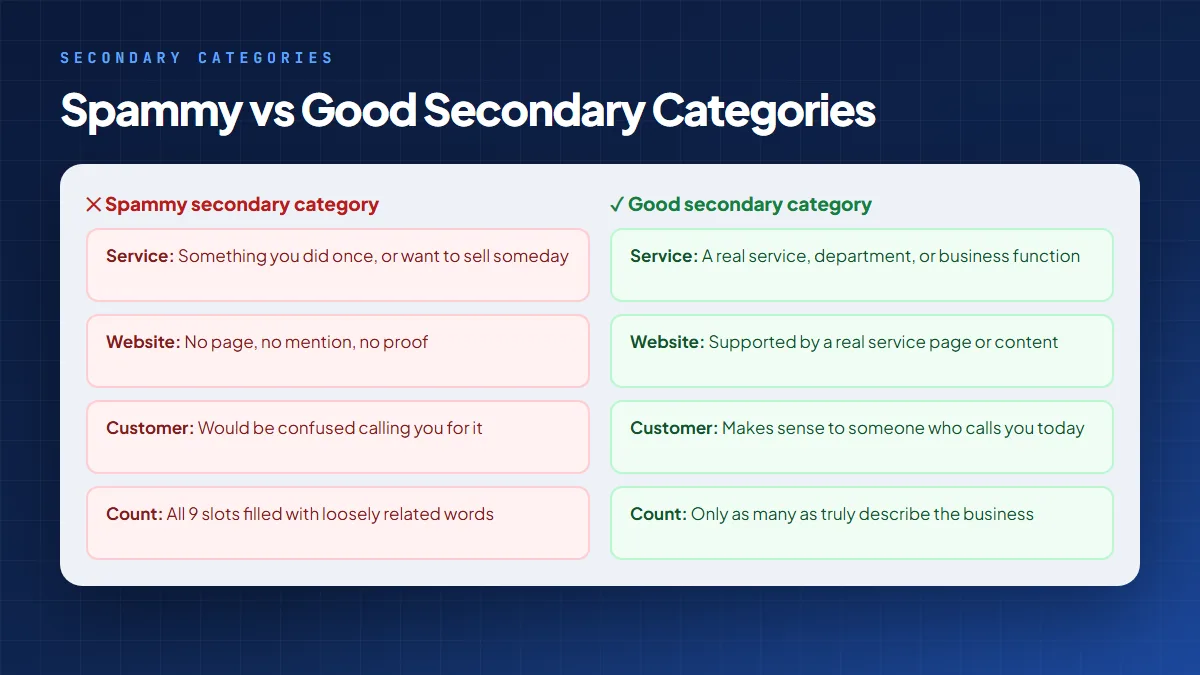
Bad secondary categories usually fail one of these tests. For example, a contractor should not add every construction-related category in the universe. If Google sees a roofer, flooring company, kitchen remodeler, painter, landscaper, and concrete contractor all hiding inside one tiny office with one phone number, it may look less like a real business and more like a local SEO piñata.
If you serve more than one city or location, category consistency becomes even more important. Read the Local SEO Mississauga guide on SEO for multi-location businesses before creating separate profiles or location pages.
Many people search for a Google Business Profile categories list 2026, Google business categories list, Google My Business categories list, or list of GBP categories. The important point is this: do not rely on a random static PDF from three years ago as your only source.
Google categories can vary by country, language, and availability. Google’s Business Profile API categories endpoint retrieves categories based on region and language, and search matches the front of a category name. The most reliable places to confirm a category are:
That is the gap most basic category blogs miss. The question is not only “What is on the list?” The better question is “Which category is available in my market and best matches the way customers search for my real business?”
The examples below are not final recommendations for every business. They show how to think. Your exact category should be checked in the live Google Business Profile category picker.
| Business type | Possible primary category | Possible secondary categories | Category logic |
|---|---|---|---|
| Dental clinic | Dentist | Cosmetic dentist, Dental clinic, Emergency dental service | Start with the main clinical identity. Add services only if they are real and important. |
| Law firm | Law firm | Family law attorney, Immigration attorney, Personal injury attorney | Use secondary legal categories for real practice areas, not every law term. |
| Restaurant | Restaurant or cuisine-specific category | Caterer, Takeout restaurant, Delivery restaurant | Cuisine or restaurant type should lead. Add service formats when accurate. |
| Home renovation company | General contractor or Remodeler | Kitchen remodeler, Bathroom remodeler | Match the biggest revenue service and support it with service pages. |
| SEO agency | Internet marketing service or Marketing agency | Marketing consultant, Website designer | Use categories that match real services and customer search intent. |
For broader visibility issues, a detailed SEO audit can check whether your categories match your services, pages, citations, internal links, and competitors. If your profile is missing from Maps entirely, start with our guide to a business not showing up on Google Maps.
Here is the new piece most category guides skip: every important category should have website support.
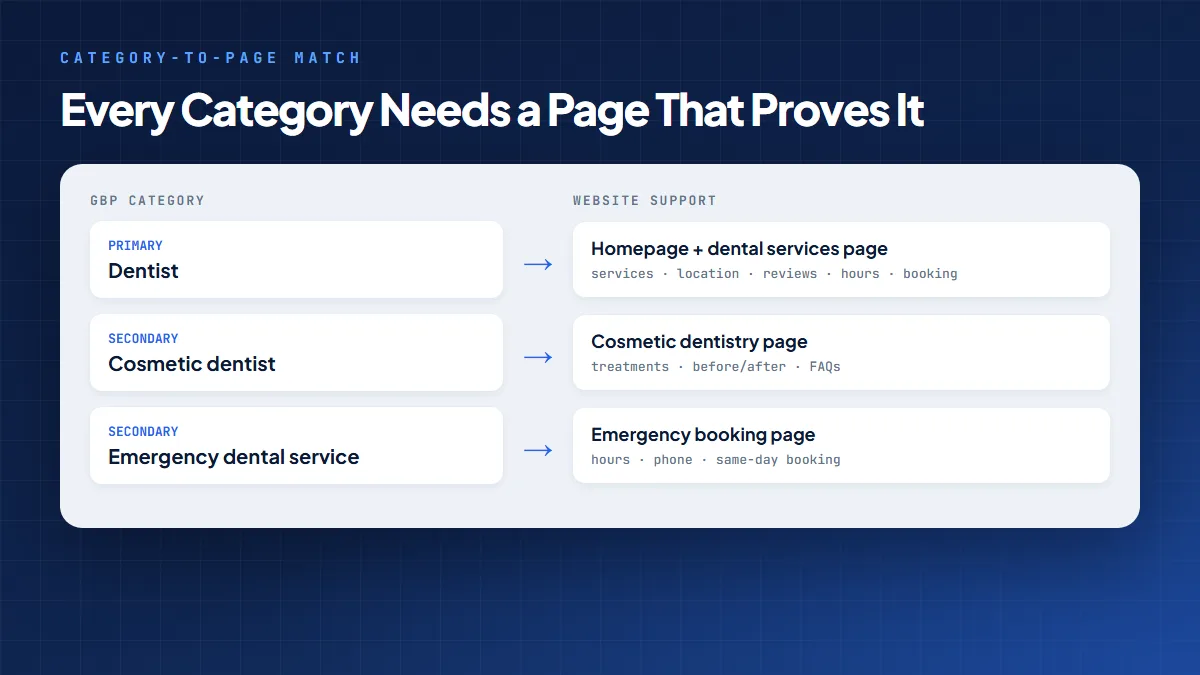
If your primary category is “Dentist,” your homepage and main service pages should clearly explain dental services, location, reviews, hours, and booking options. If you add “Cosmetic dentist” as a secondary category, you should have a strong cosmetic dentistry page. If you add “Emergency dental service,” users should find emergency booking information, hours, and phone details quickly.
This does two things:
For service-area or city expansion, pair your categories with clear location pages, local proof, and internal links. Do not expect one category change to carry the whole campaign like a tired intern with twelve coffee orders.
Change your category when there is a real business reason, not because one ranking report looked weird.
Before changing, record your current category, target keywords, Maps ranking grid, calls, direction requests, and website clicks. Then review results over several weeks. Local SEO is not instant noodles. Give the data time to cook.
Need help checking this properly? Local SEO Mississauga builds Google Business Profile, service page, citation, review, and authority signals into one local ranking system. Start with a free SEO audit or speak with an SEO consultant in Mississauga. For the rest of your profile, see our guide on how to optimize your Google Business Profile.
They are official labels inside your Business Profile that tell Google and customers what kind of business you run. They help your profile match relevant searches on Google Search and Maps.
A business category means the type of business you are. On Google, it is selected from a fixed list. You cannot write a custom category.
The primary category is the main business type. Secondary categories describe additional relevant services, departments, or business functions.
Google guidance says you can choose one primary category and up to nine more categories. Use only categories that genuinely apply.
Yes. Google states that selected categories affect local ranking. They support relevance, one of Google’s main local ranking factors.
Not automatically. Use enough categories to describe the real business, but do not add unrelated or weak categories just because slots are available.
No. Google says you must select a category from the list that shows up. If your exact category is not available, choose the closest general category.
The safest source is the live category picker inside Google Business Profile. Developers can also check categories through Google’s Business Profile API, which returns categories based on region and language.
Yes. GMB categories and Google My Business categories are older names people still use. The current product name is Google Business Profile.
It can affect visibility because the category changes how Google understands relevance. Google also says category edits may trigger re-verification. Change categories carefully and track results.
The right Google Business Profile category does not magically rank a weak business overnight. But it does give Google a clearer starting point. Your primary category should tell the truth quickly. Your secondary categories should support the truth. Your website, reviews, citations, and local links should prove the truth.
Disclaimer: The information provided in this blog is for general informational purposes only. For professional assistance and advice, please contact experts.
Written by
Umer Kureshi
Certified SEO Specialist, University of California
Umer Kureshi is a Certified SEO Specialist through the University of California. He writes about SEO, search behavior, and how businesses can stay visible as search itself keeps changing, from classic rankings to AI-generated answers.
Get a free SEO audit and a clear, prioritized plan for your Mississauga business — no long-term contract required.
Get a Free SEO Audit· 8 min read
See what an HTTP 401 error means, how it differs from 403 and how users or developers can fix authentication problems. Check the steps now.
Read article· 11 min read
Improve brand mentions in ChatGPT, Gemini and AI Overviews with stronger entities, citations and answer-ready content. Use the 2026 checklist.
Read article· 14 min read
Build a keyword plan around search intent, competition and business value, then map terms to the right pages. Follow the step-by-step process.
Read article