Technical SEO
· 8 min read
HTTP 401 Error: Meaning, Causes & Fixes
See what an HTTP 401 error means, how it differs from 403 and how users or developers can fix authentication problems. Check the steps now.
Read article
Missing from Google Maps or stuck below competitors? Find the cause fast: verification, suspension, categories, duplicates, reviews, or your website.
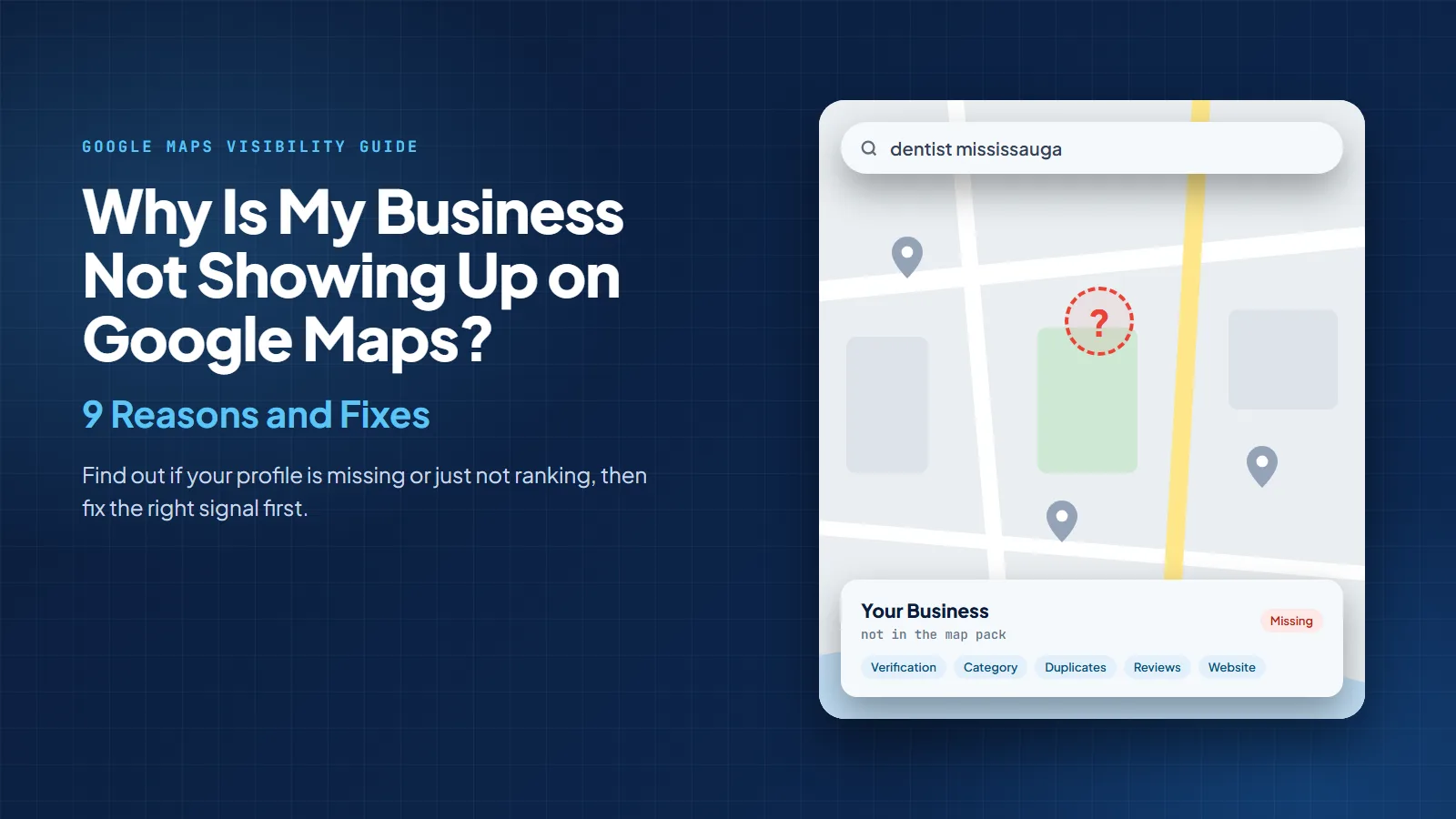
Your business is usually not showing up on Google Maps because of one of three problems: your Google Business Profile is not fully eligible or visible, your profile is live but not strong enough to rank, or your website and local signals are not supporting the profile. Google says local rankings are mainly based on relevance, distance, and prominence, so the fix depends on which signal is weak.
This is where many business owners panic. They search “plumber near me,” “dentist Mississauga,” or “best accountant near me,” do not see themselves, and assume Google has personally packed their listing into a tiny digital suitcase and sent it to Nunavut. Usually, that is not what happened.
Google Maps is also worth taking seriously. Alphabet said Google Maps passed the 2 billion monthly user milestone in 2024, and StatCounter reported Google held 85.66% of Canada’s search engine market in August 2026. If you serve local customers, disappearing from Maps is not a small technical issue. It is a lead problem, a phone-call problem, and sometimes a “why is Tuesday so quiet?” problem.
At Local SEO Mississauga, we check Google Business Profile health, Maps visibility, reviews, citations, website pages, and technical SEO together. If one part is messy, the whole local visibility machine starts coughing like an old snow blower in January.
Before changing anything, run this quick test. Open an incognito browser or the Google Maps app. Search your exact business name plus city. Then search your main service plus city. For example: “ABC Dental Mississauga” first, then “dentist Mississauga.”
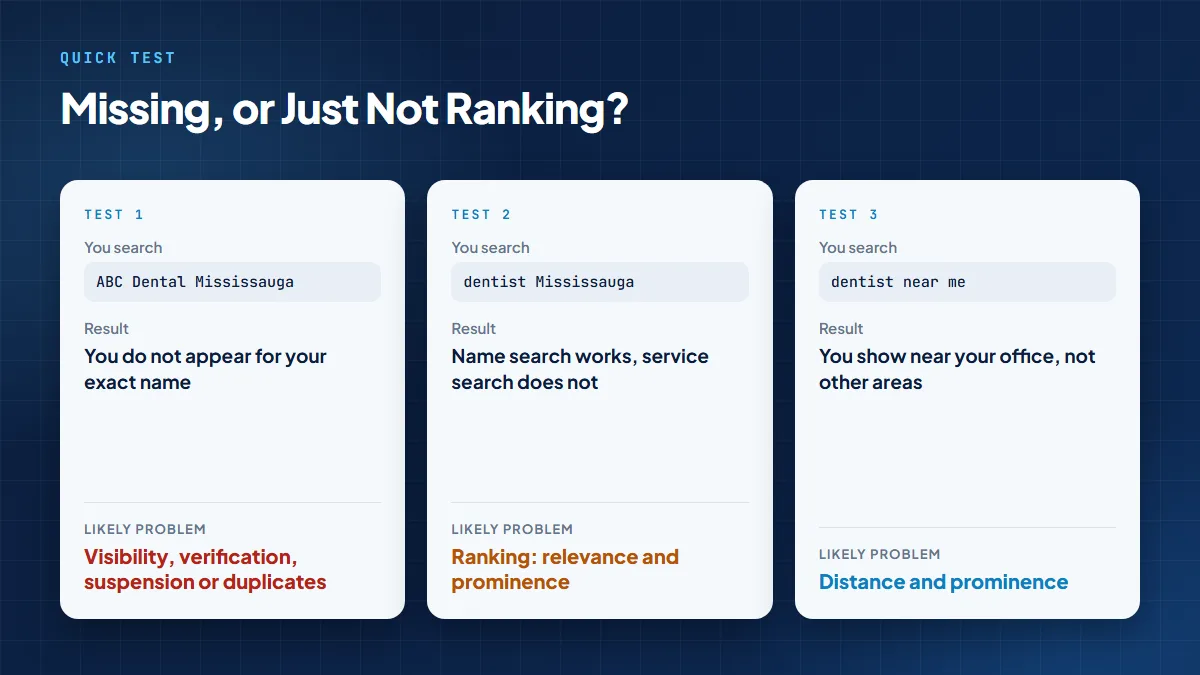
Google’s own guide to finding your business on Search and Maps says verified businesses can show information on Maps and Search, new business rankings can take up to a month to appear, and edits can take up to 3 days to update in search results. So yes, sometimes the fix is action. Sometimes the fix is patience. Sadly, there is still no “Google, please hurry, my rent is due” button.
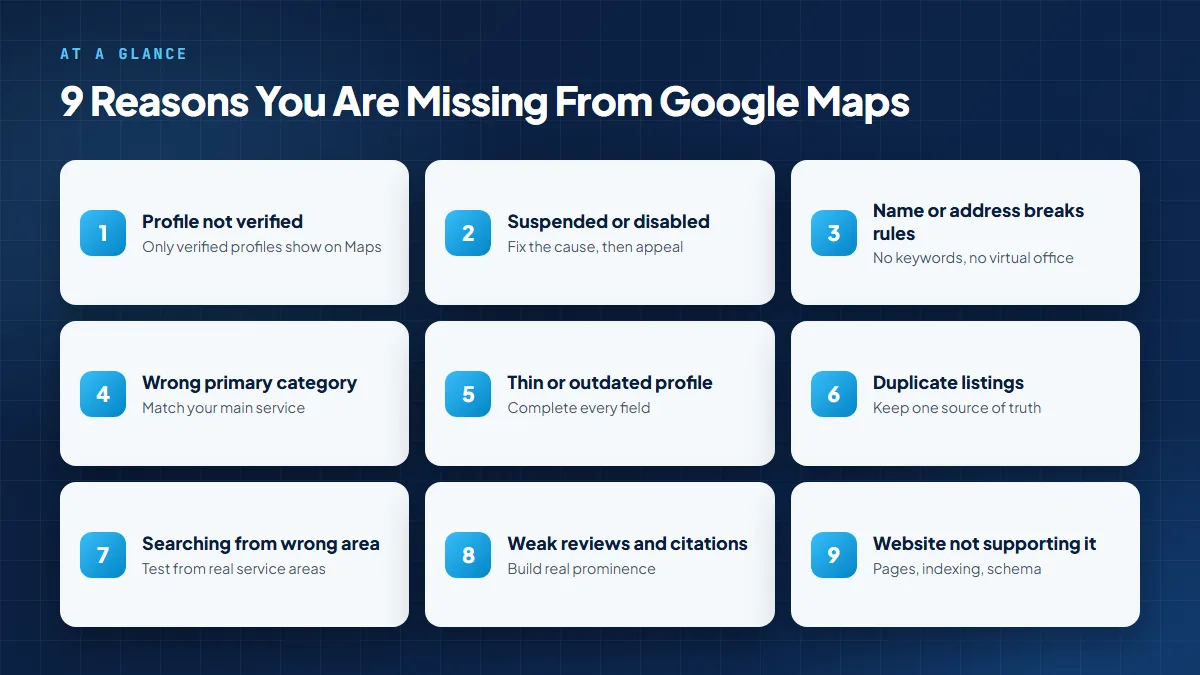
Verification is the first thing to check. Google says only verified businesses can show business information on Maps and Search. If your profile is created but not verified, it may exist inside your dashboard while staying invisible or limited to customers.
I created my Google Business Profile, but nobody can find it.
— Common pain point
Fix: Sign in to the Google account connected to the profile, check the verification status, and complete the method Google offers. This may include video, phone, text, email, or other eligible options depending on the business and location.
Must-know tip: Do not keep changing your name, address, category, or phone number while verification is pending. That can trigger more checks.
If your profile suddenly disappears, suspension is one of the first things to check. Google says profiles that do not follow its guidelines can be suspended or disabled and will not show to other users until the issue is resolved.
Common triggers include keyword-stuffed names, wrong addresses, virtual offices, duplicate profiles, fake reviews, unsupported business types, and mismatched documents. Google’s suspension and appeal instructions say helpful evidence can include official business registration, business licence, tax certificates, and business utility bills.
My listing disappeared overnight.
— Common pain point
Fix: Do not create a new profile. Review the policy issue, correct the profile, prepare matching evidence, and submit the appeal through Google’s appeals tool.
For a deeper recovery workflow, use our Google Business Profile suspension guide before submitting evidence. Appealing before fixing the cause is like sending a résumé with coffee spilled on it and hoping nobody notices.
The Google Business Profile guidelines ask businesses to represent themselves as they are known in the real world, keep the address or service area accurate, choose the fewest categories needed, and avoid more than one profile per business. They also say service-area businesses should usually have one profile for the central office or location and cannot list a virtual office unless it is staffed during business hours.
I added my keywords to the name and now my profile is not showing.
— Common pain point
Your primary category is one of the strongest relevance signals in your profile. Google’s profile editing instructions tell businesses to select the category that best matches what the business does and to choose a specific category that represents the main business.
If you are a roofing contractor but your primary category says “Construction Company,” Google may not understand why it should show you for “roof repair near me.” That is not Google being rude. That is you handing Google a vague business card and hoping it becomes a mind reader.
My competitors show up for my service, but I do not.
— Common pain point
Fix: Set the most accurate primary category for your highest-value service. Add secondary categories only when they describe real services you provide.
If category, service, and page targeting feel confusing, our SEO consultant in Mississauga service can map categories, website pages, and local keywords into one practical plan.
Google says businesses with complete and accurate information are more likely to show in local search results. It also lets businesses add hours, phone numbers, websites, photos, attributes, business descriptions, services, products, and Q&A details.
A thin profile gives Google very little to match. It is like opening a restaurant and putting a sign outside that says “Food.” Technically true. Deeply unhelpful.
My profile is verified, but I still do not show for service searches.
— Common pain point
Fix: Complete the business description, hours, services, photos, appointment link, website link, attributes, and Q&A section. Our guide on how to optimize your Google Business Profile walks through each field.
Must-know tip: Google says services may be highlighted when local customers search for an offering you provide, so keep service names and descriptions accurate.
Local SEO Mississauga includes Google Business Profile improvements inside its SEO services in Mississauga, so the profile is not treated as a one-time setup task.
Google says there should only be one profile per business because duplicates can create problems with how information displays on Maps and Search. Duplicate profiles can split reviews, confuse ownership, trigger filtering, or make the wrong listing appear.
The wrong version of my business keeps showing.
— Common pain point
Fix: Search Maps for your business name, old phone number, old address, and old brand names. Claim the right profile, remove or merge duplicates where appropriate, and keep one clear source of truth.
Pro tip: If a previous agency, employee, or old owner created the listing, request ownership instead of creating another profile.
Distance matters. Google says local results are based on relevance, distance, and prominence. If you are in Mississauga and search from Brampton, Oakville, or Toronto, the map pack can change completely. The business did not vanish; the search location changed.
I show up near my office but not in nearby cities.
— Common pain point
Fix: Test rankings from the actual service areas you care about. Build strong location pages only for areas you truly serve, and support them with reviews, citations, local content, and real service proof.
Our guide to local SEO for small businesses explains how Google profiles, local pages, reviews, citations, and trust signals work together for local visibility.
Prominence is Google’s way of estimating how well-known and trusted a business is. Reviews, review score, links, articles, directories, local mentions, and website visibility can all support this signal. Google also says there is no way to request or pay for a better local ranking. For the full picture, see our breakdown of local SEO ranking factors.
Google is also much more aggressive about quality. Its Maps content enforcement report lists 13 million fake or fraudulent Business Profiles blocked or removed in 2025. Translation: shortcuts are becoming riskier, not smarter.
A competitor with more reviews outranks me.
— Common pain point
Fix: Ask real customers for Google reviews consistently, respond to reviews, add useful photos, clean up citation mismatches, and earn local mentions from relevant websites.
Do not do this: Buy fake reviews, review yourself, or ask staff to flood your profile. That is not a strategy. That is a suspension audition.
For smaller teams, our small business SEO services focus on practical profile improvements, review growth, service pages, and local trust signals that help turn visibility into calls.
Your Business Profile does not work alone. The website connected to it helps Google and customers understand what you do, where you serve, and whether you look trustworthy. If your website is blocked, slow, thin, missing service pages, or not indexed, your Maps visibility can suffer.
My profile is fine, but I still cannot rank.
— Common pain point
If your robots.txt file or sitemap is sending the wrong signals, use our technical SEO guide on robots.txt and XML sitemaps. If you want the whole local system checked, start with an SEO audit in Mississauga.
Use this checklist before changing everything. Random edits can create new verification issues, so diagnose first and edit second.
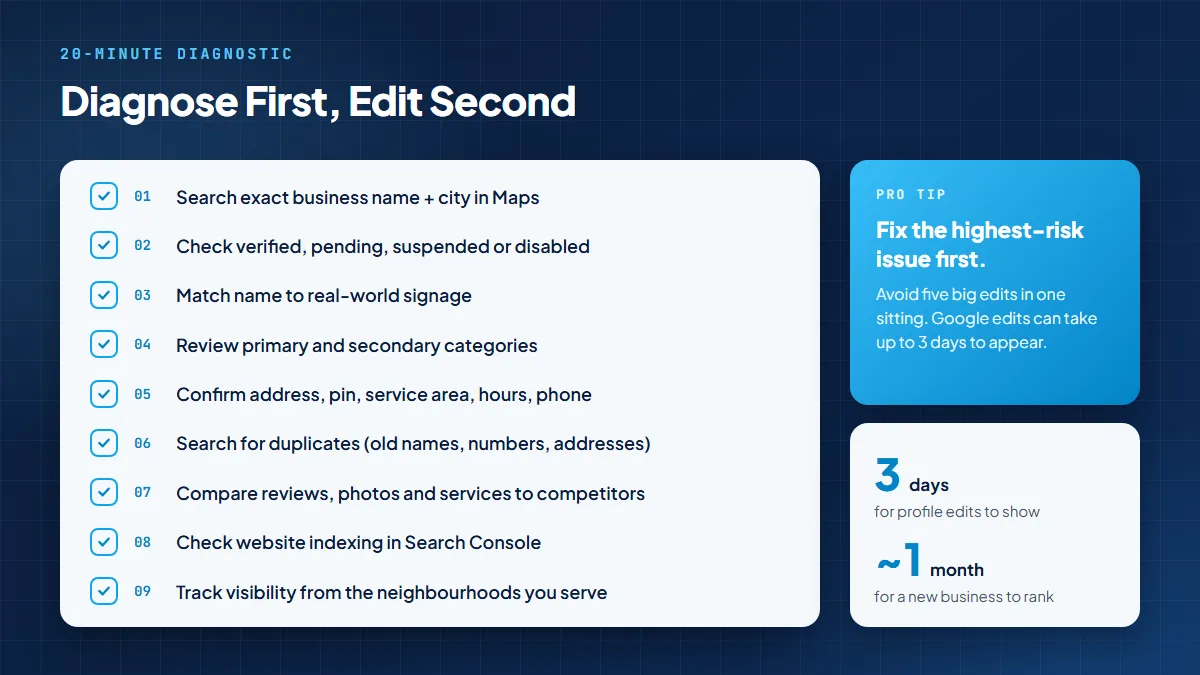
Do not make five major profile edits in one sitting unless the information is wrong. Fix the highest-risk issue first, then give Google time to process changes. Google says edits can take up to 3 days to appear in search results.
— Pro tip
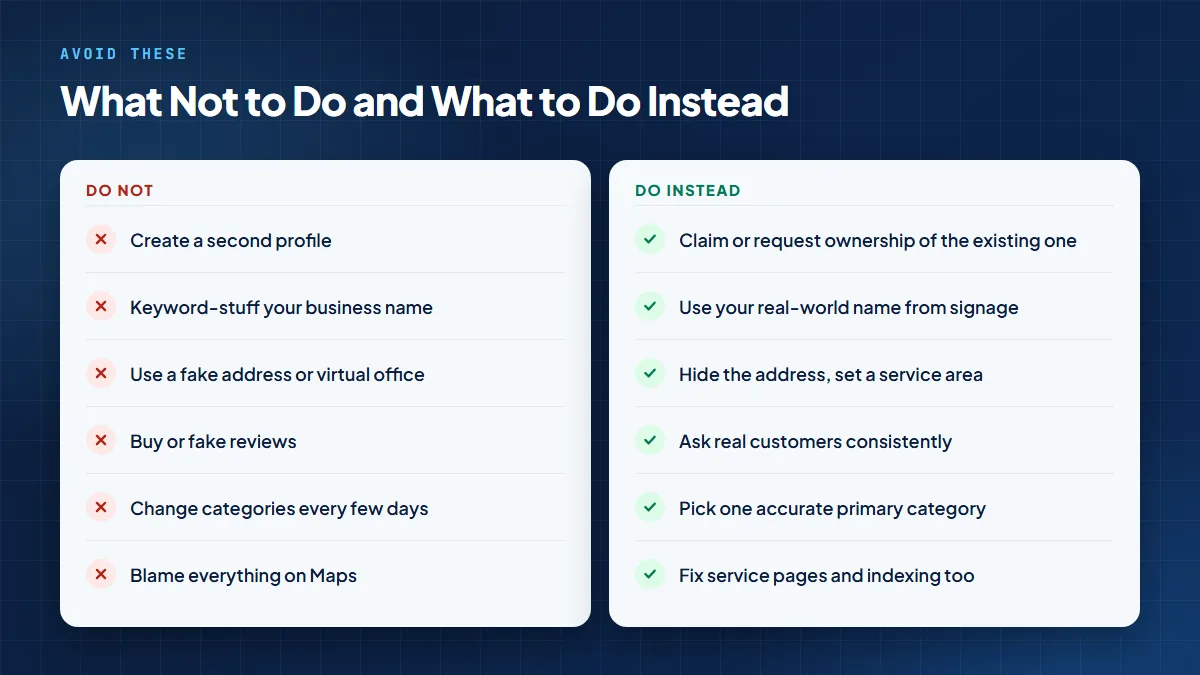
In 2026, customers are not only checking the map pack. They are also using AI Overviews, Gemini-style results, voice search, and answer engines. A complete profile, accurate business data, strong local pages, and trusted reviews help search systems understand what your business should be known for.
That is why this is not just a Maps fix. It is a local authority system. Your Google Business Profile, website, reviews, citations, photos, service pages, and answer-ready content should all say the same thing. Our Answer Engine Optimization guide explains how businesses can become clearer, more useful answers in modern search experiences.
Get expert help if your profile is suspended, the wrong listing is showing, your business appears only for its exact name, you serve multiple areas, your rankings dropped after edits, or you are not sure whether the problem is the profile, the website, or the local competition.
Local SEO Mississauga can audit your Google Business Profile, website, citations, reviews, technical SEO, and local ranking gaps. You can contact Local SEO Mississauga for a clear fix-first plan instead of guessing your way through settings like you are defusing a bomb with a YouTube tutorial.
New profiles can take time to appear and rank. Google says rankings for new businesses can take up to a month, and edits can take up to 3 days to update in search results. Also check your category, service area, duplicate listings, and profile completeness.
That usually means your profile is live but not ranking strongly for service searches. Improve relevance with the right category and services, strengthen prominence with reviews and citations, and support the profile with local website pages.
It may be unverified, pending review, suspended, disabled, or affected by an eligibility issue. Check your Business Profile dashboard first before creating another listing.
A suspended or disabled profile may not show to other users until the issue is resolved. Google recommends fixing guideline issues, preparing matching evidence, and using the official appeals tool.
Reviews can support prominence, but they are not the only factor. Google local rankings are mainly based on relevance, distance, and prominence, so a complete profile and strong website also matter.
Only if they are part of your real-world business name. Google says your business should be represented as it is consistently recognized in the real world. Extra city names and service keywords can cause problems.
The competitor may have a stronger category match, better location proximity, more reviews, stronger local pages, cleaner citations, or higher prominence. Run a local SEO audit before copying their profile.
No. Google warns there should only be one profile per business. Duplicates can cause display problems and may create suspension or filtering issues.
Yes. Your website supports relevance and trust. Clear service pages, local landing pages, internal links, crawlable pages, and consistent contact details help Google understand your business.
Verification, edits, and ranking changes do not update instantly. Some simple profile fixes can appear within days, while ranking improvements often need ongoing work on reviews, content, citations, and website quality.
When your business is not showing up on Google Maps, do not start changing everything. First identify whether the profile is missing, suspended, unverified, duplicated, misconfigured, or simply not ranking yet. Then apply the right fix in the right order.
Google Maps visibility is not one switch. It is a system: verified profile, accurate details, correct categories, strong reviews, clean citations, useful photos, service pages, technical SEO, and local authority. When those pieces line up, Google has a clearer reason to show your business and customers have a clearer reason to call.
Ready to stop guessing? Book an SEO audit in Mississauga with Local SEO Mississauga and get a focused action plan for Maps visibility, website issues, reviews, local rankings, and lead growth.
Disclaimer: The information provided in this blog is for general informational purposes only. For professional assistance and advice, please contact experts.
Written by
Umer Kureshi
Certified SEO Specialist, University of California
Umer Kureshi is a Certified SEO Specialist through the University of California. He writes about SEO, search behavior, and how businesses can stay visible as search itself keeps changing, from classic rankings to AI-generated answers.
Get a free SEO audit and a clear, prioritized plan for your Mississauga business — no long-term contract required.
Get a Free SEO Audit· 8 min read
See what an HTTP 401 error means, how it differs from 403 and how users or developers can fix authentication problems. Check the steps now.
Read article· 11 min read
Improve brand mentions in ChatGPT, Gemini and AI Overviews with stronger entities, citations and answer-ready content. Use the 2026 checklist.
Read article· 14 min read
Build a keyword plan around search intent, competition and business value, then map terms to the right pages. Follow the step-by-step process.
Read article