Technical SEO
· 8 min read
HTTP 401 Error: Meaning, Causes & Fixes
See what an HTTP 401 error means, how it differs from 403 and how users or developers can fix authentication problems. Check the steps now.
Read article
See why Google Business Profiles get suspended, what evidence Google actually accepts, and how to appeal and recover safely. Check the guide.
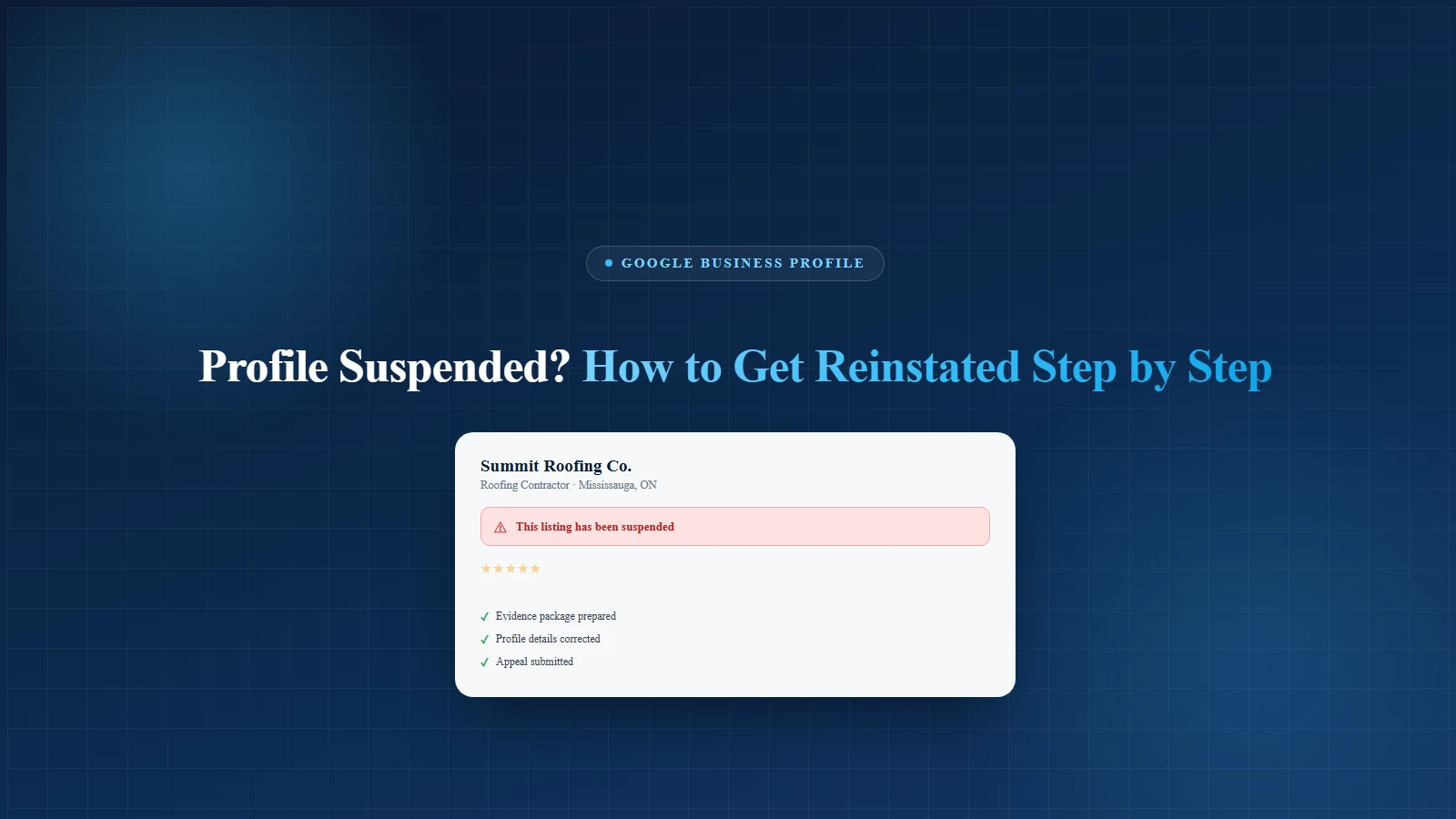
A Google Business Profile suspended notice means Google has restricted or removed your listing because something on the profile, account, address, content, or business information likely broke its rules.
The good news? Many suspended profiles can be reinstated. The bad news? If you rush the appeal like a raccoon in a garbage bin, you can make the problem worse.
For local businesses, this is not a small issue. Google Maps passed the 2 billion monthly user milestone in 2024, according to Alphabet's Q3 earnings remarks. That means your profile is not just a cute digital business card. It is often your phone line, direction button, review hub, local trust signal, and "please call me before my competitor" machine.
And Google is watching closely. In 2025, users shared over 1 billion reviews and suggested 80 million updates to business hours, contact information, and other place details on Google Maps. Google also says its AI-powered systems blocked or removed more than 12 million fake business profiles and over 240 million policy-violating reviews in a recent annual reporting period.
Translation: Google is not playing hide and seek. It is playing "prove you are real."
This guide explains why suspensions happen, what to fix before appealing, what evidence to prepare, how to submit the appeal, and how to protect your profile after reinstatement.
For hands-on help, Local SEO Mississauga can review your Google Business Profile, citations, reviews, and map visibility through a Google Business Profile and local SEO audit.
A Google Business Profile suspension means your business profile has been restricted because Google believes it does not meet its rules.
This can affect:
Google says it can suspend or disable Business Profiles that do not follow its guidelines for representing your business. If you believe the profile should be restored, you can submit an appeal.
A suspension is not always permanent. But it is also not something to treat casually. Do not poke every setting like you are trying to fix the office printer. First diagnose, then fix, then appeal.
Most business owners do not care what type of suspension it is. Fair. They just want the phone to ring again.
Still, knowing the difference helps.
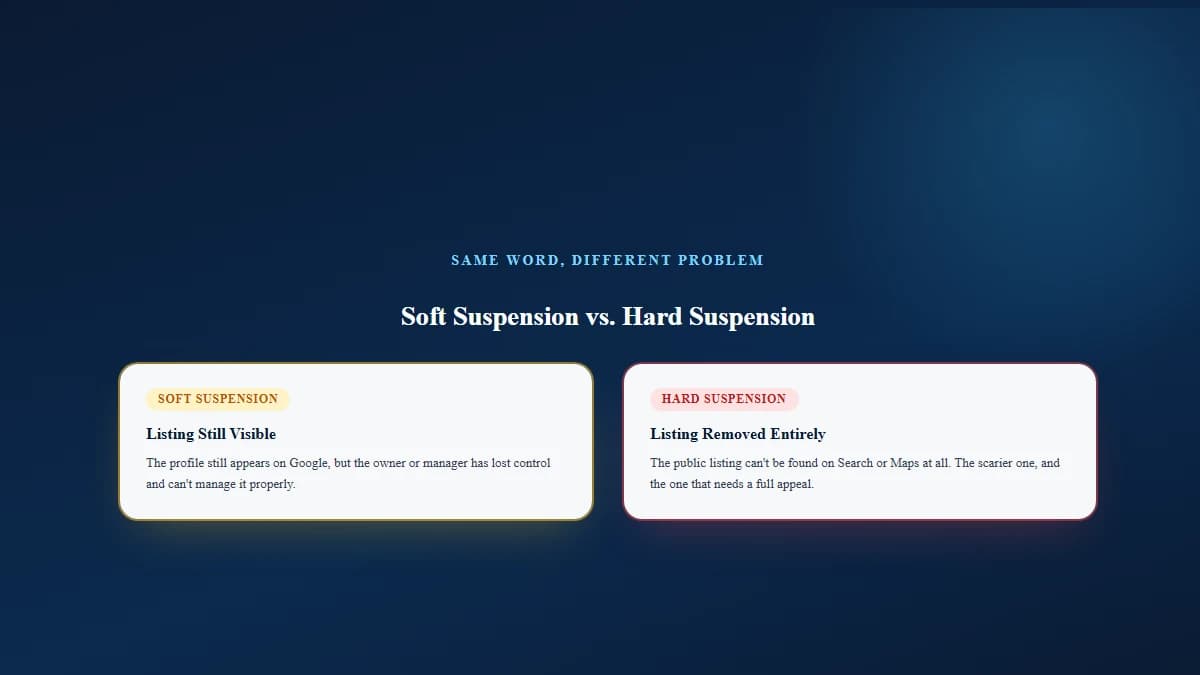
A soft suspension usually means the listing still appears publicly, but the owner or manager has lost control. You might see the profile on Google, but you cannot manage it properly.
A hard suspension usually means the public listing is removed or cannot be found on Search and Maps. This is the scarier one. It feels like Google put your listing in witness protection.
In both cases, the plan is similar:
Google's main rule is simple: your profile must represent a real, eligible business accurately. Google says a business can create a Business Profile if it has a physical location customers can visit or travels to customers where they are.
Here are the most common suspension triggers.
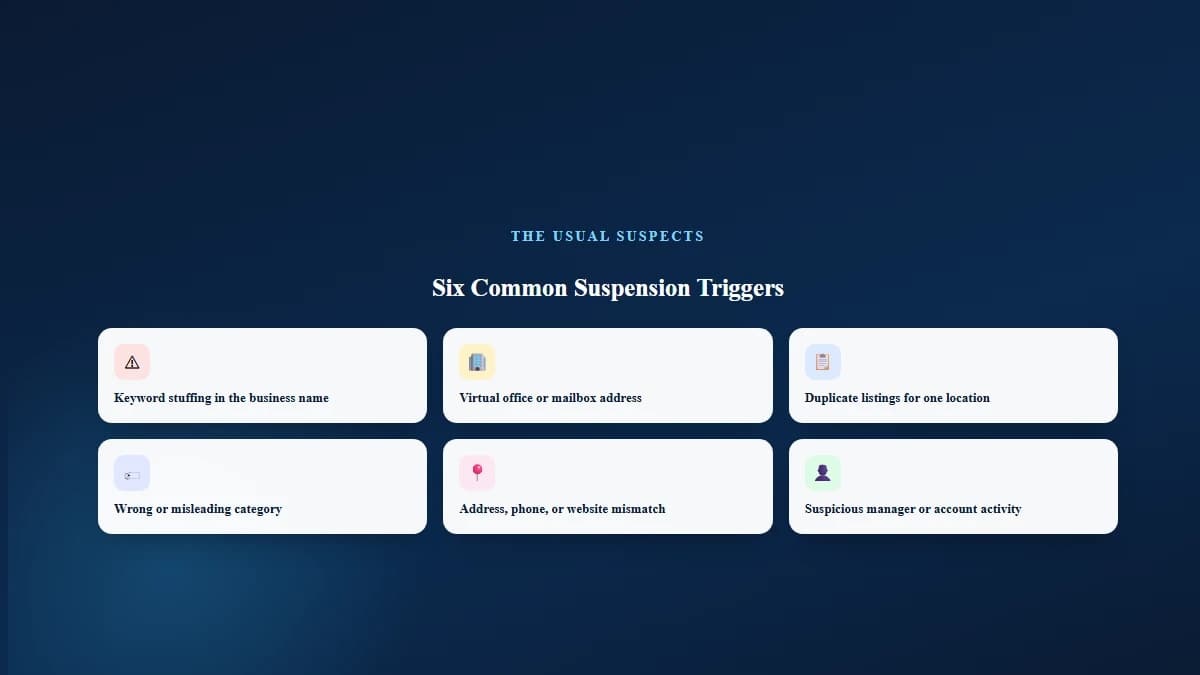
Your Google Business Profile name should match your real-world business name.
Not this: "Joe's Plumbing Best Emergency Plumber Mississauga Cheap Drain Repair Open 24 Hours"
That is not a business name. That is a panic attack wearing a title tag.
Google says your name should reflect your real-world name as used on storefronts, websites, stationery, and branding. It also warns that unnecessary information in the business name is not allowed and can lead to suspension.
This is a big one for service businesses.
Google says P.O. boxes and remote mailboxes are not acceptable, and a virtual office is not eligible if the business does not actually operate there. Co-working offices need clear signage, customer access during business hours, and staffing by your business team during those hours.
Must-know tip: If you are a service-area business working from home, you usually need to hide your address and set a service area instead of showing a residential or fake office address.
Google says there should only be one profile per business location. Duplicate profiles can create display problems on Google Maps and Search.
Do not create a new profile while your appeal is under review. Google specifically warns against creating a new Business Profile for the same business during the appeal process.
If your category says "law firm" but your site looks like a lead-gen directory, Google can get suspicious.
Use the fewest number of categories needed to describe your core business. Do not select every category that sounds profitable.
Your business name, address, and phone number should match across your profile, website, citations, signage, and documents.
At Local SEO Mississauga, this is one of the first things we check during an SEO audit, because inconsistent NAP details can create trust issues for both Google and customers.
Sometimes the issue is not the listing. It is the account managing it.
Google says if an account is restricted, the Business Profiles managed by that account can be suspended, and the business owner may not be able to create or claim other profiles until the account restriction is lifted.
Do not submit the appeal first and figure things out later. That is like sending your homework, then reading the textbook.
Google says to make sure your profile follows all guidelines before submitting an appeal. Use this pre-appeal checklist.
Check these items before touching the appeal button:
For small businesses, this profile cleanup should connect with a wider local SEO plan, not just a one-time panic fix.
Google says evidence that can strengthen an appeal includes:
Google also says the business name and address on your documents should match the profile you are appealing. That last part is where many appeals go to die.
If your profile says "ABC Roofing Mississauga," but your business registration says "ABC Home Services Inc.," and your utility bill says "A. B. C. Services," Google may not understand that these are the same business. Humans barely enjoy paperwork. Algorithms enjoy it even less.
Prepare a folder before you appeal. Include:
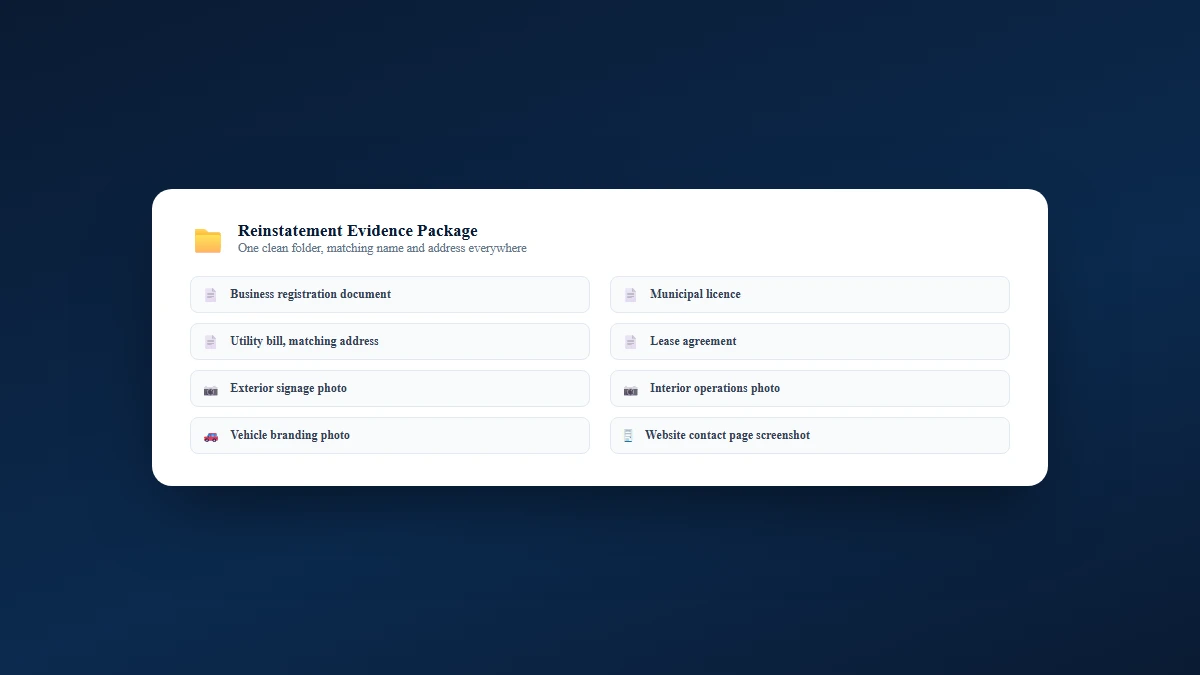
Use clear file names like:
Do not upload files called "IMG_8837_final_FINAL_reallyfinal.jpg." That file name has seen things.
Google's appeal process can change, so always use the current Google Business Profile appeals tool. As of the latest Google Business Profile guidance, the process works like this.
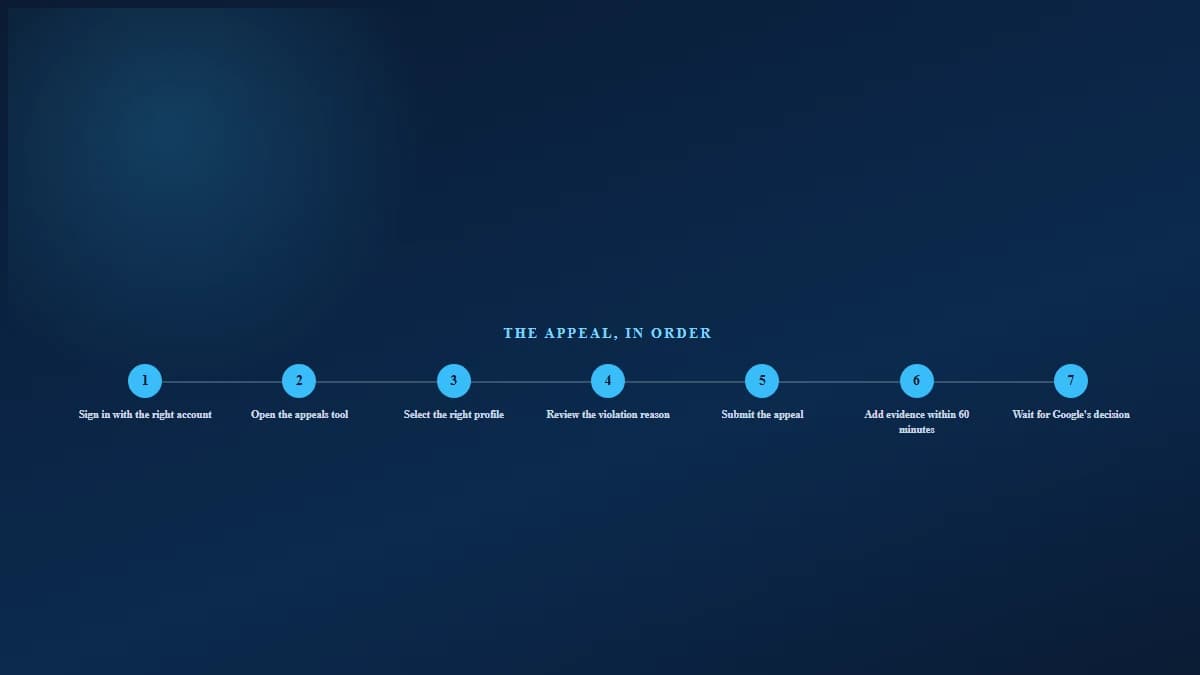
Use the Google Account connected to the suspended profile. If the agency, old employee, cousin, intern, or "SEO guy from 2021" owns it, fix ownership access first where possible.
Google says the appeals tool shows:
This is important because you are not guessing in the dark. You are reading Google's clue. Tiny clue, yes. But still a clue.
Choose the correct Business Profile. If you manage multiple locations, slow down here. Appealing the wrong profile is a very avoidable headache.
Look for language like:
Then match your fixes and evidence to that issue.
Keep your explanation short and factual. Good appeal wording reads something like this:
We reviewed the Business Profile and corrected the business name, address, category, and service area to match Google's guidelines. The attached documents show the official business registration, business address, and active operations.
— Good appeal example
Bad appeal wording sounds like this instead:
Please reinstate us. We did nothing wrong. We are the best company in Canada.
— Bad appeal example
Google does not need a motivational speech. It needs proof.
This part matters a lot. Google says that once you open the evidence form, you must submit evidence within 60 minutes, or it will not be attached to the appeal.
Must-know tip: Prepare everything before starting. Do not open the evidence form, then start looking for the hydro bill while your laptop asks to update.
Google says it reviews the appeal and sends an email with a decision.
Do not submit multiple appeals for the same issue before receiving a decision. Google's appeal guidance says not to submit multiple appeals before a decision is made.
A denial does not always mean the profile is gone forever. Google says only if your reinstatement request is denied, you may be able to request an additional review and provide extra evidence that was not included with the original appeal.
Before asking for another review, do this:
Think of the second review like bringing better receipts. Not louder receipts. Better ones.
Getting reinstated is step one. Keeping the profile healthy is step two.
Google says local results are mainly based on relevance, distance, and prominence. It also says there is no way to request or pay for a better local ranking. That means your post-reinstatement plan should rebuild trust around those three areas.
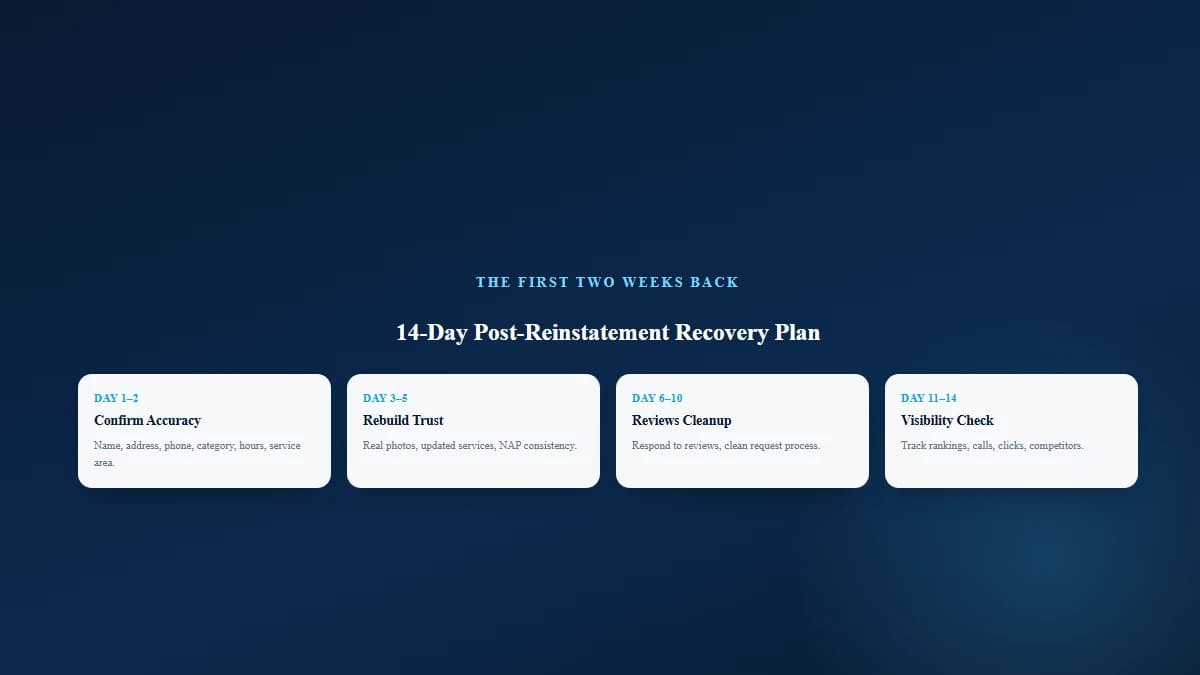
Need help with that part? Read Local SEO Mississauga's guide on getting Google reviews properly.
Your Google Business Profile and website should back each other up. That is why strong service pages, local content, and citation consistency matter. Local SEO Mississauga's SEO services in Mississauga connect profile optimization with website SEO, content, and local ranking strategy.
Most guides stop at "submit the appeal." That is useful, but incomplete.
The bigger question is: why did Google doubt the business in the first place? Here is the smarter framework.
Your reinstatement package should prove three things.
Use registration, licensing, signage, utility bills, and real photos.
Use the right address setup, service area, category, and storefront rules.
Make sure your Google profile, website, directories, social profiles, and documents tell the same story.
If one source says "Mississauga," another says "Toronto," another says "Ontario-wide," and your profile shows a virtual office, Google gets suspicious. And honestly, fair enough.
Before you appeal, confirm:
A Google Business Profile suspension is stressful, but it is usually not the end of the story.
The worst move is panic-clicking your way through the appeal form with weak evidence and messy profile details. The best move is slower, cleaner, and more boring. Sadly, boring paperwork often wins.
Fix the profile. Match the documents. Submit one clear appeal. Then rebuild the local trust signals that help your business show up again.
Local SEO Mississauga helps local businesses strengthen their Google Business Profile, website, citations, reviews, and local visibility. If your listing is suspended or your map rankings dropped, book a free SEO audit and get a practical recovery checklist.
Your profile may have been suspended because of incorrect business information, keyword stuffing, duplicate listings, an ineligible address, a virtual office issue, suspicious account activity, or policy-violating content.
Fix the likely policy issue first, gather documents that prove the business is real and eligible, then submit an appeal through Google's Business Profile appeals tool.
Google does not provide one guaranteed public timeline for every case. The timing depends on the issue, evidence quality, account status, and review volume.
No. Google says not to create a new profile for the same business while your appeal is under review. This can create duplicate problems and make recovery harder.
Useful evidence can include official business registration, business licence, tax certificates, and utility bills such as electricity, phone, water, or internet bills.
Yes. Google says a virtual office is not eligible if the business does not actually operate there. Co-working locations also need clear signage, customer access, and business staff present during stated hours.
Yes. Google says unnecessary information in the business name is not permitted and can result in suspension. Your name should match your real-world business name.
Write a short, factual explanation. Mention what you corrected and what evidence proves your business is real, eligible, and accurately represented.
You may be able to request an additional review after denial. Add new evidence that was not included in the original appeal and fix any remaining guideline issues first.
Your profile may return, but rankings can still fluctuate. Rebuild relevance, distance, and prominence signals with complete information, reviews, citations, photos, and strong local pages. Google says local rankings are mainly based on relevance, distance, and prominence.
Yes. Local SEO Mississauga can audit your profile, check NAP consistency, review suspension risks, improve your local SEO foundation, and help build a safer profile recovery plan. Start with a local SEO audit.
Written by
Umer Kureshi
Certified SEO Specialist, University of California
Umer Kureshi is a Certified SEO Specialist through the University of California. He writes about SEO, search behavior, and how businesses can stay visible as search itself keeps changing, from classic rankings to AI-generated answers.
Get a free SEO audit and a clear, prioritized plan for your Mississauga business — no long-term contract required.
Get a Free SEO Audit· 8 min read
See what an HTTP 401 error means, how it differs from 403 and how users or developers can fix authentication problems. Check the steps now.
Read article· 11 min read
Improve brand mentions in ChatGPT, Gemini and AI Overviews with stronger entities, citations and answer-ready content. Use the 2026 checklist.
Read article· 14 min read
Build a keyword plan around search intent, competition and business value, then map terms to the right pages. Follow the step-by-step process.
Read article