Technical SEO
· 8 min read
HTTP 401 Error: Meaning, Causes & Fixes
See what an HTTP 401 error means, how it differs from 403 and how users or developers can fix authentication problems. Check the steps now.
Read article
Learn what robots.txt can and cannot control, what belongs in your XML sitemap, and the crawl mistakes that hide Mississauga service pages from Google.
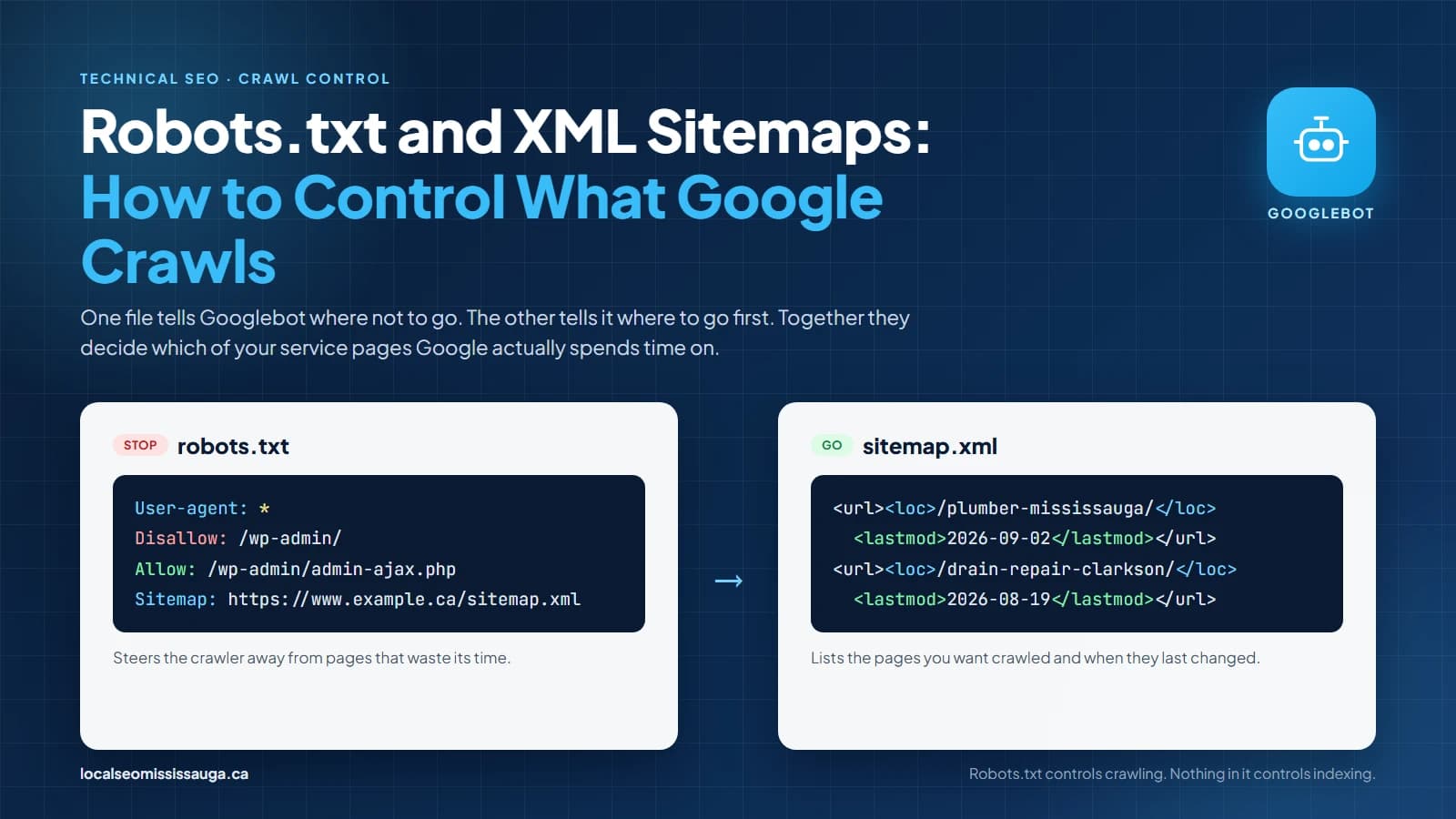
Your robots.txt file is the first thing Googlebot reads when it reaches your website. On most small business sites in Mississauga, nobody has looked at it since the site was built.
That is a problem when it still blocks the staging folder that became the live site, or when it does not say where your sitemap is.
Together, robots.txt and your XML sitemap decide which of your pages Google spends its time on. A mistake in either one keeps a service page out of the results, however good the page is.
In this guide we take you through what robots.txt can and cannot do and how an XML sitemap tells Google what matters.
The file is a plain text file at the root of your domain, at yourdomain.com/robots.txt. Google reads it before crawling anything else, and its power is narrower than most owners assume.
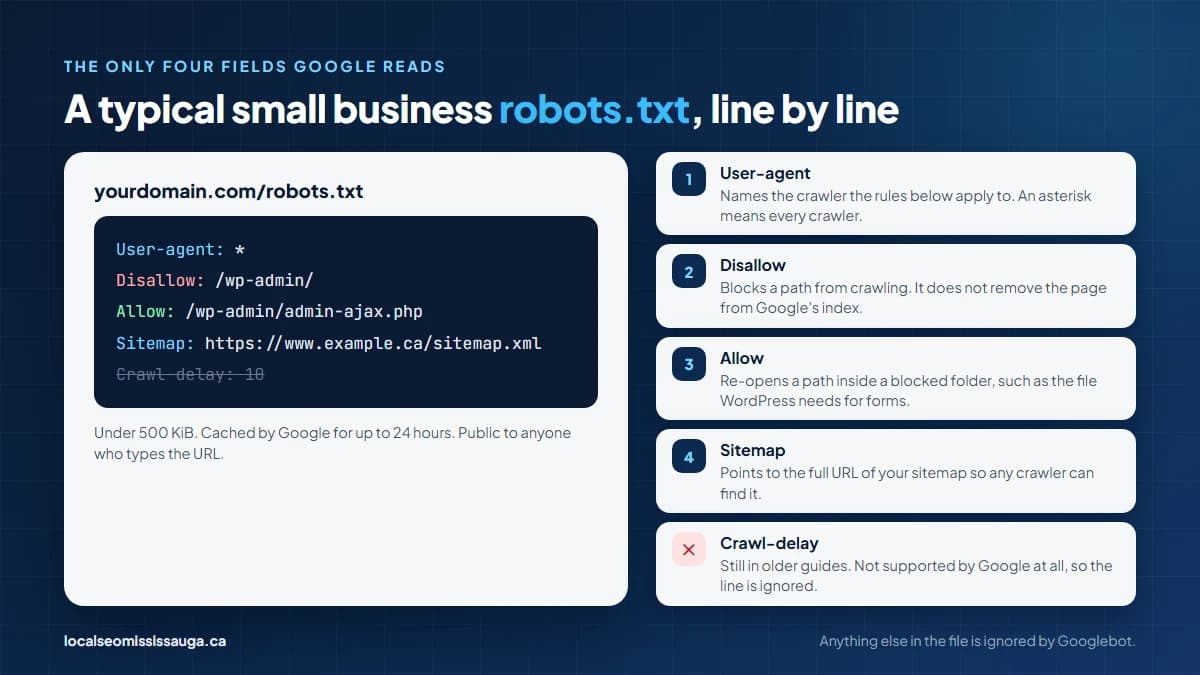
Google reads four fields in a robots.txt file and ignores everything else. User-agent names the crawler a rule applies to. Disallow blocks a path, Allow re-opens a path inside a blocked one, and Sitemap points to your sitemap's full URL.
Crawl-delay, which older guides still recommend, is not supported by Google at all.
The file has to stay under 500 kibibytes, because Google ignores anything past that point. A local business site never approaches that limit. However, a Sitemap line at the bottom of a bloated file can be cut off with it.
Google also caches the file for up to 24 hours, so a fix does not take effect the moment you upload it.
A typical robots.txt for a small business site on WordPress looks like this:
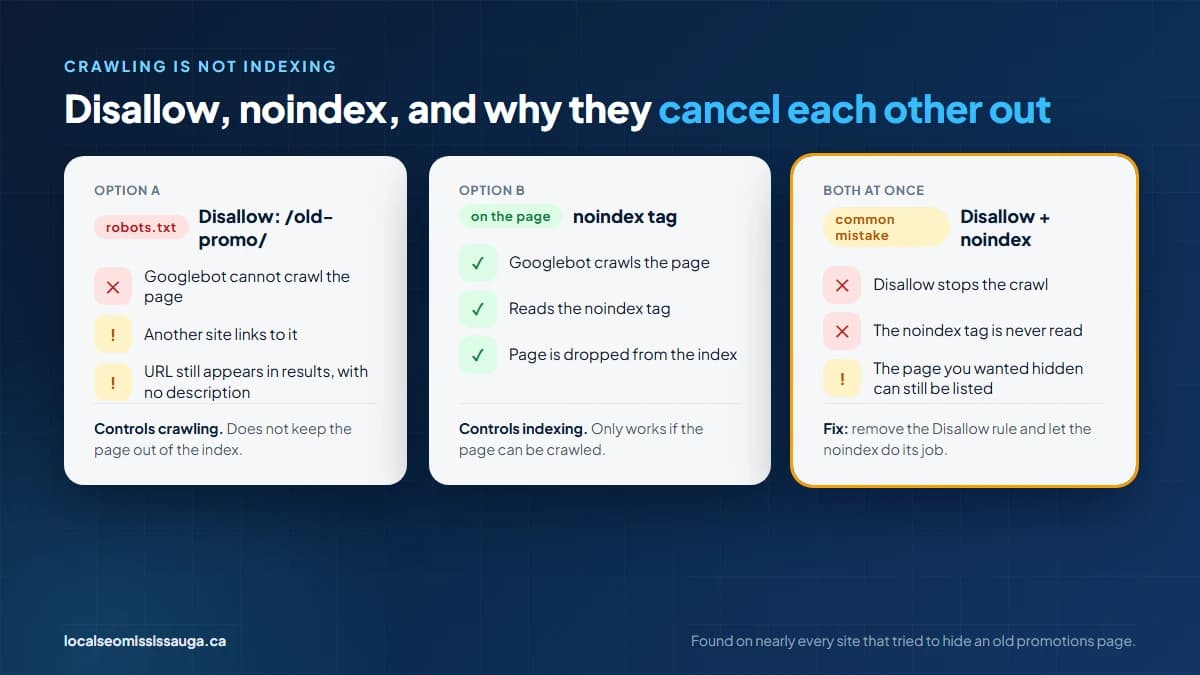
A Disallow rule stops Google from crawling a page. The rule does not stop Google from indexing it. If another site links to a blocked page, Google can list the URL in results with no description, because it was never allowed to read the page.
To keep a page out of the index you use a noindex tag on the page itself. For Google to see that tag, the page has to be crawlable. The two tools therefore work against each other when combined. Block a page and add noindex, and Google never reads the noindex.
Our team at Local SEO Mississauga finds this on nearly every site that has tried to hide an old promotions page. The fix is to remove the Disallow rule and let the noindex do its job.
The file is voluntary. Google, Bing and the major AI crawlers obey it, but a scraper does not have to. Customer portals, staff logins and unpublished pricing therefore need a password, not a robots rule.
The file is also public. A Disallow line pointing at /2027-launch/ tells competitors what you are working on. Keep anything sensitive behind authentication, and keep robots.txt for one job, which is steering Googlebot away from pages that waste its time.
Internal search results, filtered category views and admin areas are the usual candidates. On an e-commerce site, filtered and sorted category URLs are usually the largest source of wasted crawling.
If robots.txt tells Google where not to go, the sitemap tells it where to go first. The sitemap is a list of the URLs you want crawled, with the date each was last changed, in a format every search engine reads.
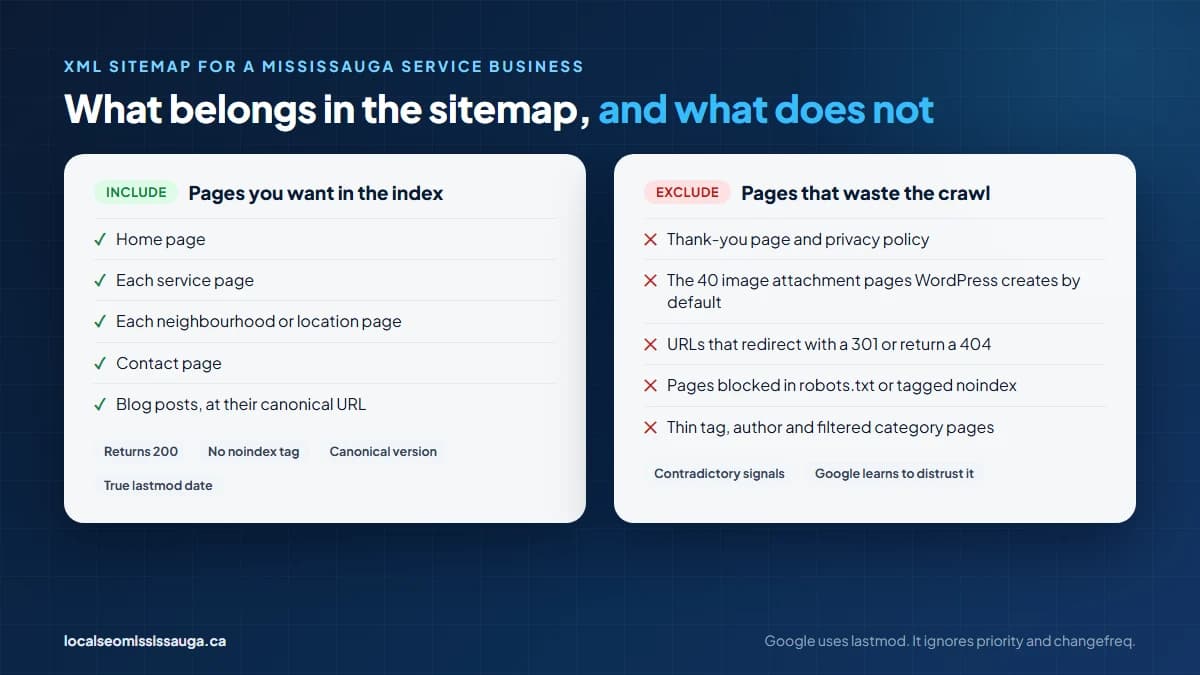
The sitemap lists only pages you want in the index, at their final URL. Every entry has to return a 200 status, carry no noindex tag, and be the canonical version of the page.
A sitemap that lists redirected URLs, blocked pages or thin tag pages sends Google contradictory signals and wastes the crawl you are trying to direct.
For a Mississauga service business, that means the home page, each service page, each neighbourhood page, the contact page and the blog posts. The thank-you page, the privacy policy and the 40 image attachment pages WordPress creates by default do not belong.
A single sitemap holds up to 50,000 URLs or 50 MB uncompressed. Beyond that you split it and list the parts in a sitemap index file. No local business site approaches either limit. A plugin that generates a separate sitemap for every post type still produces an index, and that is normal.
Of the optional fields, Google uses lastmod and ignores priority and changefreq. A lastmod date only helps if it is true, because Google learns to distrust a sitemap where every page claims to have changed today.
Our team sets the date to update from the page's real modified date, which most content management systems can do automatically.
Google finds a sitemap in two ways. You submit it in Google Search Console, which also reports which URLs were crawled and which were not. You also list its URL on a Sitemap line in robots.txt so any crawler can find it. Do both.
Google's own guidance says a site with fewer than 500 pages and good internal linking does not need a sitemap. We build one for every client anyway, because the Search Console report it unlocks is the fastest way to see which service page Google has skipped.
| File | What it controls | What it cannot do | Where Google reads it |
|---|---|---|---|
| robots.txt | Which paths Googlebot crawls | Keep a page out of the index, protect private data, slow the crawl rate | yourdomain.com/robots.txt, cached up to 24 hours |
| XML sitemap | Which pages you want crawled and when they changed | Force indexing, override a noindex tag, fix a blocked page | Search Console submission and the Sitemap line in robots.txt |
The errors below appear on Mississauga business sites more often than any others. Each one is invisible to the owner and visible to Google every day.
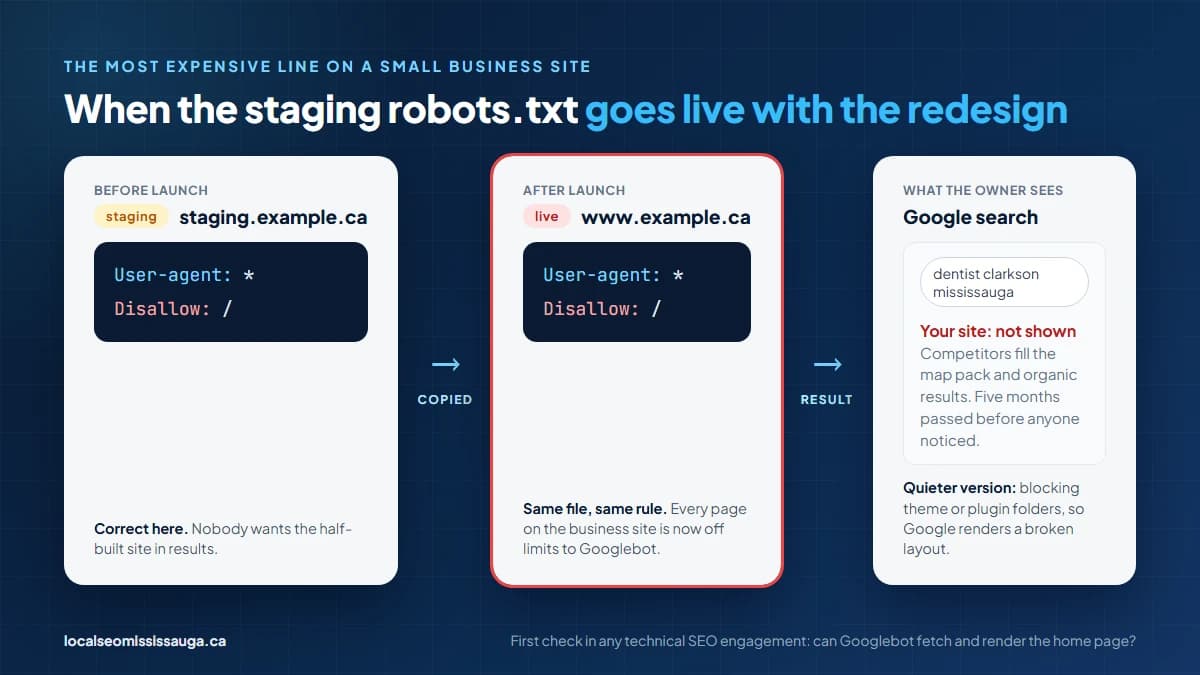
A staging site is usually built with Disallow: / to keep it out of results. When that site goes live and the robots.txt goes with it, the whole business disappears from Google and stays gone until someone notices. A Clarkson dental clinic ran that way for five months after a redesign.
The quieter version is a rule that blocks the theme or plugin folders. That stops Google from loading the CSS and JavaScript it needs to render the page, so Google evaluates a broken layout.
Our first check in any technical SEO engagement is whether Googlebot can fetch the home page and see it the way a visitor does.
A page listed in the sitemap and blocked in robots.txt is a page you have asked Google to crawl and forbidden it to crawl at the same time. Search Console reports these as "Submitted URL blocked by robots.txt." Every one is a decision you have not made.
Either the page belongs in results and the Disallow rule goes, or it does not and the sitemap entry goes.
The same applies to a sitemap full of URLs that return a 404 or that redirect with a 301 to somewhere else. A Streetsville contractor's sitemap listed 120 URLs from a site structure abandoned in 2022. Google was spending its visits confirming they were still gone.
Since 2023, Google's Google-Extended token has controlled whether your content trains its AI models, separately from whether it appears in Search and AI Overviews. Other AI companies publish their own crawler names. A robots.txt copied from a template written for a publisher can block the crawlers that feed AI answers about local businesses.
In 2026, a growing share of "who does X near me" questions are answered that way.
Decide deliberately. A Mississauga business that wants to be cited in AI Overviews and AI search answers leaves those crawlers open. One that does not can block them by name. What no business can afford is to block them without knowing, which is what a copied file does. If brand visibility in AI search is part of your plan, the robots.txt file is where that plan either holds or quietly fails.
Open yourdomain.com/robots.txt in a browser and read it. If it contains Disallow: / with nothing after the slash, or blocks a folder that holds your theme, fix it today. Then open Search Console, go to the Sitemaps report, and confirm your sitemap was submitted and shows the number of pages you expect.
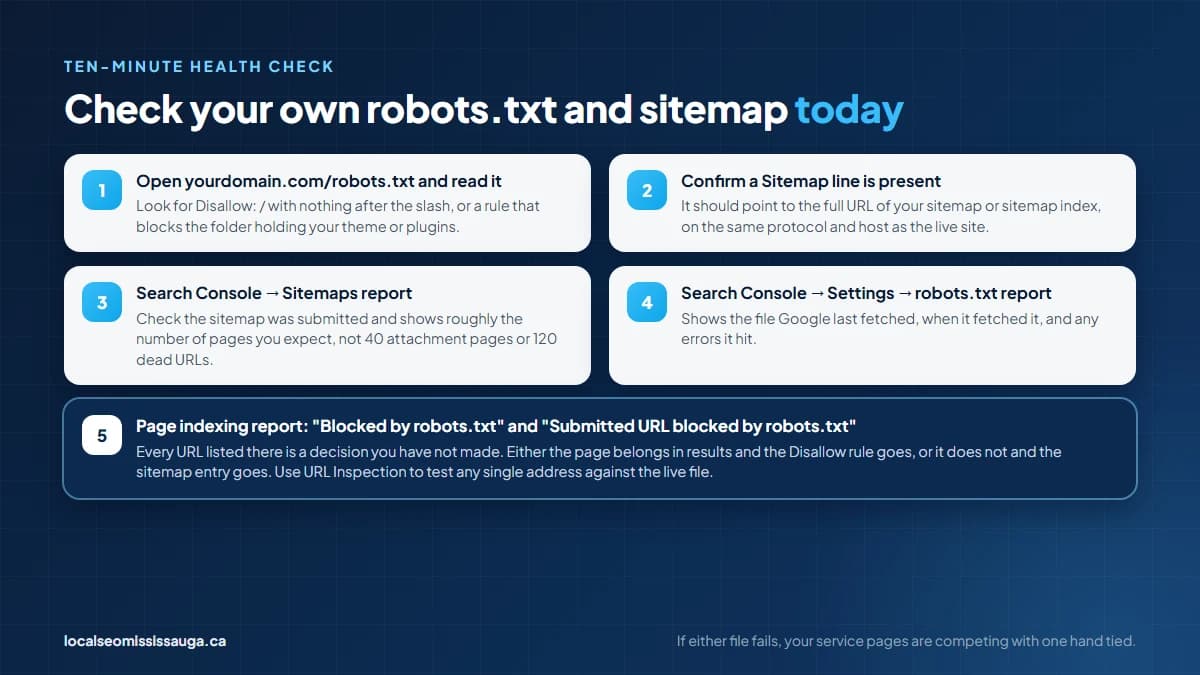
If either check fails, your service pages are competing with one hand tied. Our team at Local SEO Mississauga checks both files every week for clients, and we will check yours as part of a free SEO audit.
The audit covers robots.txt, the sitemap, the Search Console reports and how every service page renders for Googlebot.
We tell you what is blocked, what is missing and what is contradictory. Fixing it is the first step of any engagement, because nothing else we do for your small business site matters if Google cannot reach it.
Google refetches the file within about 24 hours. The pages it blocked only return once Googlebot recrawls them, which can take days for a home page and weeks for a deep service page. You can shorten the wait with the URL Inspection tool in Search Console, which lets you request indexing for the pages that matter most, one at a time.
No. Your Google Business Profile lives in Google's business database, not on your website, so a blocked site still appears in Maps. What suffers is the website link on the profile and the organic result below the map pack. A profile pointing to a site Google cannot read also loses the relevance signals the two would otherwise share.
Yes. A robots.txt file applies only to the exact protocol, host and port it sits on. That means blog.yourdomain.com and www.yourdomain.com each need their own, and an old HTTP version does not govern the HTTPS site. When a site moves to HTTPS, the file has to move with it.
Submit the index file, usually sitemap_index.xml or sitemap.xml, and Google will read the five beneath it. Submitting each part separately is also allowed and gives you a coverage report per part. That is useful when you want to see whether service pages and blog posts are being crawled at different rates.
Search Console has a robots.txt report under Settings that shows the file Google last fetched, when it fetched it, and any errors. The Page indexing report lists every URL affected under "Blocked by robots.txt," and the URL Inspection tool tests a single address against the live file.
Get a free SEO audit and a clear, prioritized plan for your Mississauga business — no long-term contract required.
Get a Free SEO Audit· 8 min read
See what an HTTP 401 error means, how it differs from 403 and how users or developers can fix authentication problems. Check the steps now.
Read article· 11 min read
Improve brand mentions in ChatGPT, Gemini and AI Overviews with stronger entities, citations and answer-ready content. Use the 2026 checklist.
Read article· 14 min read
Build a keyword plan around search intent, competition and business value, then map terms to the right pages. Follow the step-by-step process.
Read article