Technical SEO
· 8 min read
HTTP 401 Error: Meaning, Causes & Fixes
See what an HTTP 401 error means, how it differs from 403 and how users or developers can fix authentication problems. Check the steps now.
Read article
Should a multi-location business use one website or many? Learn the best site structure, location page rules, GBP setup, and a 30-day SEO action plan.
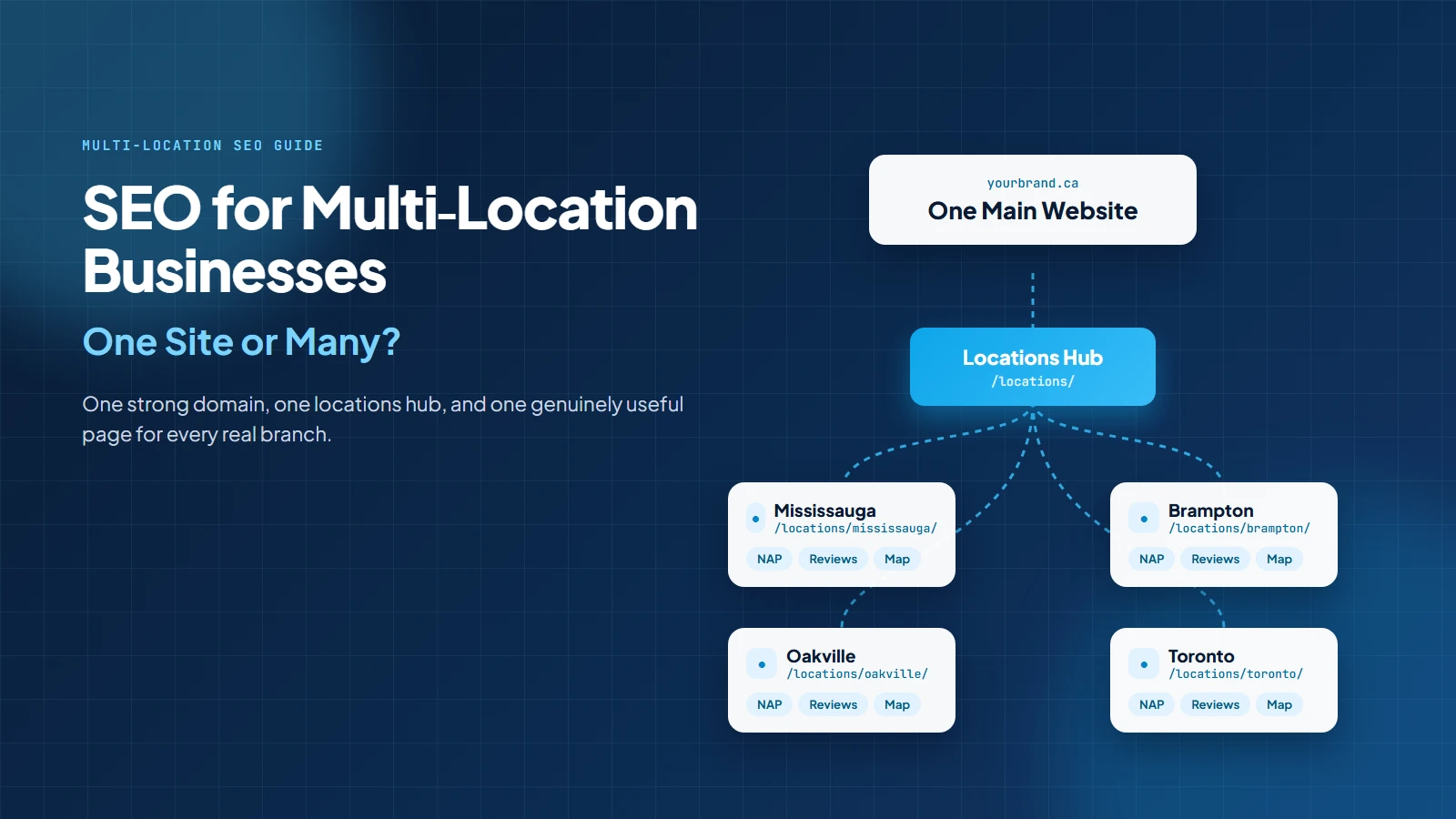
Most multi-location businesses should use one main website with dedicated location pages, not separate websites for every branch. That structure keeps brand authority together, gives Google a cleaner local story, and makes your SEO budget work like one team instead of five interns arguing over a spreadsheet.
There are exceptions. Separate websites can make sense when locations are legally separate brands, serve very different markets, or need unique language, pricing, compliance, and management. But for most clinics, restaurants, contractors, professional firms, retailers, franchises, and service businesses, one strong domain with a clear location hub is the better long-term SEO move.
This guide explains how to choose the right structure, how to build location pages that do not feel copy-pasted by a sleepy robot, and how to avoid the common multi-location SEO mistakes that make Google shrug and choose someone else.
Use one website when the business shares one brand, one service model, one marketing team, one booking system, and one customer experience. Build a locations hub, then create one strong page for each real location or major service area.
Use separate websites only when each location is truly a different business unit with different ownership, branding, offers, audience, content plan, and operational control.
| Business Situation | Best Website Structure | Why |
|---|---|---|
| Same brand with multiple branches | One website with location pages | Keeps authority, content, and reporting together |
| Franchise with strict local independence | Usually one brand website, sometimes local microsites | Depends on brand rules and content resources |
| Different legal brands | Separate sites can make sense | The customer experience and brand identity are different |
| Service-area business with no offices in every city | One site with service-area pages only where useful | Avoids fake location pages and doorway risk |
| International regions or languages | One site with regional folders, or separate sites if operations differ | Needs country, language, and local trust signals |
Multi-location SEO sounds simple until you try to scale it. One location means one homepage, one Google Business Profile, one phone number, and one set of reviews. Lovely. Peaceful. Almost suspiciously calm.
Then location two opens. Then location three. Suddenly the questions begin:
These are not small questions. They decide how search engines understand your business. Google says local results are mainly based on relevance, distance, and prominence. That means each location must prove what it offers, where it operates, and why it can be trusted. One messy structure can weaken all three local ranking signals.
Multi-location SEO matters because local search is still where buyers make fast decisions. StatCounter reported Google at 85.66% of Canada search engine market share in August 2026. For a Canadian business with several locations, that means Google is not just one channel. It is the front desk, map, directory, review board, and first impression rolled into one very judgemental rectangle.
Statistics Canada also publishes business location counts by geography, industry, and employment size. In other words, local competition can be measured by actual business locations, not just broad national averages. If you operate in Mississauga, Brampton, Toronto, Oakville, or across the GTA, your SEO plan needs to match how people search inside each market.
Performance matters too. The 2025 Web Almanac reported that only 48% of mobile websites passed all three Core Web Vitals, compared with 56% of desktop websites. If your location pages are slow, bloated, or buried in a maze of scripts, the "nearest location" might still feel far away.
For most businesses, the strongest setup is:
A simple URL structure can look like this:
| Page Type | Example URL | Purpose |
|---|---|---|
| Locations hub | /locations/ | Lists every location and helps users choose the closest one |
| Location page | /locations/mississauga/ | Ranks for brand + city and service + city searches |
| Service page | /services/seo/ | Explains the service across all locations |
| Service + location page | /seo-services-mississauga/ | Useful only when the search demand and content depth justify it |
| Blog support page | /blog/local-seo-for-restaurants/ | Answers pain-point queries and links to service/location pages |
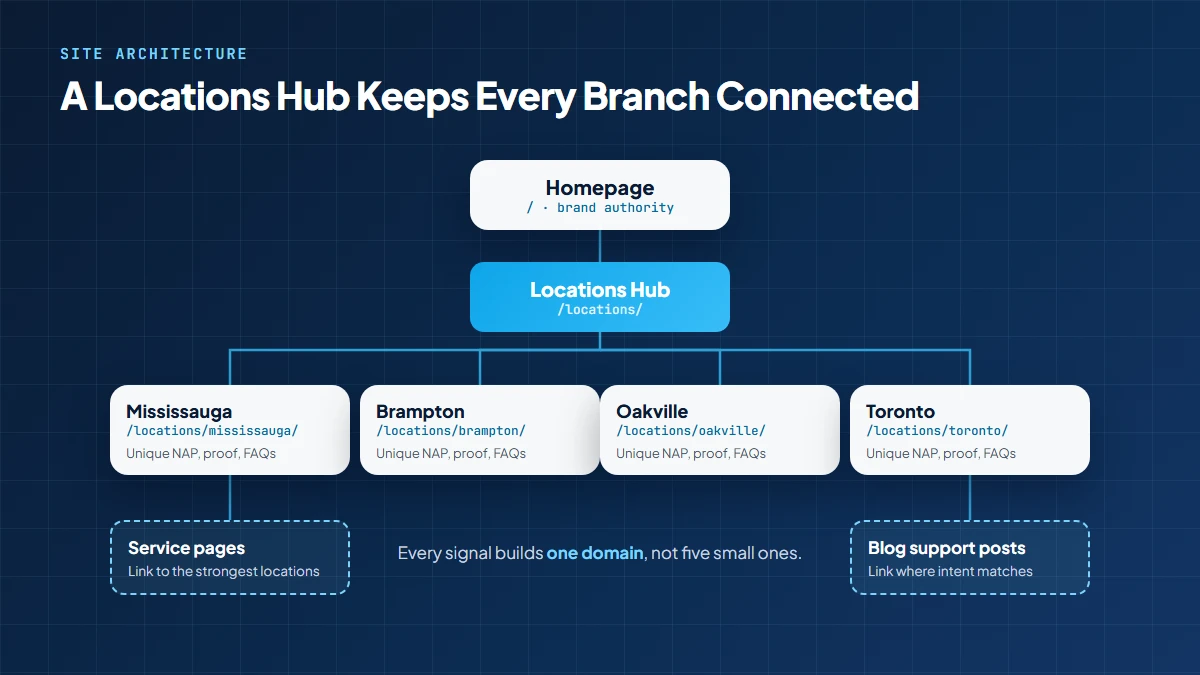
Local SEO Mississauga already uses service, technical, content, and audit pages as part of a connected SEO system. That is the same idea multi-location businesses need. Your locations should not be floating islands. They should be connected through a clear architecture and strong internal links. For companies planning the full system, review the SEO services in Mississauga page for how technical SEO, content strategy, local search, and reporting work together.
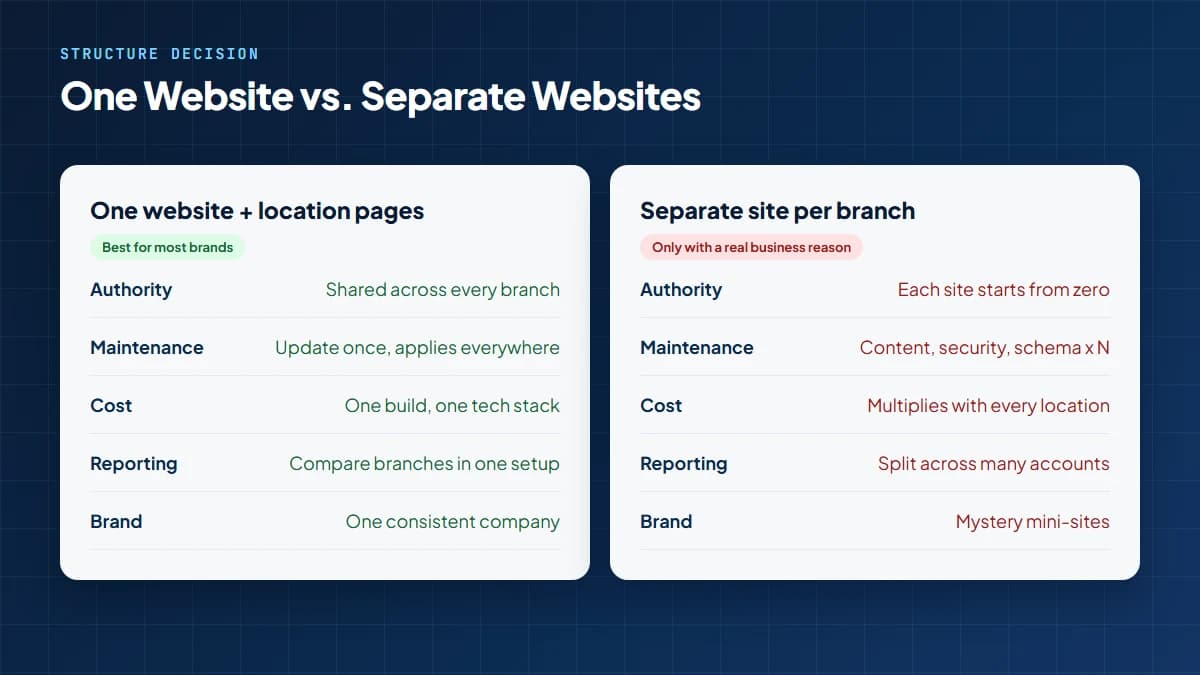
One website is usually right when your locations share the same brand, same services, same tone, same offers, and same central marketing team.
This structure works because every good signal helps the whole domain. Backlinks, blog authority, brand searches, technical fixes, and content updates all support the same website.
This is especially useful for businesses with several locations in one region, such as a dental group across the GTA, a home service company serving Mississauga and nearby cities, or a professional firm with offices in Toronto, Mississauga, and Oakville.
Separate websites are not evil. They are just expensive children. Each one needs content, technical maintenance, backlinks, tracking, schema, design updates, security, conversion testing, and someone to remember the password.
Consider separate websites only when there is a real business reason, not because "city keyword in domain" sounds clever in a meeting.
Even then, plan consolidation carefully. If you move old location sites into one main domain, use a proper 301 redirect plan. The 301 redirect guide explains how to move old URLs without turning your rankings into confetti.
Usually, yes, if each location is a real, eligible location where the business meets customers or operates according to Google Business Profile rules.
Google says businesses with physical locations customers can visit, or businesses that travel to customers, can create Business Profiles. Google also says businesses should maintain consistent names and categories across locations so customers can identify them clearly, as set out in its guidelines for representing your business.
For a storefront business, each real branch usually gets its own profile and should link to its matching location page, not always the homepage. For a service-area business, the rules are stricter. Google says service-area businesses should have one profile for the central office or location with a designated service area. Fake office profiles, virtual offices, and rented "SEO addresses" can create suspension risk.
If your profile has been suspended or you are worried about eligibility, use the Google Business Profile suspension guide before making risky edits. For everyday improvements to each branch listing, the guide on how to optimize a Google Business Profile covers categories, photos, and posts.
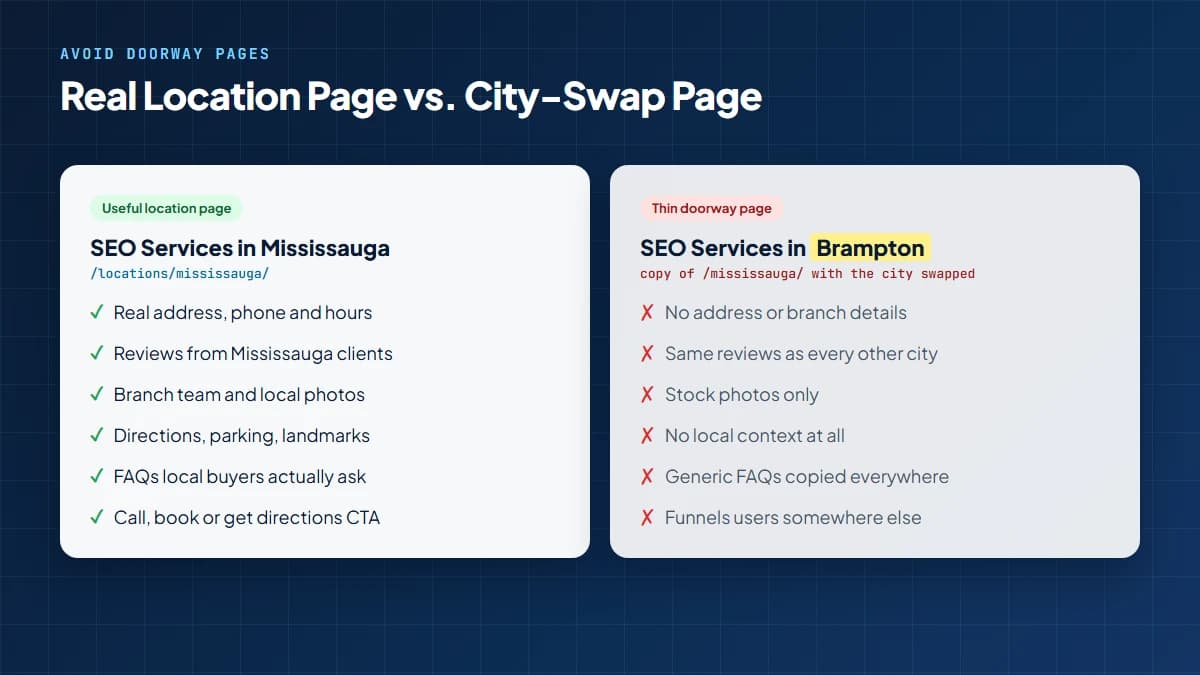
Here is the big warning: do not copy one page, swap "Mississauga" for "Brampton," and call it strategy. Google calls out doorway abuse as pages created to rank for similar search queries and funnel users somewhere else. That does not mean every location page is bad. It means weak, duplicated, search-only pages are bad.
A useful location page should include details a real customer would care about.
For deeper structure, use the location page SEO guide as the supporting internal resource. This is a natural link because it expands the exact section the reader is already thinking about.
This is where many businesses get into trouble. Serving a city is not the same as having a location there. A plumber may serve Mississauga, Brampton, Oakville, Milton, and Etobicoke from one office. That does not mean the business should create fake office listings in each city.
The safer approach is:
A good rule: if you cannot add useful local details to the page, do not publish it yet. A thin city page is like wearing a name tag to a wedding you were not invited to. Technically visible, but not convincing.
Keyword cannibalization happens when multiple pages compete for the same search. In multi-location SEO, this often happens when the homepage, service page, and three city pages all try to rank for the same keyword.
Fix it with a clear page job.
| Page | Main Job | Example Target |
|---|---|---|
| Homepage | Brand authority and broad service promise | Local SEO Mississauga |
| Main service page | Explain the service across all markets | SEO services |
| Location page | Prove the branch or city relevance | SEO services Mississauga |
| Industry page | Serve a specific buyer type | Dental SEO Mississauga |
| Blog post | Answer pain-point searches | How to improve local rankings in multiple cities |
Then use internal links to connect pages with purpose. A blog about local ranking can link to the main service page. A service page can link to the most important location pages. Location pages can link back to services and nearby location pages where useful. The internal linking guide explains why this structure helps search engines and users move through the site.
Every location page should be more than "We serve [city]. Please clap." Use this checklist before publishing.
For technical checks such as sitemap health, indexing, redirects, structured data, mobile speed, and duplicate pages, link readers to technical SEO services. For a deeper issue review, mention an SEO audit in Mississauga inside the CTA or troubleshooting section.
Yes, where it makes sense. Google says LocalBusiness structured data can tell Google about business hours, departments, reviews if your site captures them for other businesses, and other business information.
For multi-location businesses, each location page should have structured data that matches that branch. Do not put the Mississauga address on the Oakville page. Do not list hours that are different from your Google Business Profile. Do not add schema for a location that does not exist. Google is clever. Also, customers have phones. They will notice.
If the business operates across countries or languages, use Google's multi-regional guidance. Google says local signals can include local addresses, phone numbers, language, currency, links from local sites, and Business Profile signals where available. For Canada, this can matter when a company has English and French pages or separate Canadian and U.S. operations.
Here is the part most blogs skip. Before writing location pages, build a Location Truth Sheet. It is a master document that confirms what is actually true about each location.
This prevents copy-paste pages, wrong phone numbers, old hours, fake service areas, and the classic "we definitely still have that office" moment, usually said five minutes before launch.
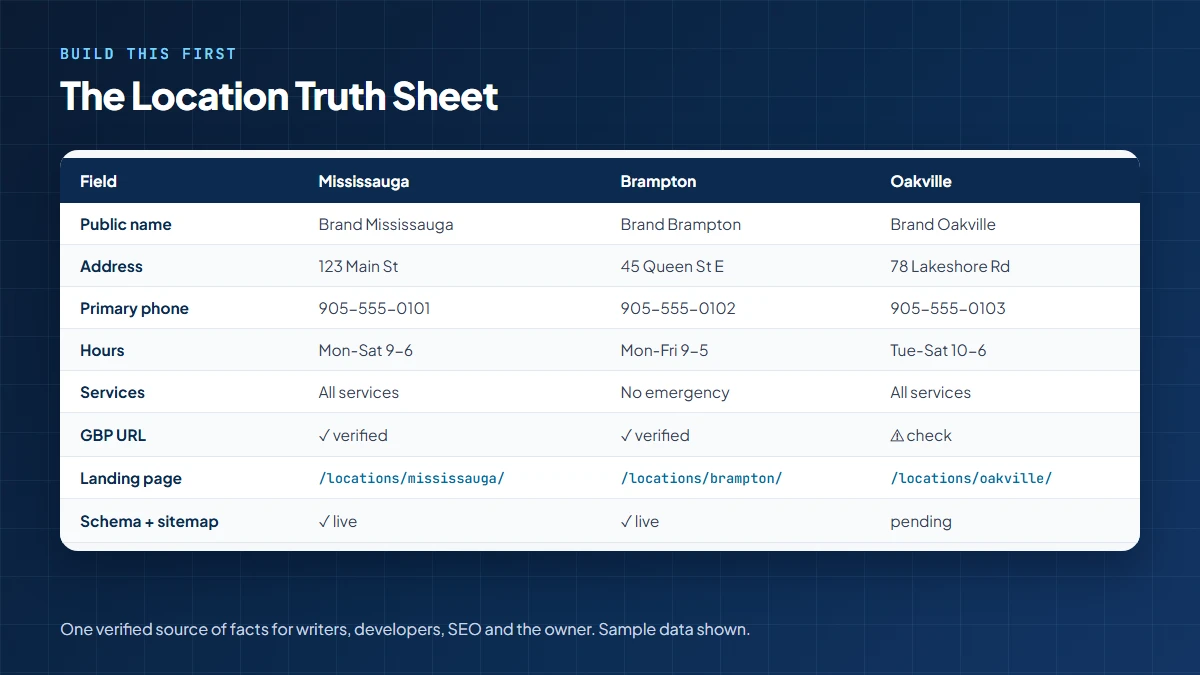
Once this exists, your writer, developer, SEO strategist, and business owner are finally working from the same facts. Peace returns. Mostly.
No. Your homepage should not try to rank for every city, every service, and every industry at once. That is not SEO. That is keyword soup.
Use the homepage for the main brand promise, primary market, and top services. Use location pages for branch-level searches. Use service pages for service-level intent. Use blogs to answer questions and support both.
For example, a company can have a homepage for the brand, a main page for Local SEO Mississauga, location or service pages for high-intent local searches, and supporting articles such as the Canadian search engine optimization guide for broader educational intent.
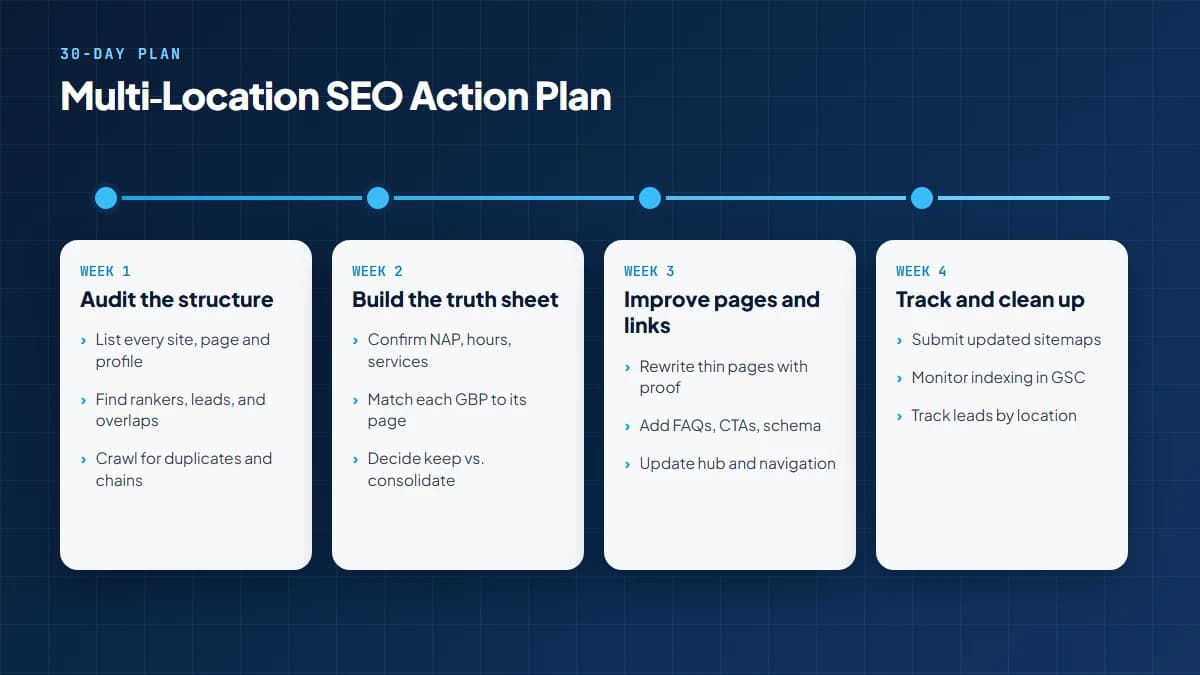
Multi-location SEO fails when reporting is one giant bucket. You need location-level tracking.
This is also where Answer Engine Optimization guide support matters. AI search needs clear, structured answers. Multi-location brands that build clean location facts, FAQs, service details, and internal links are easier for search systems to understand.
Internal links should not be sprinkled randomly like SEO parsley. They should guide users and search engines toward the right next page.
The best anchor text is simple and descriptive. Use phrases like "SEO audit in Mississauga," "technical SEO services," "location page SEO guide," or "SEO services in Mississauga." Avoid vague links like "click here," unless your website is being operated by a time traveller from 2003.
This splits authority and multiplies cost.
If the business does not operate there, the page will be weak and risky.
Google and customers both notice thin pages.
Each profile should usually link to its matching location page.
Service-area businesses need accurate representation, not fake offices.
Use proper redirects when moving from many websites into one.
You need location-level leads, calls, and bookings.
Most should use one website with dedicated location pages. This keeps authority together, makes reporting easier, and gives users one consistent brand experience.
Every real, important location usually deserves its own page if you can add unique local content, proof, and conversion details. Do not create thin pages just to target city keywords.
If each location is eligible under Google's rules, yes. A real storefront or staffed location can usually have its own profile. Service-area businesses should follow Google's service-area guidance carefully.
No. Repeating the same content with only the city name changed creates weak pages. Add real location details, local photos, services, reviews, team information, and FAQs.
Common reasons include thin content, duplicate content, poor internal links, weak sitemap setup, no local proof, crawl issues, or several pages competing for the same query.
Only create city pages where you genuinely serve customers and can provide useful local detail. A page with no proof is usually not worth publishing.
For multi-location businesses, each profile should usually link to the matching location page. That gives users and Google a clearer local match.
Usually no. Subdomains can make management and authority building harder. A clean folder structure on the main domain is usually easier to scale.
Give each page a clear job, target one location, add unique content, use descriptive internal links, and avoid making several pages target the same service-city keyword.
Include address, phone, hours, map, services, local proof, reviews, photos, FAQs, calls to action, schema, and internal links.
Yes, but only when locations are truly separate brands, countries, legal entities, or franchise units with unique content and marketing resources.
Review technical health monthly, Google Business Profile details monthly, location pages quarterly, and major site structure at least twice a year.
For most businesses, the winner is one main website with clear, useful location pages. That setup is easier to manage, easier to grow, and easier for Google to understand.
Separate websites are only worth considering when the business reality is also separate. If the brand, services, team, and customer journey are shared, keep the SEO authority shared too.
The goal is not to publish the most pages. The goal is to publish the smallest number of pages needed to explain where you work, what you offer, and why each local customer should trust you.
Need help choosing the right structure before you build 47 location pages and regret 39 of them? Contact Local SEO Mississauga for a clear SEO audit, location-page review, and multi-location plan that turns search visibility into real calls and leads.
Get a free SEO audit and a clear, prioritized plan for your Mississauga business — no long-term contract required.
Get a Free SEO Audit· 8 min read
See what an HTTP 401 error means, how it differs from 403 and how users or developers can fix authentication problems. Check the steps now.
Read article· 11 min read
Improve brand mentions in ChatGPT, Gemini and AI Overviews with stronger entities, citations and answer-ready content. Use the 2026 checklist.
Read article· 14 min read
Build a keyword plan around search intent, competition and business value, then map terms to the right pages. Follow the step-by-step process.
Read article